上一篇完成了一个可以保存多轮历史的聊天机器人,但它只能在终端中运行。普通用户更习惯在网页里输入消息,也希望直接使用麦克风说话。
本文为聊天机器人增加 Gradio 页面,并使用 MLX Whisper 在 Apple Silicon 上完成本地语音识别。语音识别不会直接代替大模型,它负责把声音转换成文字,再把文字交给上一篇的 LangChain 聊天链。
1. 语音聊天的数据流
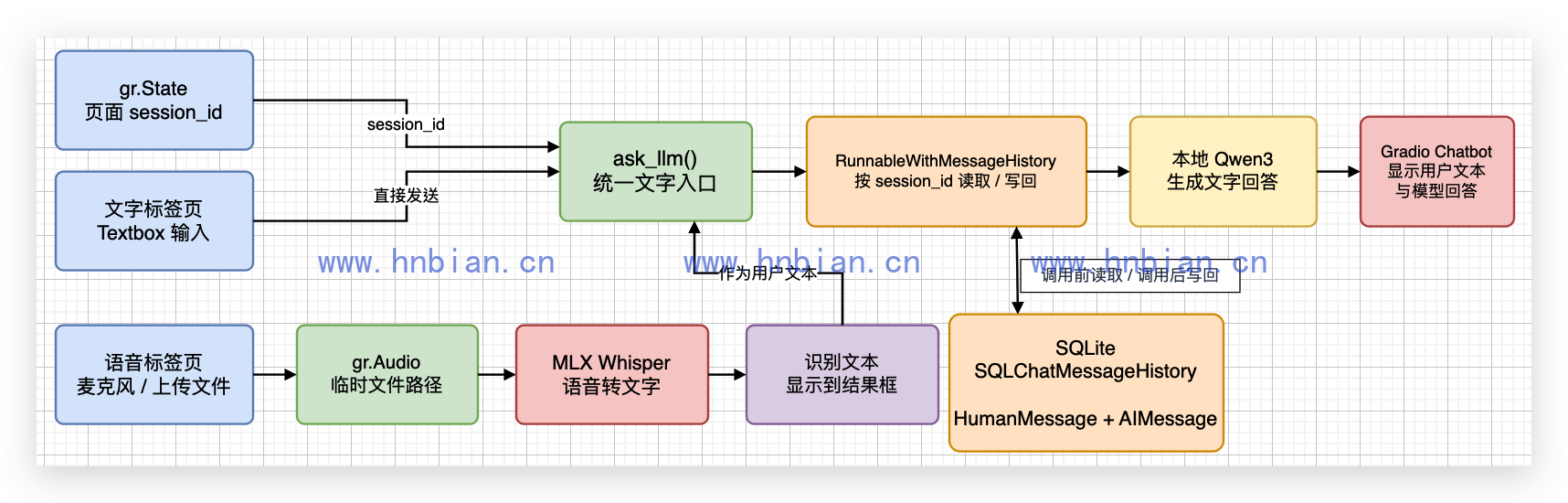
图中同时画出了文字和语音两条输入路径。它们最终都会进入同一个 ask_llm() 函数,因此模型调用、会话隔离和历史存储不需要各写一套。
一次语音问答会经过五个阶段:
- Gradio 接收麦克风录音或上传的音频文件。
- Gradio 把临时音频文件路径交给 MLX Whisper。
- MLX Whisper 把音频转换成文字,并把识别结果显示在页面中。
- LangChain 根据 session_id 读取 SQLite 历史,再把识别文本和历史消息一起交给 Qwen3。
- Gradio 在聊天窗口中显示识别文本和模型回答,LangChain 同时把本轮消息写回 SQLite。
文字输入会跳过 Whisper,直接从第 4 步开始执行。
因此,本文实际上使用了两个模型:
- Whisper 负责语音转文字,不负责回答问题。
- Qwen3 负责理解文字并生成回答,不直接读取音频。
2. 安装运行环境
代码位于:
/path/to/llm-learning/langchain/p08_gradio_voice_chatbot/激活 Python 3.12 虚拟环境并安装依赖:
cd /path/to/llm-learning
source .venv_langchain/bin/activate
python -m pip install --retries 10 --timeout 120 -r requirements.txt
新增依赖为:
gradio==5.49.1
mlx-whisper==0.4.3
mlx-whisper 还会安装 Torch、Numba 和 SciPy 等依赖,所以下载量明显大于普通 LangChain 组件。
音频解码需要 FFmpeg。macOS 可以使用 Homebrew 安装:
brew install ffmpeg检查:
ffmpeg -version3. 先完成本地语音识别
3.1 准备测试音频
为了让测试结果可重复,可以使用 macOS 自带的 say 生成一段中文语音,再转换成 16 kHz 单声道 WAV:
mkdir -p data

say -v Tingting \
  -o /tmp/llm_learning_sample.aiff \
  '你好,我叫小明,我今天想去杭州西湖散步。'

ffmpeg -y \
  -i /tmp/llm_learning_sample.aiff \
  -ar 16000 \
  -ac 1 \
  data/sample_voice.wav
3.2 下载语音模型并识别
02_transcribe_audio.py 的完整代码如下:
- 文件头, 引入依赖
# 这个文件演示如何使用 MLX Whisper 把一段本地语音转换成文字。
# 默认读取 llm-learning/data/sample_voice.wav,也可以在命令行传入其他音频路径。
#
# 依赖:mlx-whisper(Apple Silicon 上跑 Whisper)、modelscope(从国内镜像下载模型)。
# 首次运行会从 ModelScope 下载约 459MB 的 whisper-small-mlx 到 voice_model/。
#
# 用法:
#   python 02_transcribe_audio.py
#   python 02_transcribe_audio.py /path/to/your.wav

import argparse
from pathlib import Path

import mlx_whisper
from modelscope import snapshot_download- 下载模型
# parents[2]:p08_gradio_voice_chatbot -> langchain -> llm-learning(项目根目录)
project_root = Path(__file__).resolve().parents[2]
default_audio = project_root / "data" / "sample_voice.wav"
voice_model_dir = project_root / "voice_model"
# ModelScope 默认使用 master 分支;不要固定已过期的 commit revision。
voice_model_id = "mlx-community/whisper-small-mlx"

# audio 为可选位置参数;不传则使用 sample_voice.wav。
parser = argparse.ArgumentParser(description="使用 MLX Whisper 转写语音")
parser.add_argument("audio", nargs="?", default=str(default_audio))
args = parser.parse_args()

audio_path = Path(args.audio).expanduser().resolve()
if not audio_path.exists():
    raise FileNotFoundError(f"没有找到音频文件:{audio_path}")

# 以 weights.npz 是否存在判断模型是否已下载完整。
# snapshot_download 支持断点续传,下载中断后再次运行会从断点继续。
if not (voice_model_dir / "weights.npz").exists():
    voice_model_dir.mkdir(parents=True, exist_ok=True)
    snapshot_download(
        model_id=voice_model_id,
        local_dir=str(voice_model_dir),
)- 语音识别
# path_or_hf_repo 指向本地模型目录(含 config.json + weights.npz)。
# language="zh" 指定中文,有助于提高识别准确率;返回 dict,文本在 result["text"]。
result = mlx_whisper.transcribe(
    str(audio_path),
    path_or_hf_repo=str(voice_model_dir),
    language="zh",
)

print("音频文件:", audio_path)
print("语音模型:", voice_model_dir)
print("识别结果:", result["text"].strip())- 运行:
python langchain/p08_gradio_voice_chatbot/02_transcribe_audio.py真实输出:
音频文件: /Users/bianhn/Documents/git/llm-learning/data/sample_voice.wav
语音模型: /Users/bianhn/Documents/git/llm-learning/voice_model
识别结果: 你好,我叫小明,我今天想去杭州西湖散步。
模型正确识别了姓名、城市、景点和动作。
这里使用 mlx-community/whisper-small-mlx。small 模型比 tiny 更大、占用资源更多;在本文的固定中文音频中,它能够正确识别姓名、城市、景点和动作,因此继续用它完成后续页面测试。
4. 使用 Gradio 创建文本聊天页面
Gradio 可以直接用 Python 描述一个本地网页。最主要的组件有:
- gr.Blocks:页面容器。
- gr.Chatbot:显示用户消息和模型回答。
- gr.Textbox:文字输入框。
- gr.Button:发送和清空按钮。
- gr.State:保存当前浏览器会话的临时状态。
页面中的聊天函数仍然调用上一篇的 LangChain 链:
# 这个文件把有记忆的文本聊天机器人放进 Gradio 页面。
# 运行前需要先在项目根目录启动 Qwen3 的 mlx_lm.server。
#
# 架构:Gradio 负责 UI;LangChain + SQLite 负责多轮记忆;本地 mlx_lm 负责推理。
# 浏览器地址:http://127.0.0.1:7860

from pathlib import Path
from uuid import uuid4

import gradio as gr
from langchain_community.chat_message_histories import SQLChatMessageHistory
from langchain_core.prompts import ChatPromptTemplate, MessagesPlaceholder
from langchain_core.runnables.history import RunnableWithMessageHistory
from langchain_openai import ChatOpenAI

llm = ChatOpenAI(
    base_url="http://127.0.0.1:18080/v1",
    api_key="not-needed",
    model="Qwen3-14B-AWQ-4bit-MLX",
    temperature=0,
    max_tokens=256,
)

# 聊天历史持久化到项目根目录 data/chat_history.db(与 p07 的 SQLite 示例相同思路)。
project_root = Path(__file__).resolve().parents[2]
database_path = project_root / "data" / "chat_history.db"
database_path.parent.mkdir(parents=True, exist_ok=True)
connection = f"sqlite:///{database_path}"

# prompt 结构:system + 历史占位 + 本轮用户输入。
prompt = ChatPromptTemplate.from_messages(
    [
        ("system", "你是一个友好的中文聊天助手,请简洁回答。"),
        MessagesPlaceholder(variable_name="history"),
        ("human", "{input}"),
    ]
)


def get_session_history(session_id: str) -> SQLChatMessageHistory:
    """RunnableWithMessageHistory 按 session_id 读写 SQLite 中的完整对话。"""
    return SQLChatMessageHistory(session_id=session_id, connection=connection)


# 与 p07 相同:invoke 前加载 history,invoke 后写回 Human + AI 消息。
chatbot_chain = RunnableWithMessageHistory(
    prompt | llm,
    get_session_history,
    input_messages_key="input",
    history_messages_key="history",
)


def chat(message: str, history: list[dict], session_id: str):
    """Gradio 回调:用户发送一条消息时触发(submit / 点击「发送」)。

    Gradio 会把 inputs 列表里的组件当前值按顺序传进来:
        message    ← gr.Textbox 的文本
        history    ← gr.Chatbot 已显示的消息
        session_id ← gr.State 里保存的会话 ID

    返回值顺序必须与 outputs 一致:[message, chatbot, session_id]:
        ""           清空输入框
        history      更新后的聊天记录(页面展示用)
        session_id   原样带回(或首次生成的新 ID)

    注意:页面 history 与 SQLite 里的 LangChain 历史是两套数据——
    LangChain 记忆由 chatbot_chain + SQLChatMessageHistory 维护;
    这里的 history 只是 Gradio 用来渲染界面的副本。
    """
    # 防御:State 异常时补一个新的 session_id,避免 SQLite 键为空。
    if not isinstance(session_id, str) or not session_id:
        session_id = str(uuid4())

    # 空消息不调用模型,保持页面不变。
    if not message.strip():
        return "", history, session_id

    # 用 session_id 绑定 SQLite 里这一路对话;RunnableWithMessageHistory 会:
    # 1. 读出 history 消息 → 填入 prompt 的 MessagesPlaceholder
    # 2. 调用本地 Qwen3
    # 3. 把本轮 human/ai 写回数据库
    config = {"configurable": {"session_id": session_id}}
    response = chatbot_chain.invoke({"input": message}, config=config)

    # 把本轮问答追加到 Gradio Chatbot 的显示列表(不影响 SQLite 写入逻辑)。
    history = history + [
        {"role": "user", "content": message},
        {"role": "assistant", "content": response.content},
    ]
    # 第一个返回值 "" 表示清空 Textbox,方便继续输入下一条。
    return "", history, session_id


def clear_chat(session_id: str):
    """清空当前 session 的 SQLite 记录,并重置页面 Chatbot。"""
    if not isinstance(session_id, str) or not session_id:
        session_id = str(uuid4())
    get_session_history(session_id).clear()
    return [], "", session_id


with gr.Blocks(title="本地 Qwen3 聊天机器人") as demo:
    gr.Markdown("## 本地 Qwen3 聊天机器人")

    # gr.State:每个浏览器标签页一份 session_id,刷新页面会重新生成。
    session_id = gr.State(lambda: str(uuid4()))

    # type="messages" 使用 OpenAI 风格的 role/content 字典列表。
    chatbot = gr.Chatbot(type="messages", height=480)
    message = gr.Textbox(label="消息", placeholder="请输入一条消息")
    with gr.Row():
        send_button = gr.Button("发送", variant="primary")
        clear_button = gr.Button("清空")

    # 回车发送
    message.submit(
        chat,
        [message, chatbot, session_id],
        [message, chatbot, session_id],
    )
    # 点击发送
    send_button.click(
        chat,
        [message, chatbot, session_id],
        [message, chatbot, session_id],
    )
    # 清空:同时清 UI 和 SQLite
    clear_button.click(clear_chat, session_id, [chatbot, message, session_id])


if __name__ == "__main__":
    demo.launch(server_name="127.0.0.1", server_port=7860)
history 是 Gradio 页面当前要显示的消息,SQLite 历史则由 RunnableWithMessageHistory 管理。两者用途不同:
- Gradio history 决定页面现在显示什么。
- LangChain 消息历史决定下一次模型调用能看到什么。
启动页面:
python langchain/p08_gradio_voice_chatbot/01_gradio_text_chatbot.py浏览器访问:
http://127.0.0.1:7860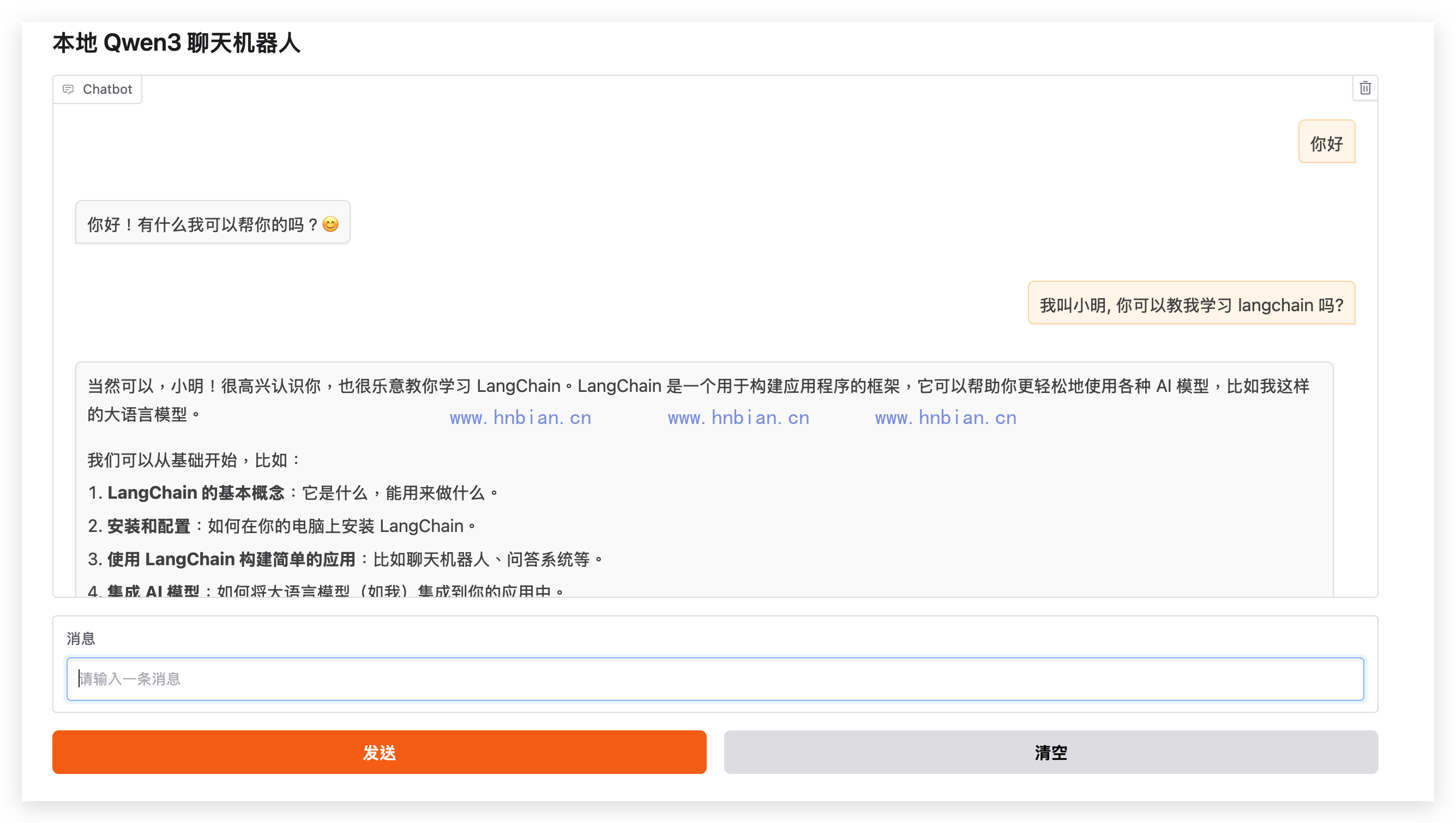
5. 把语音输入加入聊天页面
5.1 语音处理函数
def send_voice(audio_path: str | None, history: list[dict], session_id: str):
    """先把录音转成文字,再把识别结果交给聊天链。"""
    if not isinstance(session_id, str) or not session_id:
        session_id = str(uuid4())
    if not audio_path:
        return history, None, "请先录音或上传音频。", session_id

    result = mlx_whisper.transcribe(
        audio_path,
        path_or_hf_repo=str(voice_model_dir),
        language="zh",
    )
    transcript = result["text"].strip()
    updated_history, session_id = ask_llm(transcript, history, session_id)
    return updated_history, None, f"识别结果:{transcript}", session_id
函数的返回值依次更新:
- 聊天窗口。
- 音频输入组件。
- 语音识别结果文本框。
- 当前浏览器的会话 ID 状态。
5.2 Gradio 页面结构
with gr.Blocks(title="本地语音聊天机器人") as demo:
    gr.Markdown("## 本地语音聊天机器人")
    session_id = gr.State(lambda: str(uuid4()))
    chatbot = gr.Chatbot(type="messages", height=460)

    with gr.Tab("文字"):
        message = gr.Textbox(label="消息", placeholder="请输入一条消息")
        send_button = gr.Button("发送", variant="primary")

    with gr.Tab("语音"):
        audio = gr.Audio(
            sources=["microphone", "upload"],
            type="filepath",
            label="语音",
        )
        voice_button = gr.Button("识别并发送", variant="primary")
        transcript = gr.Textbox(label="语音识别结果", interactive=False)

    clear_button = gr.Button("清空对话")

    message.submit(
        send_text,
        [message, chatbot, session_id],
        [message, chatbot, session_id],
    )
    send_button.click(
        send_text,
        [message, chatbot, session_id],
        [message, chatbot, session_id],
    )
    voice_button.click(
        send_voice,
        [audio, chatbot, session_id],
        [chatbot, audio, transcript, session_id],
    )
type=”filepath” 表示 Gradio 将录音保存成临时文件,并把文件路径传给 Python 函数。Whisper 可以直接读取这个路径。
启动前先确认 Qwen3 服务正在运行:
"$VIRTUAL_ENV/bin/python" -m mlx_lm server \
  --model Qwen3-14B-AWQ-4bit-MLX \
  --host 127.0.0.1 \
  --port 18080 \
  --chat-template-args '{"enable_thinking": false}'
另开终端确认服务已经就绪:
curl http://127.0.0.1:18080/v1/models再启动语音页面:
python langchain/p08_gradio_voice_chatbot/03_gradio_voice_chatbot.py访问:
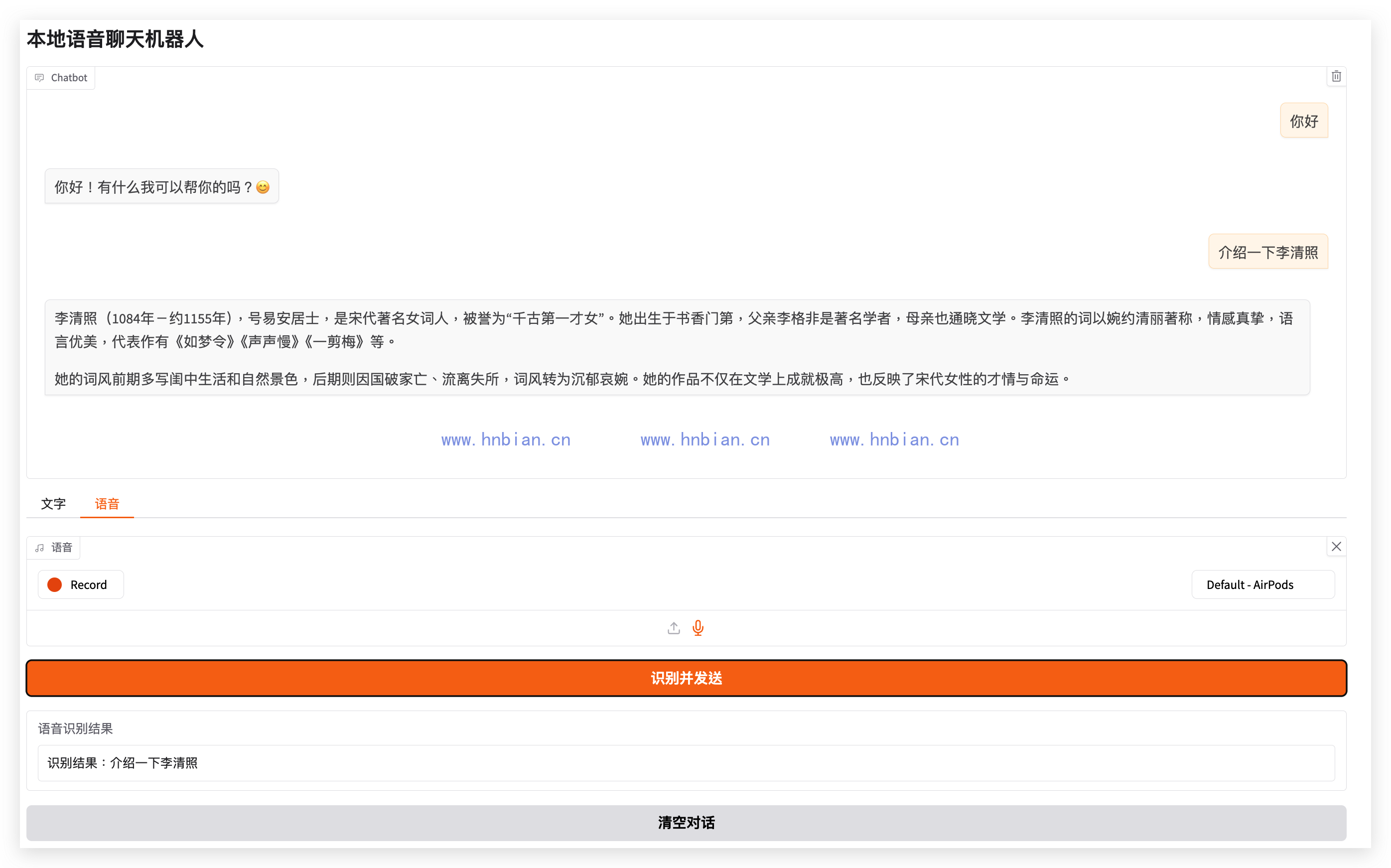
http://127.0.0.1:7861切换到“语音”标签页后,可以看到录音或上传入口、“识别并发送”按钮和只读的识别结果文本框:
5.3 完整代码
# 这个文件把文本聊天和本地语音识别放进同一个 Gradio 页面。
# 文字和语音最终都会转换成文本,再交给本地 Qwen3 回答。
#
# 运行前需要先在项目根目录启动 Qwen3 的 mlx_lm.server(与 01 相同)。
# 首次运行会从 ModelScope 下载 whisper-small-mlx 到 voice_model/(见 02)。
#
# 架构:Gradio 负责 UI(文字 Tab + 语音 Tab);
#       MLX Whisper 负责语音转文字;
#       LangChain + SQLite 负责多轮记忆;
#       本地 mlx_lm 负责推理。
# 浏览器地址:http://127.0.0.1:7861(7860 留给 01 文本版,避免端口冲突)

from pathlib import Path
from uuid import uuid4

import gradio as gr
import mlx_whisper
from langchain_community.chat_message_histories import SQLChatMessageHistory
from langchain_core.prompts import ChatPromptTemplate, MessagesPlaceholder
from langchain_core.runnables.history import RunnableWithMessageHistory
from langchain_openai import ChatOpenAI
from modelscope import snapshot_download

# parents[2]:p08_gradio_voice_chatbot -> langchain -> llm-learning(项目根目录)
project_root = Path(__file__).resolve().parents[2]

# 聊天历史持久化到 data/chat_history.db(与 01、p07 共用同一数据库文件)。
database_path = project_root / "data" / "chat_history.db"
database_path.parent.mkdir(parents=True, exist_ok=True)
connection = f"sqlite:///{database_path}"

# 本地 Whisper 模型目录;与 02_transcribe_audio.py 共用,下载一次即可。
voice_model_dir = project_root / "voice_model"
# ModelScope 默认使用 master 分支;不要固定已过期的 commit revision。
voice_model_id = "mlx-community/whisper-small-mlx"

# 页面启动时确认本地语音模型存在,不存在时通过 ModelScope 下载。
# 以 weights.npz 判断下载是否完整;中断后再次启动可续传。
if not (voice_model_dir / "weights.npz").exists():
    voice_model_dir.mkdir(parents=True, exist_ok=True)
    snapshot_download(
        model_id=voice_model_id,
        local_dir=str(voice_model_dir),
    )

llm = ChatOpenAI(
    base_url="http://127.0.0.1:18080/v1",
    api_key="not-needed",
    model="Qwen3-14B-AWQ-4bit-MLX",
    temperature=0,
    max_tokens=256,
)

# prompt 结构:system + 历史占位 + 本轮用户输入。
prompt = ChatPromptTemplate.from_messages(
    [
        ("system", "你是一个友好的中文聊天助手,请简洁回答。"),
        MessagesPlaceholder(variable_name="history"),
        ("human", "{input}"),
    ]
)


def get_session_history(session_id: str) -> SQLChatMessageHistory:
    """RunnableWithMessageHistory 按 session_id 读写 SQLite 中的完整对话。"""
    return SQLChatMessageHistory(session_id=session_id, connection=connection)


# 与 p07、01 相同:invoke 前加载 history,invoke 后写回 Human + AI 消息。
chatbot_chain = RunnableWithMessageHistory(
    prompt | llm,
    get_session_history,
    input_messages_key="input",
    history_messages_key="history",
)


def ask_llm(text: str, history: list[dict], session_id: str):
    """把文本交给有历史记录的 LangChain 聊天链(文字 Tab 和语音 Tab 共用)。

    参数:
        text       用户输入或 Whisper 识别出的文字
        history    Gradio Chatbot 当前显示的消息列表
        session_id 绑定 SQLite 中这一路对话的 ID

    返回 (updated_history, session_id)。

    注意:页面 history 与 SQLite 里的 LangChain 历史是两套数据——
    LangChain 记忆由 chatbot_chain + SQLChatMessageHistory 维护;
    这里的 history 只是 Gradio 用来渲染界面的副本。
    """
    if not isinstance(session_id, str) or not session_id:
        session_id = str(uuid4())

    if not text.strip():
        return history, session_id

    # configurable.session_id 告诉 RunnableWithMessageHistory 读写哪一路 SQLite 记录。
    config = {"configurable": {"session_id": session_id}}
    response = chatbot_chain.invoke({"input": text}, config=config)

    # 把本轮问答追加到 Gradio Chatbot 的显示列表(不影响 SQLite 写入逻辑)。
    updated_history = history + [
        {"role": "user", "content": text},
        {"role": "assistant", "content": response.content},
    ]
    return updated_history, session_id


def send_text(text: str, history: list[dict], session_id: str):
    """处理文字 Tab 的输入(submit / 点击「发送」)。

    返回值对应 outputs [message, chatbot, session_id]:
        ""              清空输入框
        updated_history 更新后的聊天记录
        session_id      原样带回
    """
    updated_history, session_id = ask_llm(text, history, session_id)
    return "", updated_history, session_id


def send_voice(audio_path: str | None, history: list[dict], session_id: str):
    """处理语音 Tab:录音/上传 → Whisper 转写 → 交给聊天链。

    audio_path 来自 gr.Audio(type="filepath"),即服务器上的临时 wav 路径。

    返回值对应 outputs [chatbot, audio, transcript, session_id]:
        updated_history  聊天区追加本轮问答
        None             清空 Audio 组件,方便重新录音
        transcript 文案  在「语音识别结果」框展示识别文字
        session_id       原样带回
    """
    if not isinstance(session_id, str) or not session_id:
        session_id = str(uuid4())
    if not audio_path:
        return history, None, "请先录音或上传音频。", session_id

    # 与 02 相同:本地 whisper-small-mlx,language="zh" 提高中文识别率。
    result = mlx_whisper.transcribe(
        audio_path,
        path_or_hf_repo=str(voice_model_dir),
        language="zh",
    )
    transcript = result["text"].strip()
    updated_history, session_id = ask_llm(transcript, history, session_id)
    return updated_history, None, f"识别结果:{transcript}", session_id


def clear_chat(session_id: str):
    """清空当前 session 的 SQLite 记录,并重置页面所有输入组件。"""
    if not isinstance(session_id, str) or not session_id:
        session_id = str(uuid4())
    get_session_history(session_id).clear()
    # 返回值顺序:[chatbot, message, audio, transcript, session_id]
    return [], "", None, "", session_id


with gr.Blocks(title="本地语音聊天机器人") as demo:
    gr.Markdown("## 本地语音聊天机器人")

    # gr.State:每个浏览器标签页一份 session_id,刷新页面会重新生成。
    session_id = gr.State(lambda: str(uuid4()))

    # type="messages" 使用 OpenAI 风格的 role/content 字典列表。
    chatbot = gr.Chatbot(type="messages", height=460)

    with gr.Tab("文字"):
        message = gr.Textbox(label="消息", placeholder="请输入一条消息")
        send_button = gr.Button("发送", variant="primary")

    with gr.Tab("语音"):
        # type="filepath" 把音频存成服务器临时文件,供 mlx_whisper 读取。
        audio = gr.Audio(sources=["microphone", "upload"], type="filepath", label="语音")
        voice_button = gr.Button("识别并发送", variant="primary")
        transcript = gr.Textbox(label="语音识别结果", interactive=False)

    clear_button = gr.Button("清空对话")

    # 文字 Tab:回车发送
    message.submit(
        send_text,
        [message, chatbot, session_id],
        [message, chatbot, session_id],
    )
    # 文字 Tab:点击发送
    send_button.click(
        send_text,
        [message, chatbot, session_id],
        [message, chatbot, session_id],
    )
    # 语音 Tab:识别并发送
    voice_button.click(
        send_voice,
        [audio, chatbot, session_id],
        [chatbot, audio, transcript, session_id],
    )
    # 清空:同时清 UI(聊天区、文字框、音频、识别结果)和 SQLite
    clear_button.click(
        clear_chat,
        session_id,
        [chatbot, message, audio, transcript, session_id],
    )


if __name__ == "__main__":
    demo.launch(server_name="127.0.0.1", server_port=7861)
7. 浏览器会话为什么需要独立 ID
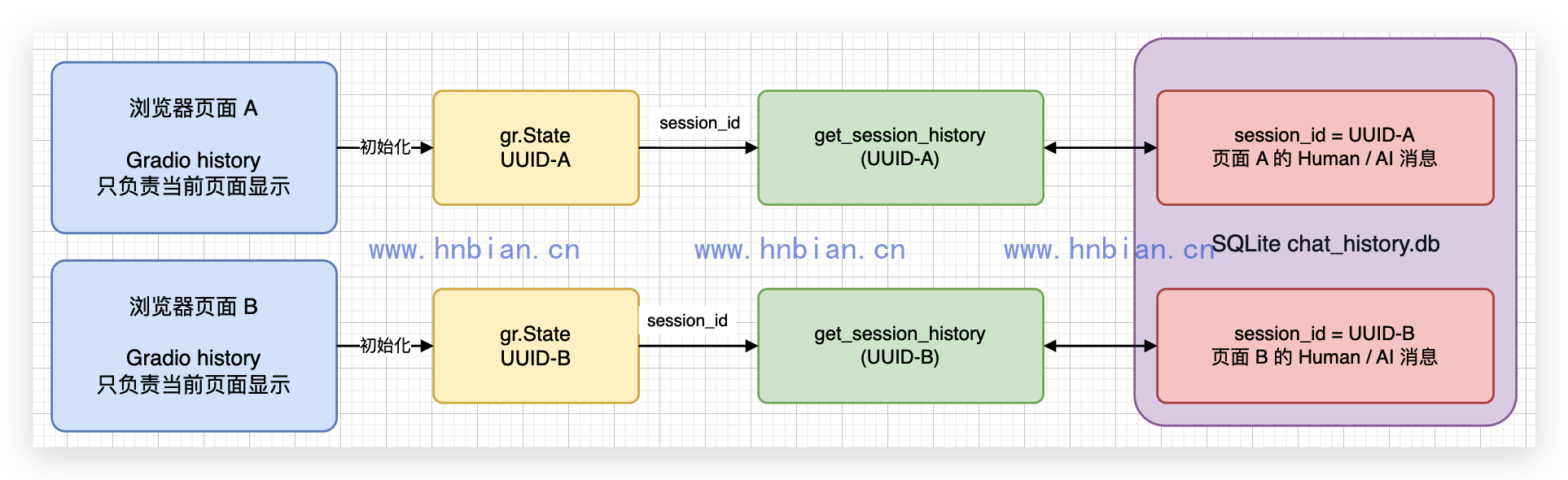
如果把会话 ID 固定写成:
session_id = "user123"所有访问页面的人都会读写同一份聊天历史。本文使用:
session_id = gr.State(lambda: str(uuid4()))每个页面会话会得到独立 UUID,并作为 LangChain 的 session_id。同一个页面中的文字输入和语音输入会共用这个 ID,因此两种输入方式看到的是同一段对话历史;另一个标签页则会得到新的 ID,不会读取前一个页面的会话。
这里需要区分两种状态:
- gr.State 只在当前 Gradio 页面会话中保存 UUID。
- SQLChatMessageHistory 根据 UUID 读取和写入 SQLite 中的模型历史。
gr.State 不是登录或身份认证机制。刷新页面或重新打开页面可能得到新的 UUID,当前示例也没有提供“输入旧会话 ID 并恢复页面消息”的功能。如果需要稳定绑定真实用户,应在登录系统中取得用户或会话标识,而不是把随机 UUID 当成账户 ID。
代码中还增加了类型判断:
if not isinstance(session_id, str) or not session_id:
    session_id = str(uuid4())
这是因为直接通过 Gradio Client 调用接口时,页面初始化事件可能尚未执行。增加兜底后,网页调用和 API 调用都不会把函数对象错误地写入 SQLite 查询参数。
8. 常见问题
8.1 pip 下载 Torch 时中断
首次安装实测遇到:
IncompleteRead: 58512192 bytes read, 52700853 more expected这是网络下载中断,不是 Python 版本或依赖代码错误。重新执行并增加重试:
python -m pip install \
  --retries 10 \
  --timeout 120 \
  -r requirements.txt
pip 会复用已经缓存的其他安装包。
8.2 Hugging Face 下载权重时 TLS 断开
实测下载 weights.npz 时出现:
SSL: UNEXPECTED_EOF_WHILE_READING因此代码改用 ModelScope 下载相同的 mlx-community/whisper-small-mlx。ModelScope SDK 下载中断时会保留进度,再次运行脚本即可续传。
8.3 页面提示没有麦克风
先检查浏览器是否获得麦克风权限。若只是验证程序,也可以直接上传 WAV、MP3、M4A 或 FLAC 文件,不需要使用麦克风。
8.4 语音能识别,但模型没有回答
Whisper 和 Qwen3 是两个独立环节。先确认终端已经启动 mlx_lm.server,再访问:
http://127.0.0.1:18080/v1/models/v1/models 返回成功只能证明服务进程能够响应并列出模型,不能证明聊天推理一定成功。如果语音识别结果已经显示,而聊天回答失败,应继续检查 Qwen3 服务终端中的 /v1/chat/completions 请求日志和模型加载错误,而不是重新下载 Whisper。
8.5 页面在手机宽度下是否可用
本文实际检查了桌面视口和 390 × 844 移动视口。Gradio 会把输入组件自动调整为单列,聊天窗口、标签、输入框和按钮没有发生重叠。
9. 小结
这一章没有让 Qwen3 直接处理声音,而是建立了一条清晰的本地处理链:
音频 -> MLX Whisper -> 文字 -> LangChain -> Qwen3 -> Gradio| 组件 | 输入 | 输出 | 作用 |
|---|---|---|---|
| gr.Audio | 麦克风或音频文件 | 本地临时路径 | 接收语音 |
| MLX Whisper | 音频路径 | 识别文本 | 本地语音转文字 |
| gr.State | 页面初始化 | UUID 字符串 | 隔离浏览器会话 |
| LangChain 聊天链 | 识别文本和历史消息 | AIMessage | 调用本地 Qwen3 |
| gr.Chatbot | 用户文本和模型回答 | 聊天页面 | 显示多轮对话 |