前文已经介绍了本地模型、OpenAI 兼容接口、消息、提示词模板和输出解析器,但每个示例基本都只完成一次调用。
真正的聊天机器人还要解决一个问题:用户说完第一句话后,模型能不能在第二轮继续理解前面的内容?
例如:
用户:我叫小明。
助手:你好,小明。
用户:我叫什么名字?
助手:小明。
第二个问题中没有再次出现“小明”。模型要回答正确,就必须同时收到第一轮对话。本文将前面学过的组件组合起来,完成一个支持内存历史、SQLite 持久化和历史摘要的聊天机器人。
1. 聊天机器人的整体结构
无论历史保存在内存还是 SQLite,RunnableWithMessageHistory 的职责都一样:根据 session_id 读取历史、调用聊天链,再把本轮消息写回同一个会话。
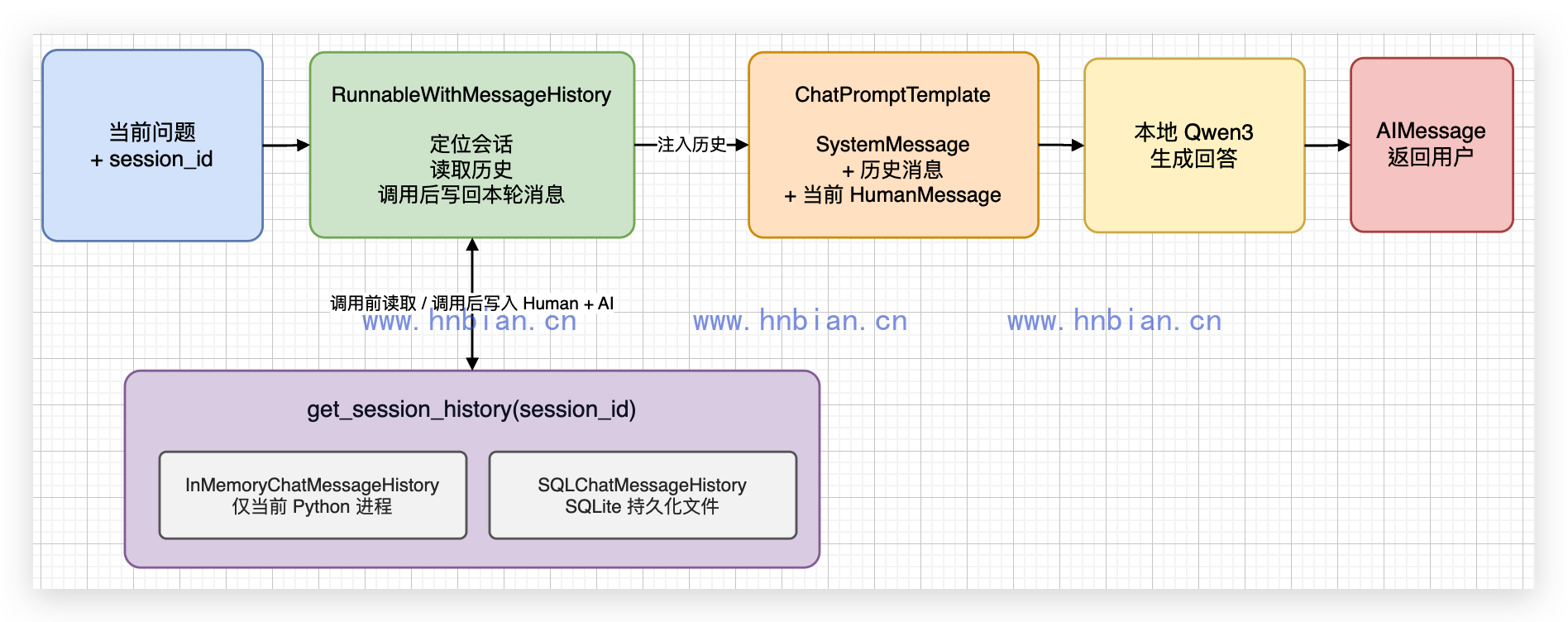
这套聊天机器人的数据流可以分成五步:
- 用户提交当前问题。
- 程序根据 session_id 找到当前会话。
- LangChain 读取该会话的历史消息。
- 提示词模板把历史消息和当前问题一起交给 Qwen3。
- 新的用户消息和模型回答继续写入历史记录。
这里所说的“记忆”不是模型永久学会了新知识,而是应用程序在每次调用时重新把相关历史发送给模型。
2. 准备运行环境
本文代码位于:
/path/to/llm-learning/langchain/p07_chatbot_with_memory/进入项目并激活 Python 3.12 虚拟环境:
cd /path/to/llm-learning
source .venv_langchain/bin/activate
python -m pip install -r requirements.txt
启动本地 Qwen3 服务:
"$VIRTUAL_ENV/bin/python" -m mlx_lm server \
  --model Qwen3-14B-AWQ-4bit-MLX \
  --host 127.0.0.1 \
  --port 18080 \
  --chat-template-args '{"enable_thinking": false}'
另开终端确认服务返回模型列表:
curl http://127.0.0.1:18080/v1/models3. 从没有记忆的单轮聊天开始
先看最普通的聊天链:
# 这个文件演示最基础的单轮聊天。
# 两次调用彼此独立,因此第二个问题不会自动得到第一次调用的内容。

from langchain_core.prompts import ChatPromptTemplate
from langchain_openai import ChatOpenAI


# 连接项目根目录已经启动的 Qwen3 OpenAI 兼容服务。
llm = ChatOpenAI(
    base_url="http://127.0.0.1:18080/v1",
    api_key="not-needed",
    model="Qwen3-14B-AWQ-4bit-MLX",
    temperature=0,
    max_tokens=96,
)

# 每次调用只会收到当前填入 question 的问题。
prompt = ChatPromptTemplate.from_messages(
    [
        ("system", "你是一个中文聊天助手,请简短回答。"),
        ("human", "{question}"),
    ]
)
chain = prompt | llm

first = chain.invoke({"question": "我最喜欢的水果是苹果,请记住。"})
print("第一次回答:", first.content)

# 这里没有把第一次对话传回模型,所以模型不知道“我”喜欢什么。
second = chain.invoke({"question": "我最喜欢的水果是什么?"})
print("第二次回答:", second.content)
运行:
python langchain/p07_chatbot_with_memory/01_single_turn_chatbot.py真实输出:
第一次回答: 好的,已记住你最喜欢的水果是苹果。
第二次回答: 你最喜欢的是哪种水果呢?可以告诉我,我很想了解哦!
第一次回答中的“已记住”只是自然语言。第二次调用只有当前问题,没有第一轮消息,所以模型实际并没有得到“苹果”这个信息。
4. 使用内存保存多轮对话
4.1 给提示词增加历史消息位置
聊天提示词中需要增加一个 MessagesPlaceholder:
prompt = ChatPromptTemplate.from_messages(
    [
        ("system", "你是一个中文聊天助手,请根据历史消息简短回答。"),
        MessagesPlaceholder(variable_name="history"),
        ("human", "{input}"),
    ]
)
最终发送给模型的顺序是:
SystemMessage
历史 HumanMessage
历史 AIMessage
当前 HumanMessage
4.2 使用 RunnableWithMessageHistory
完整代码如下:
# 这个文件演示如何用 RunnableWithMessageHistory 保存内存中的多轮对话。
# 消息只存在当前 Python 进程中,脚本结束后就会消失。
#
# 核心思路:模型本身没有记忆;每轮调用前把同一会话的历史消息拼进 prompt,再发给 LLM。

from langchain_core.chat_history import InMemoryChatMessageHistory
from langchain_core.prompts import ChatPromptTemplate, MessagesPlaceholder
from langchain_core.runnables.history import RunnableWithMessageHistory
from langchain_openai import ChatOpenAI

# 连接项目根目录已经启动的 Qwen3 OpenAI 兼容服务。
llm = ChatOpenAI(
    base_url="http://127.0.0.1:18080/v1",
    api_key="not-needed",
    model="Qwen3-14B-AWQ-4bit-MLX",
    temperature=0,
    max_tokens=96,
)

# MessagesPlaceholder 会在运行时被替换成「当前 session 的历史消息列表」。
# 最终发给模型的顺序:system → history(多轮)→ 本轮 human(input)
prompt = ChatPromptTemplate.from_messages(
    [
        ("system", "你是一个中文聊天助手,请根据历史消息简短回答。"),
        MessagesPlaceholder(variable_name="history"),
        ("human", "{input}"),
    ]
)
chain = prompt | llm

# 全局字典:key 是 session_id,value 是该用户/会话的消息列表。
# 相同 session_id 始终指向同一份 InMemoryChatMessageHistory。
store: dict[str, InMemoryChatMessageHistory] = {}


def get_session_history(session_id: str) -> InMemoryChatMessageHistory:
    """RunnableWithMessageHistory 每次 invoke 都会调用此函数,按 session_id 取历史。"""
    if session_id not in store:
        store[session_id] = InMemoryChatMessageHistory()
    return store[session_id]


def print_session_history(session_id: str, title: str = "") -> None:
    """打印指定 session 当前保存的历史消息(RunnableWithMessageHistory 写入 store)。"""
    if title:
        print(f"\n--- {title}(session_id={session_id!r})---")
    history = get_session_history(session_id)
    if not history.messages:
        print("  (暂无历史消息)")
        return
    for index, message in enumerate(history.messages, start=1):
        print(f"  {index}. [{message.type}] {message.content}")


# 包装 chain,自动完成三件事:
# 1. invoke 前:从 get_session_history 加载 history,填入 prompt
# 2. 调用 prompt | llm
# 3. invoke 后:把本轮 HumanMessage + AIMessage 写回该 session 的 history
chatbot = RunnableWithMessageHistory(
    chain,
    get_session_history,
    input_messages_key="input",      # invoke 参数字典里,用户输入对应的 key
    history_messages_key="history",  # 与 MessagesPlaceholder 的 variable_name 一致
)

# config.configurable.session_id 决定读写 store 里的哪一份历史。
xiaoming_config = {"configurable": {"session_id": "xiaoming"}}
other_config = {"configurable": {"session_id": "other-user"}}

# 第 1 轮:history 为空,模型只看见「我叫小明。」
answer1 = chatbot.invoke({"input": "我叫小明。"}, config=xiaoming_config)
print("小明第 1 轮:", answer1.content)
print_session_history("xiaoming", "第 1 轮结束后,小明的 history")

# 第 2 轮:history 已含第 1 轮问答,模型能根据历史回答「小明」
answer2 = chatbot.invoke({"input": "我叫什么名字?只回答名字。"}, config=xiaoming_config)
print("小明第 2 轮:", answer2.content)
print_session_history("xiaoming", "第 2 轮结束后,小明的 history")

# 换一个 session_id:store["other-user"] 是空的,读不到小明的 history
answer3 = chatbot.invoke({"input": "我叫什么名字?"}, config=other_config)
print("另一个会话:", answer3.content)
print_session_history("other-user", "另一个会话的 history(应为空或只有本轮)")

# 也可直接访问:store["xiaoming"].messages 或 get_session_history("xiaoming").messages
真实输出:
小明第 1 轮: 你好,小明!很高兴认识你。有什么我可以帮你的吗?

--- 第 1 轮结束后,小明的 history(session_id='xiaoming')---
  1. [human] 我叫小明。
  2. [ai] 你好,小明!很高兴认识你。有什么我可以帮你的吗?
小明第 2 轮: 小明

--- 第 2 轮结束后,小明的 history(session_id='xiaoming')---
  1. [human] 我叫小明。
  2. [ai] 你好,小明!很高兴认识你。有什么我可以帮你的吗?
  3. [human] 我叫什么名字?只回答名字。
  4. [ai] 小明
另一个会话: 你还没有告诉我你的名字呢,可以告诉我吗?

--- 另一个会话的 history(应为空或只有本轮)(session_id='other-user')---
  1. [human] 我叫什么名字?
  2. [ai] 你还没有告诉我你的名字呢,可以告诉我吗?
这里有三个重要参数:
- input_messages_key=”input”:当前用户输入使用哪个字段。
- history_messages_key=”history”:历史消息应该放入提示词的哪个占位符。
- session_id:本次调用属于哪个会话。
相同 session_id 可以读取相同历史,不同 session_id 之间互相隔离。
5. 使用 SQLite 持久化聊天历史
内存历史有一个明显问题:Python 进程停止后,字典中的消息全部消失。要让程序重新启动后仍能找到历史,可以使用 SQLChatMessageHistory。
两种历史实现都通过 session_id 隔离会话,主要差别在数据生命周期:
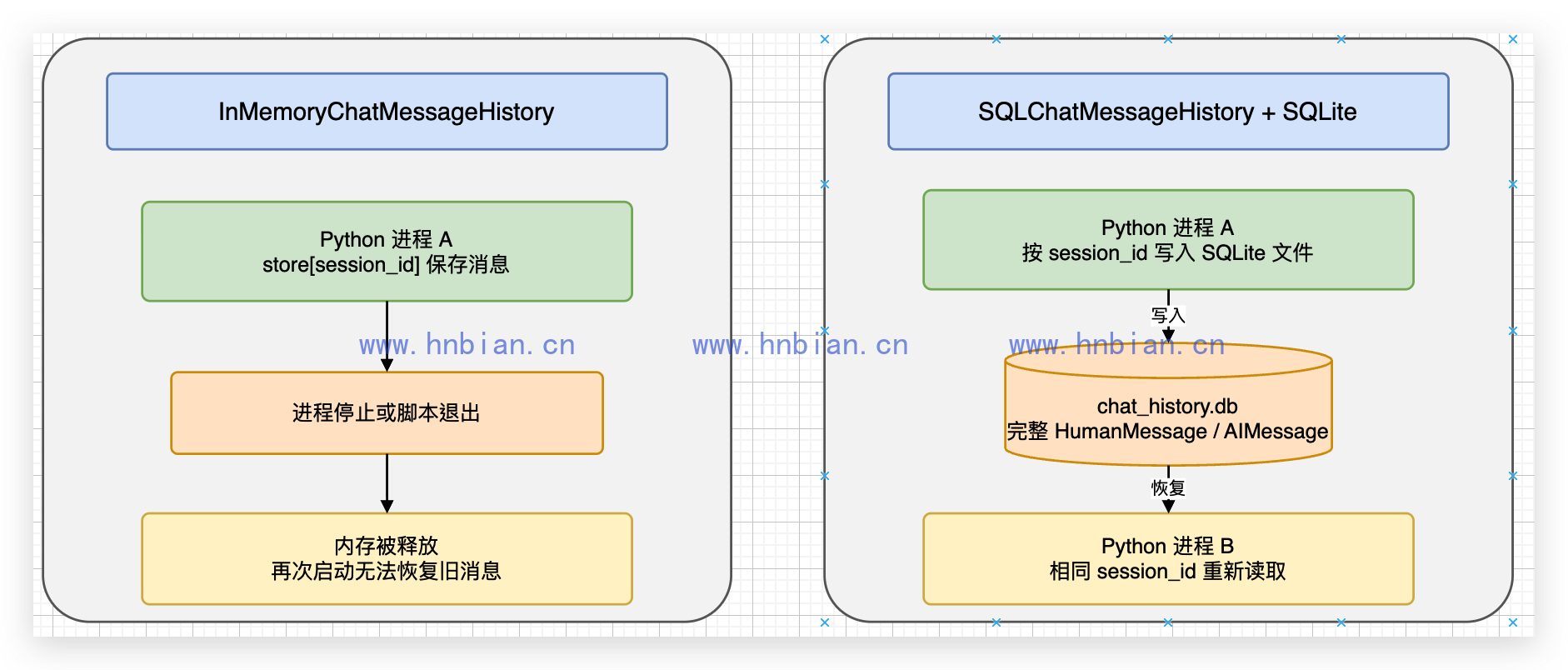
session_id 只是历史记录的分组键,不是登录认证。实际应用仍然要由自己的用户系统生成并保护会话标识,不能直接信任浏览器随意提交的值。
5.1 创建 SQLite 历史
from pathlib import Path
from langchain_community.chat_message_histories import SQLChatMessageHistory

project_root = Path(__file__).resolve().parents[2]
database_path = project_root / "data" / "chat_history.db"
database_path.parent.mkdir(parents=True, exist_ok=True)
connection = f"sqlite:///{database_path}"

def get_session_history(session_id: str) -> SQLChatMessageHistory:
    return SQLChatMessageHistory(session_id=session_id, connection=connection)
SQLChatMessageHistory 推荐传入 connection=。早期示例常见的 connection_string= 已经弃用,运行时会出现提示。
5.2 验证重新创建聊天链后仍能回忆
完整示例位于 03_sqlite_chatbot.py。核心调用如下:
def create_chatbot() -> RunnableWithMessageHistory:
    return RunnableWithMessageHistory(
        prompt | llm,
        get_session_history,
        input_messages_key="input",
        history_messages_key="history",
    )

session_id = "sqlite-demo"
config = {"configurable": {"session_id": session_id}}
get_session_history(session_id).clear()

chatbot = create_chatbot()
first = chatbot.invoke({"input": "我家养了一只叫豆豆的猫。"}, config=config)
print("第 1 轮:", first.content)

# 重新创建对象,历史仍然从 SQLite 中读取。
chatbot = create_chatbot()
second = chatbot.invoke({"input": "我的猫叫什么名字?只回答名字。"}, config=config)
print("重新创建聊天链后的回答:", second.content)

history = get_session_history(session_id)
print("数据库消息数量:", len(history.messages))
真实输出:
第 1 轮: 豆豆真可爱,它有什么特别的地方吗?
重新创建聊天链后的回答: 豆豆
数据库消息数量: 4
两轮对话会保存两条 HumanMessage 和两条 AIMessage,所以数据库中共有 4 条消息。

6. 消息摘要
多轮历史不能无限加入提示词。消息越多,占用的上下文越大,推理时间和内存消耗也会增加。
常见处理方式包括:
- 只保留最近几轮消息。
- 对较早的消息生成摘要。
- 完整消息仍保存在数据库中,摘要只用于当前模型输入。
本文把后两种方式组合起来:旧消息生成摘要,最近消息保留原始对象,而 SQLite 继续保存全部消息。这样既能控制本次模型上下文,也不会因为生成摘要而丢失原始记录。
6.1 生成旧消息摘要
summary_prompt = ChatPromptTemplate.from_messages(
    [
        ("system", "请把下面的聊天历史压缩成一段简短事实摘要,不要遗漏姓名、喜好和地点。"),
        ("human", "{history_text}"),
    ]
)
summary_chain = summary_prompt | llm | StrOutputParser()
这里使用上一篇介绍的 StrOutputParser,因为摘要链只需要普通字符串,而不是带完整元数据的 AIMessage。
6.2 只压缩本次模型输入
recent_message_count = 4


def prepare_context(values: dict) -> dict:
    history = values.get("history", [])
    if len(history) <= recent_message_count:
        return {"input": values["input"], "summary": "暂无。", "history": history}

    old_messages = history[:-recent_message_count]
    recent_messages = history[-recent_message_count:]
    summary = summary_chain.invoke({"history_text": messages_to_text(old_messages)})
    print("生成的历史摘要:", summary)
    return {"input": values["input"], "summary": summary, "history": recent_messages}
完整链为:
answer_chain = RunnableLambda(prepare_context) | answer_prompt | llm

chatbot = RunnableWithMessageHistory(
    answer_chain,
    get_session_history,
    input_messages_key="input",
    history_messages_key="history",
)
执行顺序是:
- RunnableWithMessageHistory 从 SQLite 读取完整历史。
- prepare_context 把旧消息转换成摘要,只保留最近 4 条原始消息。
- answer_prompt 组合摘要、最近消息和当前问题。
- Qwen3 生成回答。
- RunnableWithMessageHistory 把本轮问题和回答继续写入 SQLite。
需要特别区分“模型本次看到的上下文”和“数据库实际保存的历史”:
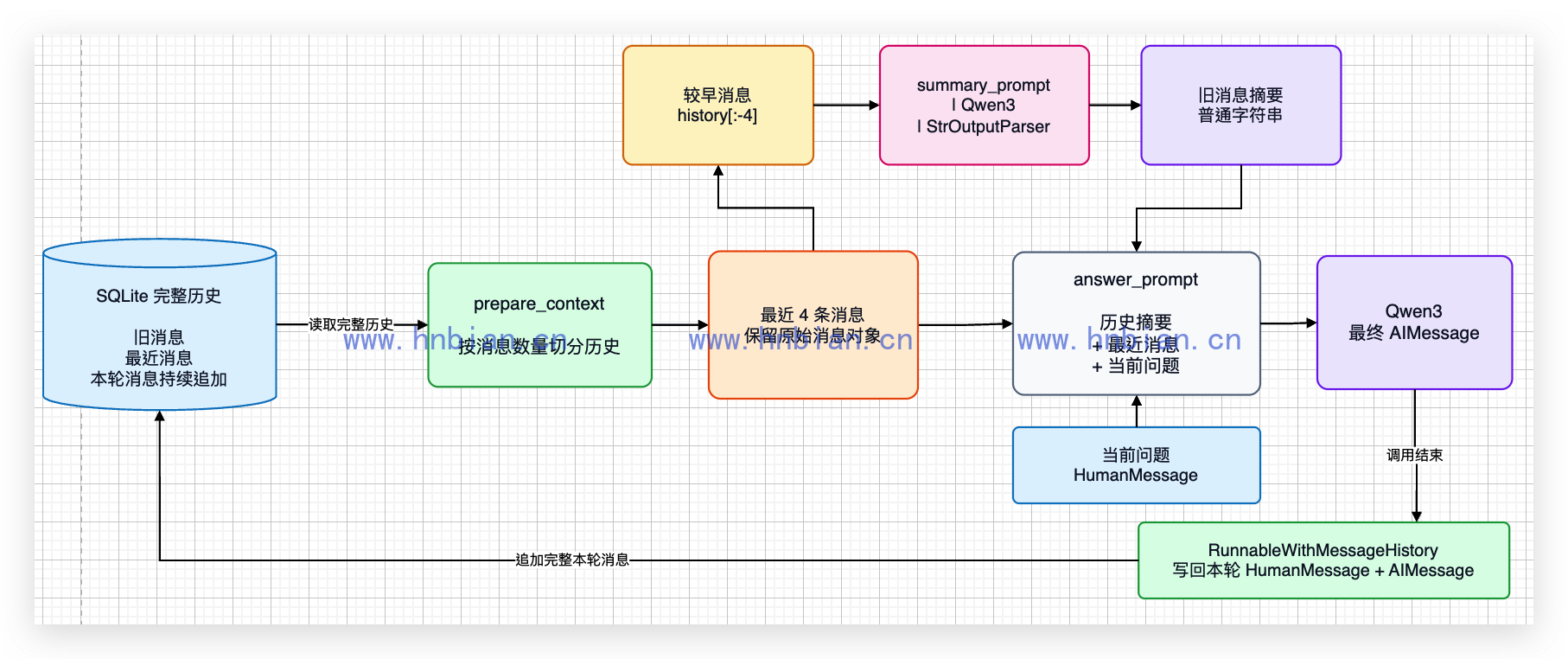
摘要链只处理较早的消息,回答链看到的是“摘要 + 最近消息 + 当前问题”。调用结束后,本轮完整的 HumanMessage 和 AIMessage 仍然追加到 SQLite。
6.3 真实运行结果
# 这个文件演示如何在历史较长时生成摘要。
# SQLite 始终保留完整历史,只有发送给模型的上下文会被压缩。

from pathlib import Path

from langchain_community.chat_message_histories import SQLChatMessageHistory
from langchain_core.messages import BaseMessage
from langchain_core.output_parsers import StrOutputParser
from langchain_core.prompts import ChatPromptTemplate, MessagesPlaceholder
from langchain_core.runnables import RunnableLambda
from langchain_core.runnables.history import RunnableWithMessageHistory
from langchain_openai import ChatOpenAI

llm = ChatOpenAI(
    base_url="http://127.0.0.1:18080/v1",
    api_key="not-needed",
    model="Qwen3-14B-AWQ-4bit-MLX",
    temperature=0,
    max_tokens=128,
)

project_root = Path(__file__).resolve().parents[2]
database_path = project_root / "data" / "chat_history.db"
database_path.parent.mkdir(parents=True, exist_ok=True)
connection = f"sqlite:///{database_path}"

# 旧消息超过限制后,只保留最近 4 条原始消息。
recent_message_count = 4

summary_prompt = ChatPromptTemplate.from_messages(
    [
        ("system", "请把下面的聊天历史压缩成一段简短事实摘要,不要遗漏姓名、喜好和地点。"),
        ("human", "{history_text}"),
    ]
)
summary_chain = summary_prompt | llm | StrOutputParser()

answer_prompt = ChatPromptTemplate.from_messages(
    [
        ("system", "你是中文聊天助手。历史摘要:{summary}"),
        MessagesPlaceholder(variable_name="history"),
        ("human", "{input}"),
    ]
)

def messages_to_text(messages: list[BaseMessage]) -> str:
    """把消息对象转换成便于摘要模型阅读的文本。"""
    lines = []
    for message in messages:
        role = "用户" if message.type == "human" else "助手"
        lines.append(f"{role}:{message.content}")
    return "\n".join(lines)


def prepare_context(values: dict) -> dict:
    """生成旧消息摘要,并保留最近几条原始消息。"""
    history = values.get("history", [])
    if len(history) <= recent_message_count:
        return {"input": values["input"], "summary": "暂无。", "history": history}

    # 历史过长时一分为二:前面的压缩成摘要,最后 recent_message_count 条原样保留
    old_messages = history[:-recent_message_count]   # 较早的消息 → 交给 summary_chain 生成 summary
    recent_messages = history[-recent_message_count:]  # 最近 4 条 → 仍以原始对话形式发给模型
    summary = summary_chain.invoke({"history_text": messages_to_text(old_messages)})
    print("\n\n生成的历史摘要:", summary)
    return {"input": values["input"], "summary": summary, "history": recent_messages}


def get_session_history(session_id: str) -> SQLChatMessageHistory:
    """从 SQLite 中取得完整历史。"""
    return SQLChatMessageHistory(session_id=session_id, connection=connection)

# RunnableWithMessageHistory 先注入完整历史,再由 prepare_context 压缩模型输入。
answer_chain = RunnableLambda(prepare_context) | answer_prompt | llm
chatbot = RunnableWithMessageHistory(
    answer_chain,
    get_session_history,
    input_messages_key="input",
    history_messages_key="history",
)

session_id = "summary-demo"
config = {"configurable": {"session_id": session_id}}
get_session_history(session_id).clear()

questions = [
    "我叫小明。",
    "我最喜欢的水果是苹果。请再推荐一个对身体健康有帮助的评估",
    "我现在住在杭州。你能推荐杭州的旅游景点吗?",
    "说几个杭州的历史名人",
    "说几个杭州的历史典故",
    "说几个杭州的神话故事",
    "请说出我的名字、喜欢的水果和居住城市。",
]

for number, question in enumerate(questions, start=1):
    answer = chatbot.invoke({"input": question}, config=config)
    print(f"第 {number} 轮用户消息:{question}")
    print(f"第 {number} 轮AI消息:{answer.content}")

full_history = get_session_history(session_id)
print("SQLite 中保留的完整消息数量:", len(full_history.messages))
运行:
python langchain/p07_chatbot_with_memory/04_chatbot_with_summary.py关键输出:
第 1 轮用户消息:我叫小明。
第 1 轮AI消息:你好,小明!很高兴认识你。我是你的聊天助手,有什么我可以帮你的吗?
第 2 轮用户消息:我最喜欢的水果是苹果。请再推荐一个对身体健康有帮助的评估
第 2 轮AI消息:你好,小明!很高兴你喜欢苹果,它确实是一种非常健康的水果,富含维生素C、纤维和抗氧化物。

如果你想要另一个对身体健康有帮助的水果,我推荐你试试 **蓝莓**。蓝莓含有丰富的抗氧化剂,尤其是花青素,有助于保护大脑健康、改善记忆力,同时还能增强免疫力,对心脏也有好处。

当然,如果你指的是“评估”而不是“水果”,可能你打错了字?如果是想了解一个对身体健康有帮助的**评估方法**,比如健康评估、体检项目或营养评估,也可以告诉我,我可以为你详细说明。

欢迎你进一步说明你的
第 3 轮用户消息:我现在住在杭州。你能推荐杭州的旅游景点吗?
第 3 轮AI消息:当然可以,小明!欢迎你来到杭州,这座美丽的城市有着“人间天堂”的美誉。杭州不仅风景优美,还有丰富的历史文化底蕴。以下是一些值得一游的景点推荐:

---

### 🌿 **西湖**
- **必去景点**:断桥、苏堤、白堤、雷峰塔、三潭印月、曲院风荷
- **推荐理由**:西湖是杭州的灵魂,四季皆美,可以划船、骑行、散步,感受“欲把西湖比西子,淡妆浓抹总相宜”的诗意。

---

### 🏯 **灵隐


生成的历史摘要: 用户小明与助手进行了初次交流,助手向小明问好并表示愿意提供帮助。
第 4 轮用户消息:说几个杭州的历史名人
第 4 轮AI消息:当然可以!杭州作为历史文化名城,孕育了许多杰出的历史人物。以下是几位与杭州有深厚渊源的历史名人:

---

### 1. **苏轼(苏东坡)**
- **朝代**:北宋
- **与杭州的关系**:苏轼曾两度在杭州任职,任杭州知州期间主持疏浚西湖,修建了著名的“苏堤”,为杭州留下了许多文化遗产。
- **代表作品**:《饮湖上初晴后雨》(“欲把西湖比西子,淡妆浓抹总相宜”)

---

### 2. **白居


生成的历史摘要: 小明最喜欢吃苹果,他询问了另一个对身体健康有帮助的水果,助手推荐了蓝莓。对话发生在一次普通的聊天中。
第 5 轮用户消息:说几个杭州的历史典故
第 5 轮AI消息:当然可以!杭州作为一座历史悠久的城市,有许多流传千古的历史典故,以下是几个著名的:

---

### 1. **西湖十景的由来**
- **典故背景**:南宋时期,宋高宗赵构在杭州定都,将杭州改名为“临安”。为了美化都城,朝廷命人整理西湖风光,形成了“西湖十景”。
- **代表景点**:苏堤春晓、曲院风荷、平湖秋月、断桥残雪等。

---

### 2. **白蛇传的传说**
- **典故背景**:传说中


生成的历史摘要: 小明住在杭州,最喜欢吃苹果,还喜欢健康的食物。他询问了杭州的旅游景点,助手推荐了西湖和灵隐寺等景点。
第 6 轮用户消息:说几个杭州的神话故事
第 6 轮AI消息:当然可以!杭州作为一座历史悠久、文化底蕴深厚的城市,有许多与神话传说相关的有趣故事。以下是几个著名的杭州神话故事:

---

### 1. **白蛇传(白娘子传说)**
- **故事简介**:传说中,白蛇精白素贞与许仙在杭州相遇,后因法海和尚的干预,白素贞被镇压在雷峰塔下。这个故事是中国四大民间传说之一,与杭州的西湖、断桥、雷峰塔等景点密切相关。
- **相关地点**:断桥、雷峰塔、西湖。

---

### 2.


生成的历史摘要: 小明住在杭州,最喜欢吃苹果,还喜欢旅游和历史。他询问了杭州的旅游景点和历史名人,助手推荐了西湖、灵隐寺等景点,并介绍了苏轼、白居易等与杭州有关的历史人物。
第 7 轮用户消息:请说出我的名字、喜欢的水果和居住城市。
第 7 轮AI消息:你的名字是**小明**,喜欢的水果是**苹果**,居住的城市是**杭州**。
SQLite 中保留的完整消息数量: 14
摘要中保留了姓名,最近消息中保留了水果和城市,因此模型能回答完整。更重要的是,数据库仍然有 8 条原始消息。
7. 查看数据库中的完整历史
# 这个文件用于查看 SQLite 中保存的完整聊天历史。
# 默认查看 04_chatbot_with_summary.py 创建的 summary-demo 会话。

import argparse
from pathlib import Path

from langchain_community.chat_message_histories import SQLChatMessageHistory

parser = argparse.ArgumentParser(description="查看指定 session_id 的聊天历史")
parser.add_argument("session_id", nargs="?", default="summary-demo")
args = parser.parse_args()

project_root = Path(__file__).resolve().parents[2]
database_path = project_root / "data" / "chat_history.db"
connection = f"sqlite:///{database_path}"

history = SQLChatMessageHistory(session_id=args.session_id, connection=connection)
print("会话 ID:", args.session_id)
print("消息数量:", len(history.messages))

for number, message in enumerate(history.messages, start=1):
    print(f"{number}. {type(message).__name__}:{message.content}")
运行:
python langchain/p07_chatbot_with_memory/05_inspect_chat_history.py输出中的消息顺序为:
会话 ID: summary-demo
消息数量: 14
1. HumanMessage:我叫小明。
2. AIMessage:你好,小明!很高兴认识你。我是你的聊天助手,有什么我可以帮你的吗?
3. HumanMessage:我最喜欢的水果是苹果。请再推荐一个对身体健康有帮助的评估
4. AIMessage:你好,小明!很高兴你喜欢苹果,它确实是一种非常健康的水果,富含维生素C、纤维和抗氧化物。

如果你想要另一个对身体健康有帮助的水果,我推荐你试试 **蓝莓**。蓝莓含有丰富的抗氧化剂,尤其是花青素,有助于保护大脑健康、改善记忆力,同时还能增强免疫力,对心脏也有好处。

当然,如果你指的是“评估”而不是“水果”,可能你打错了字?如果是想了解一个对身体健康有帮助的**评估方法**,比如健康评估、体检项目或营养评估,也可以告诉我,我可以为你详细说明。

欢迎你进一步说明你的
5. HumanMessage:我现在住在杭州。你能推荐杭州的旅游景点吗?
6. AIMessage:当然可以,小明!欢迎你来到杭州,这座美丽的城市有着“人间天堂”的美誉。杭州不仅风景优美,还有丰富的历史文化底蕴。以下是一些值得一游的景点推荐:

---

### 🌿 **西湖**
- **必去景点**:断桥、苏堤、白堤、雷峰塔、三潭印月、曲院风荷
- **推荐理由**:西湖是杭州的灵魂,四季皆美,可以划船、骑行、散步,感受“欲把西湖比西子,淡妆浓抹总相宜”的诗意。

---

### 🏯 **灵隐
7. HumanMessage:说几个杭州的历史名人
8. AIMessage:当然可以!杭州作为历史文化名城,孕育了许多杰出的历史人物。以下是几位与杭州有深厚渊源的历史名人:

---

### 1. **苏轼(苏东坡)**
- **朝代**:北宋
- **与杭州的关系**:苏轼曾两度在杭州任职,任杭州知州期间主持疏浚西湖,修建了著名的“苏堤”,为杭州留下了许多文化遗产。
- **代表作品**:《饮湖上初晴后雨》(“欲把西湖比西子,淡妆浓抹总相宜”)

---

### 2. **白居
9. HumanMessage:说几个杭州的历史典故
10. AIMessage:当然可以!杭州作为一座历史悠久的城市,有许多流传千古的历史典故,以下是几个著名的:

---

### 1. **西湖十景的由来**
- **典故背景**:南宋时期,宋高宗赵构在杭州定都,将杭州改名为“临安”。为了美化都城,朝廷命人整理西湖风光,形成了“西湖十景”。
- **代表景点**:苏堤春晓、曲院风荷、平湖秋月、断桥残雪等。

---

### 2. **白蛇传的传说**
- **典故背景**:传说中
11. HumanMessage:说几个杭州的神话故事
12. AIMessage:当然可以!杭州作为一座历史悠久、文化底蕴深厚的城市,有许多与神话传说相关的有趣故事。以下是几个著名的杭州神话故事:

---

### 1. **白蛇传(白娘子传说)**
- **故事简介**:传说中,白蛇精白素贞与许仙在杭州相遇,后因法海和尚的干预,白素贞被镇压在雷峰塔下。这个故事是中国四大民间传说之一,与杭州的西湖、断桥、雷峰塔等景点密切相关。
- **相关地点**:断桥、雷峰塔、西湖。

---

### 2.
13. HumanMessage:请说出我的名字、喜欢的水果和居住城市。
这说明摘要没有替换或删除数据库中的消息。
8. 常见问题
8.1 模型仍然记不住上一轮
依次检查:
- 提示词中是否包含 MessagesPlaceholder(“history”)。
- history_messages_key 是否也是 history。
- 两次调用是否使用相同 session_id。
- 是否通过 RunnableWithMessageHistory 调用,而不是直接调用原始 chain。
8.2 不同用户看到了相同历史
通常是所有请求都使用了同一个固定 session_id。实际页面应为每个用户或浏览器会话生成独立值,下一篇 Gradio 文章会处理这个问题。
8.3 重启后历史消失
InMemoryChatMessageHistory 只存在内存中。需要跨进程保存时,应改用 SQLChatMessageHistory 或其他持久化历史实现。
8.4 摘要后数据库消息减少
不要为了写入摘要而调用 clear() 清空正式会话,也不要用一条摘要消息覆盖原始消息。正确做法是完整历史继续留在数据库中,只在构造本次模型输入时使用摘要。
9. 小结
本文把前面介绍的内容第一次组合成了完整功能:
- ChatOpenAI 连接本地 Qwen3。
- ChatPromptTemplate 组织系统消息、历史消息和当前问题。
- MessagesPlaceholder 为历史消息预留位置。
- RunnableWithMessageHistory 自动读取和写入历史。
- session_id 隔离不同会话。
- SQLChatMessageHistory 将消息持久化到 SQLite。
- StrOutputParser 提取历史摘要文本。
- RunnableLambda 在回答前整理模型上下文。