一、概述
Apache Spark 和Apache HBase 是两个使用比较广泛的大数据组件。很多场景需要使用Spark分析/查询Hbase中的数据,而目前Spark内置是支持很多数据源的,其中就包括了HBase,但是内置的读取数据源还是使用了TableInputFormat来读取HBase中的数据。这个TableInputFormat有一些缺点:
- 一个Task里面只能启动一个Scan去Hbase中读取数据;
- TableInputFormat中不支持BulkGet;
- 不能享受到SparkSQL内置catalyst引擎的优化;
基于这些问题,来自Hortonworks的工程师们为我们带来了全新的Apache Spark – Apache HBase Connector( https://github.com/hortonworks-spark/shc ),下面简称SHC。通过这个类库,我们可以直接使用SparkSQL将DataFrame中的数据写入HBase中;而且我们也可以使用SparkSQL去查询HBase中的数据,在查询HBase的时候充分利用了catalyst引擎做了许多优化,比如分区修剪(partition pruning),列修剪(column pruning),谓词下推(predicate pushdown)和数据本地行(data locality)等等。因为有了这些优化,通过Spark查询HBase的速度有了很大的提升。
SHC同事还提供了将DataFrame中的数据直接写入到HBase中,但是整个代码并没有什么优化的地方,在此不会对其进行介绍,可以自己去其Github上相关代码。
二、SHC 是如何实现查询优化的呢?
SHC主要使用下面几种优化方式,使得Spark获取HBase的数据扫描范围得到减少,以提高数据读取的效率。为了方便下面讲解我们先定义一个HBase catalog结构如下:
val catalog = s"""{
  |"table":{"namespace":"default", "name":"shc", "tableCoder":"PrimitiveType"},
  |"rowkey":"key",
  |"columns":{
    |"col0":{"cf":"rowkey", "col":"id", "type":"int"},
    |"col1":{"cf":"cf1", "col":"col1", "type":"boolean"},
    |"col2":{"cf":"cf2", "col":"col2", "type":"double"},
    |"col3":{"cf":"cf3", "col":"col3", "type":"float"},
    |"col4":{"cf":"cf4", "col":"col4", "type":"int"},
    |"col5":{"cf":"cf5", "col":"col5", "type":"bigint"},
    |"col6":{"cf":"cf6", "col":"col6", "type":"smallint"},
    |"col7":{"cf":"cf7", "col":"col7", "type":"string"},
    |"col8":{"cf":"cf8", "col":"col8", "type":"tinyint"}
  |}
|}""".stripMargin
2.1 将使用RowKey的查询方式转换成Get方式查询
我们都知道,HBase中使用Get查询的效率是非常高的,所以如果查询的过滤条件是针对RowKey进行的,那么我们可以将它转换成Get查询。那么如果有类似下面的查询:
val df = withCatalog(catalog)
df.createOrReplaceTempView("iteblog_table")
sqlContext.sql("select * from iteblog_table where id = 1")
sqlContext.sql("select * from iteblog_table where id = 1 or id = 2")
sqlContext.sql("select * from iteblog_table where id in (1, 2)")
因为查询条件是针对RowKey进行的,所以这种情况下直接可以转换成Get或者BulkGet请求的。第一个SQL查询过程类似于下面的过程。
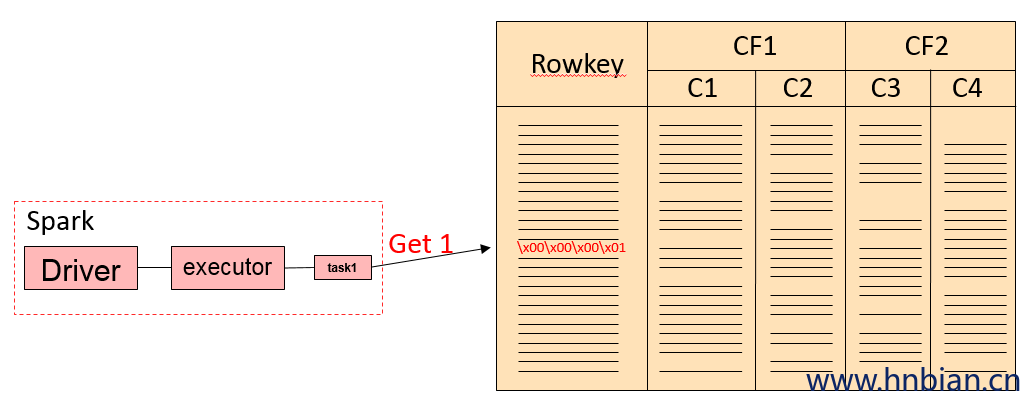
后面两条SQL查询其实是等价的,实现上会把 key in (x1,x2,x3…) 转换成(key == x1) or (key == x2) or …的。整个查询流程如下:
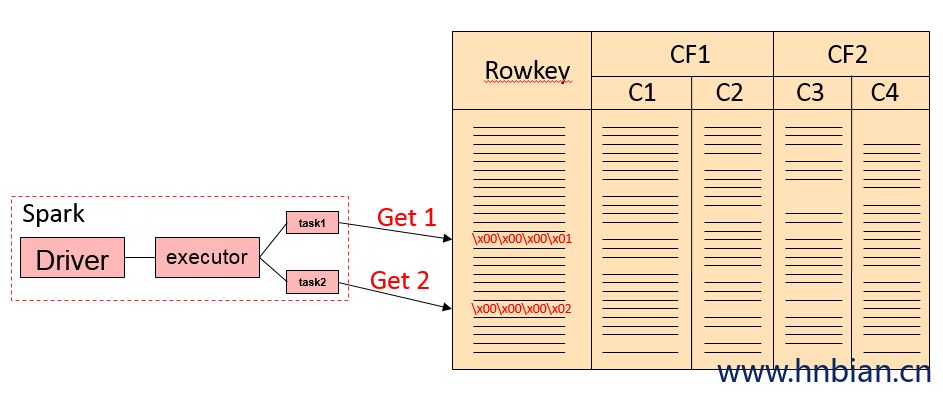
如果我们的查询里面有RowKey还有其他列的过滤,比如下面的例子:
sqlContext.sql("select id, col6, col8 from iteblog_table where id = 1 and col7 = 'xxx'")那么上面的SQL就会翻译成下面的查询
val filter = new SingleColumnValueFilter(
              Bytes.toBytes("cf7"), Bytes.toBytes("col7 ")
              CompareOp.EQUAL,
             Bytes.toBytes("xxx"))

val g = new Get(Bytes.toBytes(1))
g.addColumn(Bytes.toBytes("cf6"), Bytes.toBytes("col6"))
g.addColumn(Bytes.toBytes("cf8"), Bytes.toBytes("col8"))
g.setFilter(filter)
如果有多个and 条件,都是使用SingleColumnValueFilter进行的过滤的。
下面看一个使用or 进行过滤的例子,查询SQL如下:
sqlContext.sql("select id, col6, col8 from iteblog_table where id = 1 or col7 = 'xxx'")如果碰到这种非RoeKey的过滤,那么这种查询是需要扫描HBase的全表。上面的查询在SHC里面就是将HBase里面所有的数据拿到,然后传输到Spark,再通过Spark里面进行过滤的,可见SHC在这种情况下效率是很低下的。
注意,上面的查询在SHC返回的结果是错误的。具体原因是在将 id = 1 or col7 = “xxx” 查询条件进行合并时,丢弃了所有的查询条件,相当于返回表的所有数据。
def or[T](left: HRF[T],
            right: HRF[T])(implicit ordering: Ordering[T]): HRF[T] = {
    val ranges = ScanRange.or(left.ranges, right.ranges)
    val typeFilter = TypedFilter.or(left.tf, right.tf)
    HRF(ranges, typeFilter, left.handled && right.handled)
}
同理,类似于下面的查询在SHC里面其实都是全表扫描,并且将所有的数据返回到Spark层面上再进行一次过滤。
sqlContext.sql("select id, col6, col8 from iteblog_table where id = 1 or col7 <= 'xxx'")
sqlContext.sql("select id, col6, col8 from iteblog_table where id = 1 or col7 >= 'xxx'")
sqlContext.sql("select id, col6, col8 from iteblog_table where col7 = 'xxx'")
很显然,这种方式查询效率不高,一种可行的方案是将算子下推到HBase层面,在HBase层面通过SingleColumnValueFilter过滤一部分数据,然后再返回到Spark,这样可以节省很多数据的传输。
2.2 组合RowKey的查询优化
SHC还支持组合RowKey的方式来建表,具体如下:
def cat =
  s"""{
     |"table":{"namespace":"default", "name":"iteblog", "tableCoder":"PrimitiveType"},
     |"rowkey":"key1:key2",
     |"columns":{
     |"col00":{"cf":"rowkey", "col":"key1", "type":"string", "length":"6"},
     |"col01":{"cf":"rowkey", "col":"key2", "type":"int"},
     |"col1":{"cf":"cf1", "col":"col1", "type":"boolean"},
     |"col2":{"cf":"cf2", "col":"col2", "type":"double"},
     |"col3":{"cf":"cf3", "col":"col3", "type":"float"},
     |"col4":{"cf":"cf4", "col":"col4", "type":"int"},
     |"col5":{"cf":"cf5", "col":"col5", "type":"bigint"},
     |"col6":{"cf":"cf6", "col":"col6", "type":"smallint"},
     |"col7":{"cf":"cf7", "col":"col7", "type":"string"},
     |"col8":{"cf":"cf8", "col":"col8", "type":"tinyint"}
     |}
     |}""".stripMargin
上面的col00 和col01 两个列组合成一个RowKey ,并且col00排在前面,col01排在后面。比如col00 = ‘row001’,col01 = 2,那么组合的rowkey 为 row002\x00\x00\x00\x02。那么在组合RowKey的查询SHC都有哪些优化呢?现在我们有如下查询:
df.sqlContext.sql("select col00, col01, col1 from iteblog where col00 = 'row000' and col01 = 0").show()根据上面的信息,RowKey其实是由 col00 和 col01 组合而成的,那么上面的查询其实可以将 col00 和 col01 进行拼接,然后组合成一个RowKey,然后上面的查询其实可以换成一个Get查询。但是在SCH里面,上面的查询是转换成一个Scan 和一个 Get 查询的。Scan 的 startRow为row000, endRow为 row000\xff\xff\xff\xff;get的rowkey为 row000\xff\xff\xff\xff,然后再将所有符合条件的数据返回,最后再在Spark层面上做一次过滤,得到最后查询的结果。因为SHC里面组合键查询的代码还没完善所以当前实现应该不是最终的。
在SHC里面下面两条SQL查询下沉到HBase的逻辑一致
df.sqlContext.sql("select col00, col01, col1 from iteblog where col00 = 'row000'").show()
df.sqlContext.sql("select col00, col01, col1 from iteblog where col00 = 'row000' and col01 = 0").show()
唯一的区别是Spark层面上的过滤。
2.3 Scan查询优化
如果我们的查询有 < 或 > 等查询过滤条件,比如下面的查询条件:
df.sqlContext.sql("select col00, col01, col1 from iteblog where col00 > 'row000' and col00 < 'row005'").show()这个在SHC里面转换成HBase的过滤为一条 Get 和一个 Scan,具体为get的RowKey为 row0005\xff\xff\xff\xff;Scan的startRow为row000,endRow 为 row005\xff\xff\xff\xff,然后将查询的结果返回到spark层面上进行过滤。
总体来说SHC能在一定程度上对查询进行与哦话,避免了全表扫面,但经过测评那个,SHC其实还有很多不完善的地方,算子下称并没有下沉到HBase层面上进行。目前这个项目正在和HBase自带的connectors进行整合( https://github.com/apache/hbase-connectors ) ,相关 issue 参见 Enhance the current spark-hbase connector。
三、SHC 测试代码
maven 依赖
<dependency>
  <groupId>com.hortonworks</groupId>
  <artifactId>shc-core</artifactId>
  <version>1.1.1-2.1-s_2.11</version>
</dependency>
如果jar包下载不下来可以手动下载到指定路径的文件夹下面然后手动注册一下
mvn install:install-file -DgroupId=com.hortonworks -DartifactId=shc-core -Dversion=1.1.1-2.1-s_2.11 -Dpackaging=jar -Dfile=shc-core-1.1.1-2.1-s_2.11.jar
import org.apache.spark.sql.execution.datasources.hbase._
import org.apache.spark.sql.{DataFrame, SparkSession}

object HBaseSource {

  val cat = s"""{
               |"table":{"namespace":default", "name":"test", "tableCoder":"PrimitiveType"},
               |"rowkey":"key",
               |"columns":{
               |"rk":{"cf":"rowkey", "col":"key", "type":"string"},
               |"deviceNo":{"cf":"info", "col":"deviceNo", "type":"string"}
               |}
               |}""".stripMargin

  def main(args: Array[String]) {
    System.setProperty("hadoop.home.dir", "D:\\ProgramFiles\\winutils-master\\hadoop-2.7.1")
    val spark = SparkSession.builder()
      .appName("HBaseSourceExample")
      .master("local[4]")
      .getOrCreate()

    val sc = spark.sparkContext
    val sqlContext = spark.sqlContext

    import sqlContext.implicits._

    def withCatalog(cat: String): DataFrame = {
      sqlContext
        .read
        .options(Map(HBaseTableCatalog.tableCatalog->cat))
        .format("org.apache.spark.sql.execution.datasources.hbase")
        .load()
    }

    // 读取数据
    val df = withCatalog(cat)
    df.show(false)
    df.createTempView("test")
    sqlContext.sql("select deviceNo from test").show()
    df.filter($"deviceNo" <= "row005")
      .select($"deviceNo", $"deviceNo").show

    //保存数据
    df.write.options(
       Map(HBaseTableCatalog.tableCatalog -> cat, HBaseTableCatalog.newTable -> "5"))
       .format("org.apache.spark.sql.execution.datasources.hbase")
       .save()
    spark.stop()
  }
}