前文已经完成本地 Tool、流式工具调用和 Agent API 的介绍。调用 Agent 时,我们一直把用户问题放在 messages 中,但实际应用除了问题本身,通常还需要知道是谁发起了请求。
例如,一个用户询问“告诉我当前用户的年龄”,模型只看到这句话,并不知道“当前用户”具体是谁。应用可以要求用户把 ID 写在问题中,但这样既不自然,也可能把不应该由模型决定的身份信息暴露成工具参数。
更合适的方式是在调用 Agent 时额外传入用户 ID、用户名、租户或权限等上下文。动态提示词和 Tool 可以读取这些数据,而模型只需要处理正常的用户问题。
一种常见写法是把这类数据放在 config["configurable"] 中。这个写法有助于理解配置如何跟随一次调用传播,但业务上下文已经有了更明确的入口:context_schema、context= 和 runtime.context。
本篇先理解 RunnableConfig,再使用类型化 Runtime Context 创建一个能够识别当前用户的本地 Qwen3 Agent。
1. 智能体为什么需要运行时上下文
先看下面这条问题:
告诉我当前用户的年龄和城市。要正确回答,Agent 至少还需要两个信息:
user_id:用于查询用户资料
user_name:用于生成个性化系统提示词
这些字段不适合直接放进用户消息:
- 用户不应该每次都手工填写自己的 ID。
- 用户 ID 应该由登录系统或服务端确认,而不是由模型猜测。
- Tool 不应该要求模型生成当前用户 ID,否则模型可能传错用户。
- 同一个 Agent 应该能够被不同用户复用,而不是把用户名写死在代码中。
运行时上下文解决的就是这个问题:调用方在运行开始时提供一组业务数据,Agent 的提示词、Tool 或中间件可以在本次运行中读取它们。
**2. Config、Context 和 State **
在 LangChain 和 LangGraph 中,下面三个对象很容易混淆:
- config:控制一次执行,例如标签、追踪信息、回调和线程配置。
- context:提供本次运行需要的业务上下文,例如用户 ID 和用户名。
- state:保存执行过程中不断变化的数据,例如消息和中间结果。
下图从传入方式、读取入口、可变性和生命周期四个角度比较这三个对象。尤其需要注意:State 默认只存在于单次运行中,配置 Checkpointer 后才可以按线程保存并在后续调用中恢复。
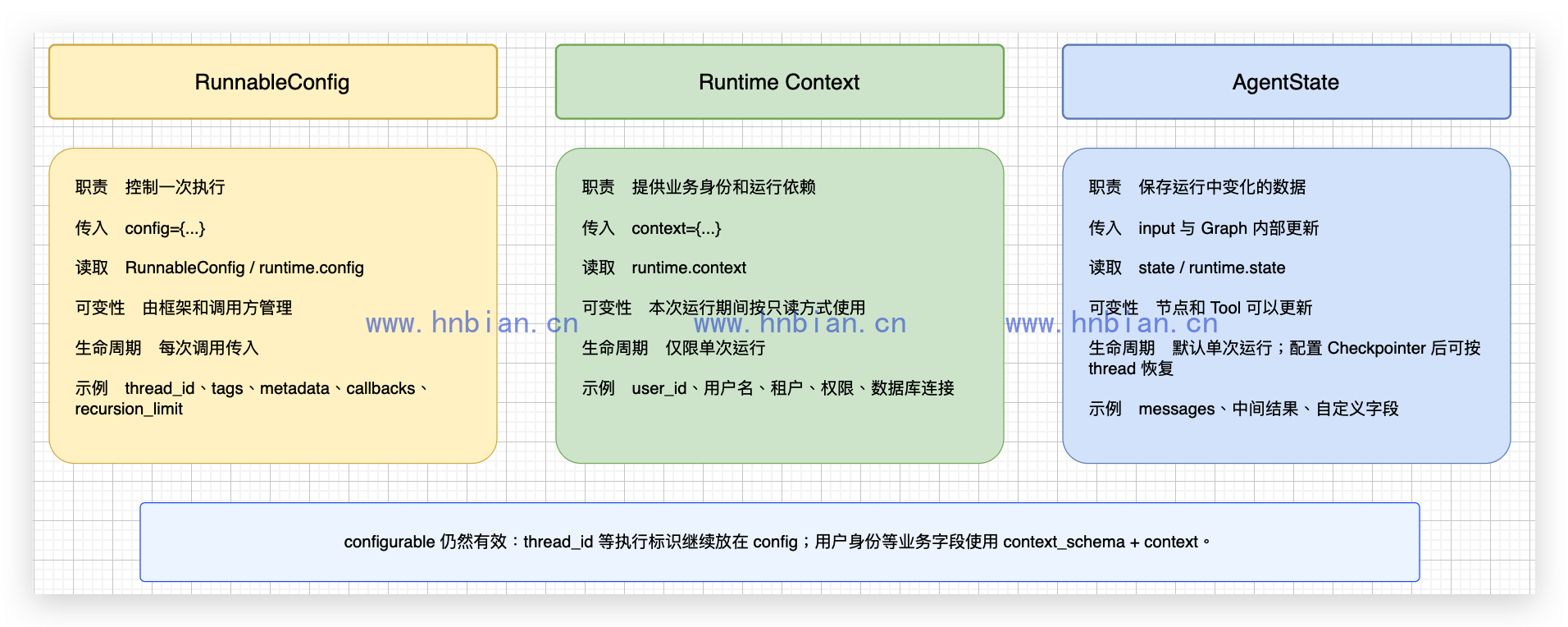
configurable 并没有被废弃,thread_id 等执行标识仍然需要放在这里。本文只是把用户身份这类业务字段迁移到 Runtime Context,让执行控制与业务依赖各自使用明确的入口。
本篇只实现前两个对象。AgentState 仅用于说明边界,不定义自定义字段,也不讨论 Reducer、Checkpointer 或记忆存储。
2.1 静态上下文
静态上下文具有下面几个特点:
- 在调用 invoke()、stream() 或 Agent API 时传入。
- 只服务于本次运行。
- 动态提示词和 Tool 可以读取同一份上下文。
- 运行过程中应当把它视为只读数据。
这里的“不可变”是应用层面的设计约定。Python 不会自动阻止代码修改一个普通字典中的内容。正确做法是只读取 Context,需要变化的数据留给后续的 State 或 Store,而不是在 Tool 中修改 Context。
3. 先理解 RunnableConfig
可以采用下面的结构传入用户名:
config = {
    "configurable": {
        "user_name": "小明",
    }
}
最外层对象是 RunnableConfig。configurable 是其中的一个字段,里面可以存放调用方传入的可配置值。
这个对象不是项目配置文件。它与下面这些文件没有关系:
.env
langgraph.json
pyproject.toml
它是一份跟随当前 Runnable 或 Graph 调用传播的运行配置。
**3.1 RunnableConfig **
除了 configurable,常见字段还包括:
| 字段 | 作用 |
|---|---|
| tags | 给当前运行增加标签,便于追踪和筛选 |
| metadata | 附加运行元数据 |
| callbacks | 设置回调处理器 |
| recursion_limit | 限制 Graph 的最大递归步数 |
| run_name | 设置当前运行名称 |
使用 Checkpointer 时,thread_id 仍然放在 configurable 中:
config = {
    "configurable": {
        "thread_id": "conversation-001",
    }
}
thread_id 是 LangGraph 持久化机制需要的执行标识,不应该因此把所有业务字段都继续塞进 configurable。
3.2 编写 RunnableConfig 示例
langgraph/p07_agent_runtime_context/01_runnable_configurable_basic.py 的完整代码如下:
"""演示 RunnableConfig 与 configurable 静态配置写法。"""

from langchain_core.runnables import RunnableConfig, RunnableLambda

def read_config(question: str, config: RunnableConfig) -> dict[str, object]:
    """读取本次 Runnable 调用携带的配置。"""

    # 第 1 步:从 config 中取出 configurable。
    # 如果调用方没有传入该字段,就使用空字典。
    configurable = config.get("configurable", {})
    return {
        "question": question,
        "user_name": configurable.get("user_name", "匿名用户"),
        "tags": config.get("tags", []),
        "metadata": config.get("metadata", {}),
    }

# RunnableLambda 会把 invoke() 的 config 自动注入 read_config()。
runnable = RunnableLambda(read_config)

# 第 2 步:调用 Runnable,并通过 config 传入本次调用的配置。
result = runnable.invoke(
    "请介绍一下当前用户。",
    config={
        "configurable": {"user_name": "小明"},
        "tags": ["context-demo"],
        "metadata": {"source": "series-24"},
    },
)

# 第 3 步:读取函数返回的普通字典。
print(f"问题:{result['question']}")
print(f"用户名:{result['user_name']}")
print(f"标签:{result['tags']}")
print(f"元数据:{result['metadata']}")
执行:
cd /path/to/llm-learning

source .venv_langgraph/bin/activate
python langgraph/p07_agent_runtime_context/01_runnable_configurable_basic.py
真实输出如下:
问题:请介绍一下当前用户。
用户名:小明
标签:['context-demo']
元数据:{'source': 'series-24', 'user_name': '小明'}这次调用中,configurable.user_name 也被合并到了运行元数据中,因此最后一行同时出现了 source 和 user_name。
4. Runtime Context
RunnableConfig 是通用运行配置。把 user_name 放进 configurable 可以正常读取,但这会把业务身份和执行控制放在同一个字典中。
create_agent() 提供了单独的 context_schema 参数。编译后的 Graph 也支持:
graph.invoke(input, context={...})因此可以形成更清晰的分工:
config  -> 怎样执行
context -> 为谁执行、依赖什么业务数据
Context 会被包装在 LangGraph 的 Runtime 中。动态提示词通过 request.runtime.context 读取,Tool 通过 ToolRuntime.context 读取。
下图按照一次完整工具调用的顺序展示 Context 的两条读取路径:动态提示词读取 user_name,本地 Tool 读取 user_id。config 只控制这次运行,不会自动变成模型提示词的一部分。
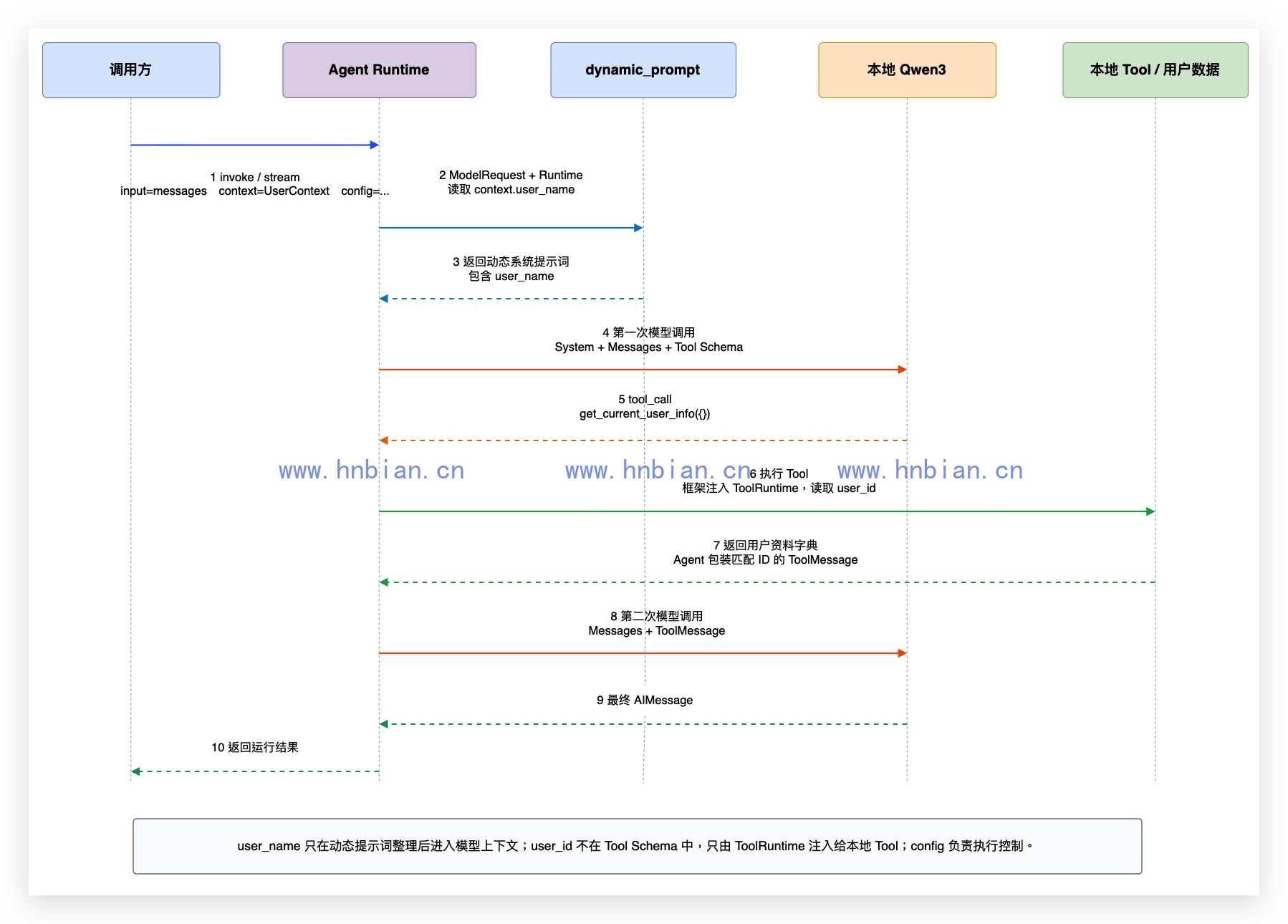
动态提示词会在每次模型调用前执行。ToolRuntime 则在执行 Tool 时由框架注入,不出现在模型可见的参数 Schema 中。两者读取的是同一次运行的 Context,但使用目的不同。
原始 Context 不会作为一个完整对象直接发送给模型。应用可以选择把用户名整理进系统提示词;用户 ID 则只交给本地 Tool 使用,不出现在模型可见的工具参数中。
5. 准备项目和运行环境
示例继续使用 LangGraph 系列 2 创建的 .venv_langgraph,依赖由项目配置统一管理。
安装 p07 本地项目:
cd /path/to/llm-learning

source .venv_langgraph/bin/activate
python -m pip install -e langgraph/p07_agent_runtime_context
python -m pip check
实际检查结果:
No broken requirements found.5.1 启动本地 Qwen3
模型服务复用 LangGraph 系列 6 创建的 .venv_tool_server:
cd /path/to/llm-learning

.venv_tool_server/bin/python -m mlx_lm server \
  --model Qwen3-14B-AWQ-4bit-MLX \
  --host 127.0.0.1 \
  --port 18080 \
  --prompt-cache-size 0 \
  --chat-template-args '{"enable_thinking": false}'
另开终端检查模型接口:
curl --noproxy '*' \
  http://127.0.0.1:18080/v1/models
接口返回一个可用模型,后续代码均通过 http://127.0.0.1:18080/v1 连接它。
6. 定义Agent Graph
本例只需要两个字段:
class UserContext(TypedDict):
    """定义每次 Agent 运行必须传入的用户上下文。"""

    user_id: str
    user_name: str
TypedDict 可以让编辑器和类型检查工具知道上下文有哪些字段,但它不会自动完成完整的运行时校验。因此示例会在读取字段之前主动检查 Context 是否存在。
6.1 使用动态系统提示词
固定系统提示词通常这样定义:
system_prompt="你是一个中文智能助手。"如果提示词需要使用当前用户名,就不能把名字写死。@dynamic_prompt 会在每次模型调用前执行,并通过 ModelRequest 提供本次运行的 Runtime:
@dynamic_prompt
def personalized_prompt(request: ModelRequest) -> str:
    context = request.runtime.context
    if context is None or "user_name" not in context:
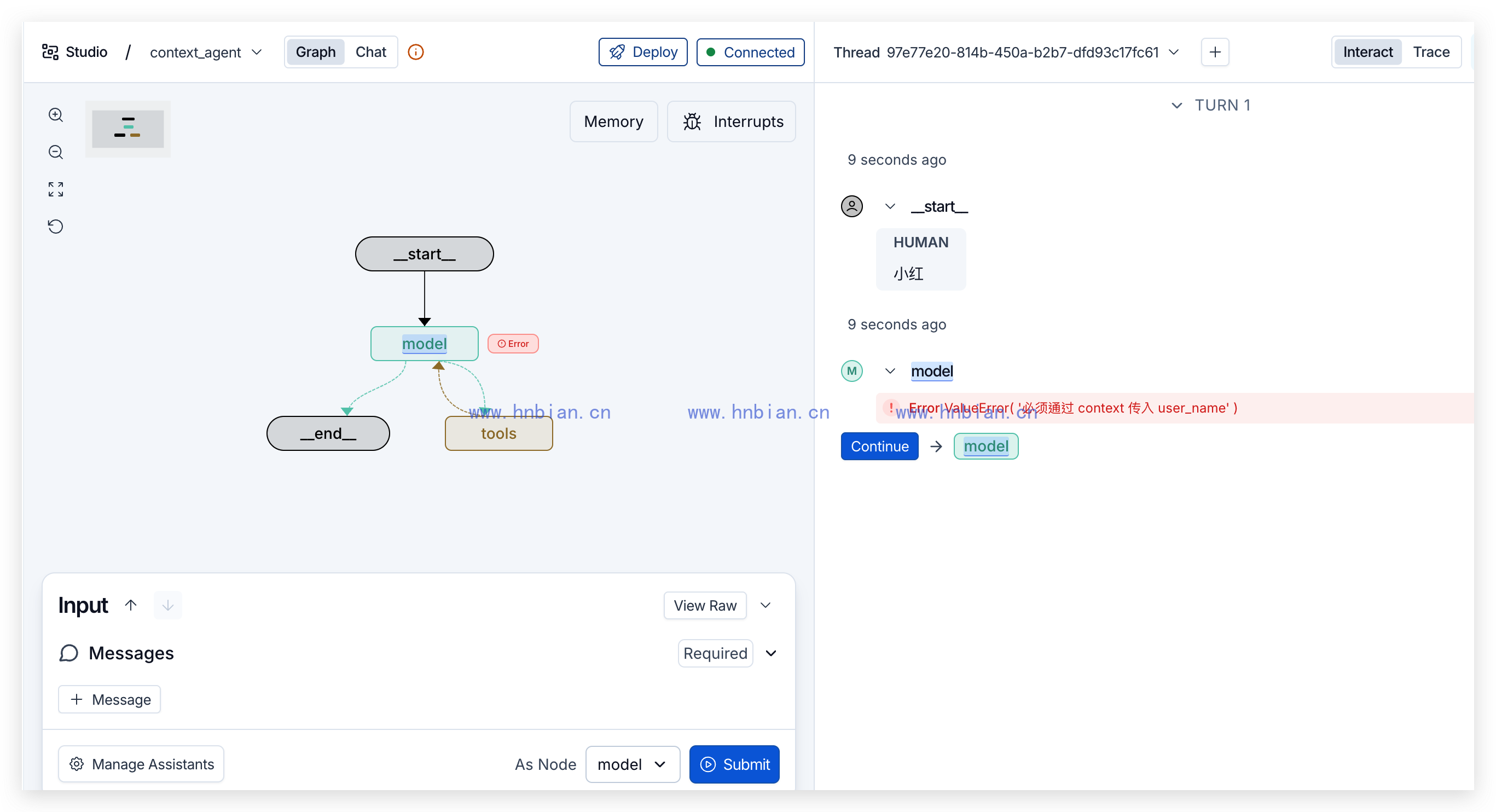
        raise ValueError("必须通过 context 传入 user_name")

    user_name = context["user_name"]
    return (
        "你是一个中文智能助手。"
        f"当前用户的名字是{user_name}。"
        "用户询问自己的资料时,必须调用 get_current_user_info 工具。"
    )
这里的函数是中间件,不是 Tool。每次模型准备回答时都会执行,不需要模型先判断是否调用它。
6.2 在 Tool 中读取当前用户
用户 ID 不应该作为普通 Tool 参数:
# 不推荐:user_id 需要由模型生成
def get_user_info(user_id: str):
    ...
使用 ToolRuntime 后,框架会自动注入 Context:
@tool
def get_current_user_info(runtime: ToolRuntime[UserContext]) -> dict[str, object]:
    """查询当前用户的姓名、年龄和所在城市。"""

    context = runtime.context
    if context is None or "user_id" not in context:
        raise ValueError("必须通过 context 传入 user_id")

    user_id = context["user_id"]
    return USER_DATABASE.get(user_id, {"error": "没有找到当前用户"})
模型只需要决定是否调用 get_current_user_info,不需要知道当前用户 ID。
6.3 完整代码
langgraph/p07_agent_runtime_context/src/context_agent/graph.py 的完整代码如下:
"""创建使用类型化运行时上下文的本地 Qwen3 Agent。"""

from typing_extensions import TypedDict

import httpx
from langchain.agents import create_agent
from langchain.agents.middleware import ModelRequest, dynamic_prompt
from langchain.tools import ToolRuntime, tool
from langchain_openai import ChatOpenAI


class UserContext(TypedDict):
    """定义每次 Agent 运行必须传入的用户上下文。"""

    user_id: str
    user_name: str


# 使用固定数据模拟用户数据库,避免引入数据库和后续记忆知识。
USER_DATABASE = {
    "user-001": {"name": "小明", "age": 18, "city": "杭州"},
    "user-002": {"name": "小红", "age": 20, "city": "成都"},
}

# 第 1 步:创建本地 Qwen3 模型客户端。
model = ChatOpenAI(
    model="Qwen3-14B-AWQ-4bit-MLX",
    base_url="http://127.0.0.1:18080/v1",
    api_key="not-needed",
    temperature=0,
    max_tokens=256,
    # 禁止 httpx 读取系统代理,确保本机请求直连 127.0.0.1。
    http_client=httpx.Client(trust_env=False),
)

@dynamic_prompt
def personalized_prompt(request: ModelRequest) -> str:
    """根据本次运行的用户名生成动态系统提示词。"""

    # 动态提示词在每次调用时运行,可以读取本次调用的 context。
    context = request.runtime.context
    if context is None or "user_name" not in context:
        raise ValueError("必须通过 context 传入 user_name")

    user_name = context["user_name"]
    return (
        "你是一个中文智能助手。"
        f"当前用户的名字是{user_name}。"
        "用户询问自己的资料时,必须调用 get_current_user_info 工具。"
    )


@tool
def get_current_user_info(runtime: ToolRuntime[UserContext]) -> dict[str, object]:
    """查询当前用户的姓名、年龄和所在城市。"""

    # 第 2 步:工具通过 runtime 读取当前用户。
    # runtime 由 LangChain 自动注入,模型不需要生成 user_id 参数。
    context = runtime.context
    if context is None or "user_id" not in context:
        raise ValueError("必须通过 context 传入 user_id")

    user_id = context["user_id"]
    return USER_DATABASE.get(user_id, {"error": "没有找到当前用户"})


# 第 3 步:组装 Agent。
# context_schema 声明本 Graph 接收的运行时上下文结构。
graph = create_agent(
    model=model,
    tools=[get_current_user_info],
    middleware=[personalized_prompt],
    context_schema=UserContext,
)
这里没有定义 state_schema,也没有导入 AgentState。本例只关心运行开始时传入的静态上下文。
7. 调用 Context Agent
调用 Graph 时,用户问题仍然放在 messages 中,身份信息通过单独的 context 参数传入,无法在消息中直接传入:
result = graph.invoke(
    {"messages": [{"role": "user", "content": "告诉我当前用户的年龄和城市。"}]},
    context={"user_id": user_id, "user_name": user_name},
)
langgraph/p07_agent_runtime_context/02_invoke_context_agent.py 的完整代码如下:
"""直接调用 Context Agent,验证动态提示词、工具上下文和用户隔离。"""

from langchain_core.messages import AIMessage, ToolMessage
from langchain_core.utils.function_calling import convert_to_openai_tool

from context_agent.graph import get_current_user_info, graph

def run_for_user(user_id: str, user_name: str) -> None:
    """使用指定用户上下文运行一次 Agent。"""

    result = graph.invoke(
        {"messages": [{"role": "user", "content": "告诉我当前用户的年龄和城市。"}]},
        context={"user_id": user_id, "user_name": user_name},
    )

    # 依次查看 Agent 产生的消息,便于理解工具调用过程。
    print(f"\n当前上下文:{user_id} / {user_name}")
    for message in result["messages"]:
        if isinstance(message, AIMessage) and message.tool_calls:
            print(f"工具调用:{message.tool_calls[0]['name']}")
        elif isinstance(message, ToolMessage):
            print(f"工具结果:{message.content}")

    print(f"最终回答:{result['messages'][-1].content}")


# 第 1 步:确认 runtime 参数由框架注入,模型看不到 user_id 和 user_name。
tool_schema = convert_to_openai_tool(get_current_user_info)
print(f"模型可见的工具参数:{tool_schema['function']['parameters']['properties']}")

# 第 2 步:分别传入两个用户的运行时上下文,验证数据相互隔离。
run_for_user("user-001", "小明")
run_for_user("user-002", "小红")
执行:
(.venv_langgraph) (base) bianhn@BianhnMacBook-Pro p07_agent_runtime_context % python 02_invoke_context_agent.py本次真实输出如下:
模型可见的工具参数:{}

当前上下文:user-001 / 小明
工具调用:get_current_user_info
工具结果:{"name": "小明", "age": 18, "city": "杭州"}
最终回答:当前用户的年龄是18岁,所在城市是杭州。

当前上下文:user-002 / 小红
工具调用:get_current_user_info
工具结果:{"name": "小红", "age": 20, "city": "成都"}
最终回答:小红今年20岁,来自成都。
这段结果验证了三件事:
- 模型看到的工具参数是空字典,runtime 和用户身份没有暴露给模型。
- 两次运行都调用了同一个 get_current_user_info 工具。
- 两位用户分别得到自己的资料,没有发生上下文串用。
模型回答的具体措辞可能变化,但工具名称、工具返回的数据和用户隔离结果应该保持一致。
8 使用 SDK 调用
langgraph/p07_agent_runtime_context/03_call_context_agent_api.py 的完整代码如下:
"""使用 LangGraph Python SDK 向 Agent Server 传入运行时上下文。"""

from langgraph_sdk import get_sync_client


def call_agent(user_id: str, user_name: str) -> None:
    """通过 Agent API 查询指定上下文对应的用户资料。"""

    # 第 1 步:连接 Agent Server。
    client = get_sync_client(url="http://127.0.0.1:2024")
    tool_result = ""
    final_answer = ""

    # 第 2 步:把用户身份放在 context 中,而不是放进用户问题。
    for chunk in client.runs.stream(
        None,  # 使用 Threadless Run,本例不保存聊天历史。
        "context_agent",  # 对应 langgraph.json 中注册的 Graph 名称。
        input={
            "messages": [
                {"role": "user", "content": "告诉我当前用户的年龄和城市。"},
            ]
        },
        context={"user_id": user_id, "user_name": user_name},
        stream_mode="messages-tuple",
    ):
        if chunk.event != "messages":
            continue

        # messages-tuple 第一项是消息块,第二项是执行元数据。
        message, _metadata = chunk.data
        if message.get("type") == "tool":
            tool_result = message.get("content", "")
        elif message.get("type") == "AIMessageChunk" and tool_result:
            final_answer += message.get("content", "")

    # 第 3 步:分别展示工具读取的资料和模型整理的回答。
    print(f"上下文:{user_id} / {user_name}")
    print(f"工具结果:{tool_result}")
    print(f"最终回答:{final_answer}")


call_agent("user-001", "小明")
call_agent("user-002", "小红")
从 llm_learning 根目录执行:
.venv_langgraph/bin/python \
  langgraph/p07_agent_runtime_context/03_call_context_agent_api.py
真实结果如下:
上下文:user-001 / 小明
工具结果:{"name": "小明", "age": 18, "city": "杭州"}
最终回答:小明今年18岁,来自杭州。
上下文:user-002 / 小红
工具结果:{"name": "小红", "age": 20, "city": "成都"}
最终回答:当前用户的年龄是20岁,所在城市是成都。
如果后面同时使用线程持久化,可以把 thread_id 交给 Agent Server,同时继续通过 context 传递本次运行的业务身份。不要把 Context 当作聊天记录保存方式。
9. Context 的生命周期和隔离范围
本例连续执行了两次相同问题:
第一次:user-001 / 小明
第二次:user-002 / 小红
Graph 和 Tool 没有变化,只有调用时传入的 Context 不同。每次运行都会创建自己的 Runtime,因此第二次运行不会继续使用第一次的 user_id。
Context 也不会因为 Agent Server 使用相同 Graph 就自动保存。下一次运行仍然必须重新传入。需要保存聊天历史时应使用 Thread 和 Checkpointer;需要保存跨会话资料时应使用 Store 或业务数据库。这些内容将在后文介绍。