上一篇介绍了 LangChain 中的消息。我们已经知道,聊天模型接收的通常不是一段孤立文字,而是由 SystemMessage、HumanMessage、AIMessage 等对象组成的消息列表。
接下来会遇到另一个问题:消息结构可以固定,但其中的角色、问题、语言、历史消息和示例会不断变化。如果每次调用都重新拼接字符串和消息列表,代码很快就会变得重复并且难以维护。
提示词模板就是用来解决这个问题的。它把固定结构保留下来,把变化内容声明为变量,运行时再填入具体值。
本文从最简单的 PromptTemplate 开始,逐步介绍 ChatPromptTemplate、变量占位符、消息占位符、partial()、Few-shot 和 ICL,最后把模板真实交给本地 Qwen3 验证结果。
先从整体上区分字符串模板和聊天模板的输入、输出:
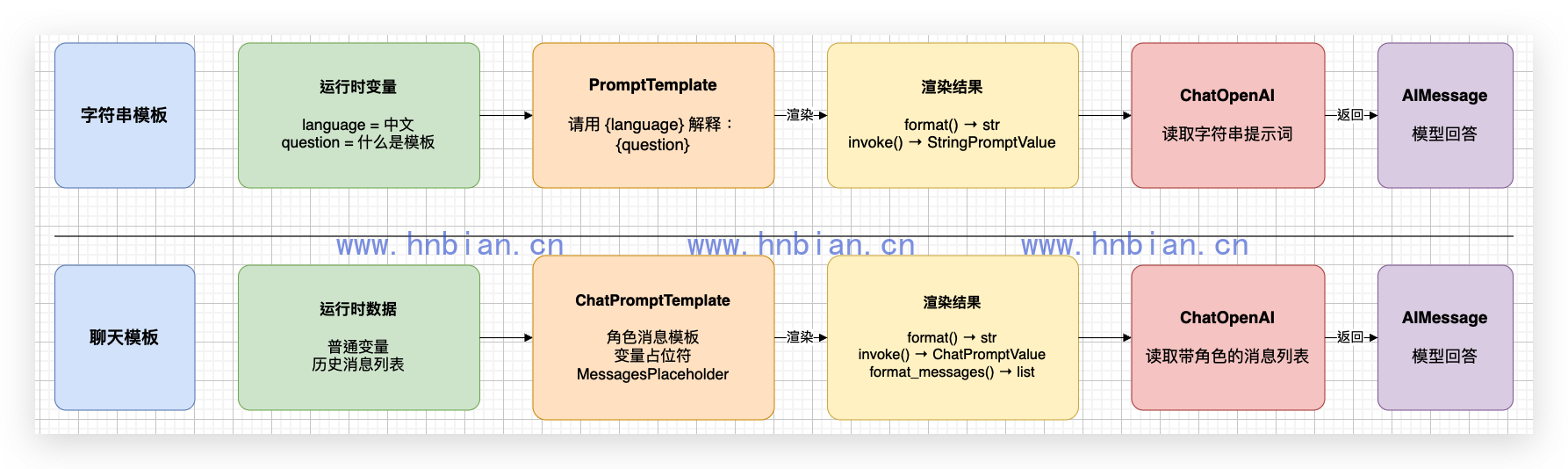
PromptTemplate 最终组织一段字符串;ChatPromptTemplate 会保留消息角色、顺序和历史结构。两者都可以继续连接聊天模型,但模板渲染完成并不等于模型已经生成回答。
1. 为什么不只使用 Python 字符串
1.1 字符串拼接可以使用,但容易失控
最简单的提示词可以用 f-string:
language = "中文"
question = "什么是提示词模板?"
prompt = f"请用{language}解释:{question}"
只有一两个变量时,这样写没有问题。但当提示词中包含角色、输出格式、历史消息和多个示例时,会逐渐出现这些问题:
- 固定文字和变量混在一起,可读性下降。
- 相同结构分散在多个文件中,修改容易遗漏。
- 变量名写错时,很难快速发现。
- system、human、ai 等角色需要手动组织。
- 历史消息和 Few-shot 示例只能继续手动拼接。
1.2 提示词模板分离固定结构和动态变量
模板可以先声明:
请用{language}解释:{question}运行时再传入:
language = 中文
question = 什么是提示词模板?
最终得到:
请用中文解释:什么是提示词模板?模板不会自动提高模型能力,也不能保证模型不产生错误。它的主要价值是让输入结构清楚、可复用、可检查,并且可以继续与 LangChain 模型组件组合。
2. 运行环境与代码目录
代码位于:
/path/to/llm-learning/langchain/p05_prompt_templates当前共有九个示例:
p05_prompt_templates/
├── 01_prompt_template_basic.py
├── 02_prompt_chain_and_composition.py
├── 03_chat_prompt_template_basic.py
├── 04_messages_placeholder.py
├── 05_partial_and_message_templates.py
├── 06_few_shot_prompt_template.py
├── 07_few_shot_chat_prompt_template.py
├── 08_few_shot_chat_with_model.py
└── 09_icl_relationship_reasoning.py
进入项目并激活 Python 3.12 虚拟环境:
cd /path/to/llm-learning
source .venv_langchain/bin/activate
检查版本:
python -c 'import importlib.metadata as m; print(m.version("langchain-core"))'确认命令能够打印版本号后继续。运行脚本时会看到:
PyTorch was not found. Models won't be available and only tokenizers, configuration and file/data utilities can be used.这是 Transformers 检查本地深度学习框架时产生的提示。六个纯模板示例不加载模型;02、08 和 09 通过 HTTP 调用独立的 MLX-LM Server,也不依赖 PyTorch,因此不影响本文结果。
3. PromptTemplate:字符串提示词模板
3.1 创建模板
PromptTemplate 用来生成一段普通字符串提示词。
最推荐的基础写法是:
PromptTemplate.from_template("请用{language}解释:{question}")from_template() 会自动识别 {language} 和 {question},并把它们记录为模板需要的输入变量。
代码文件为 01_prompt_template_basic.py:
# 这个文件演示最基础的 PromptTemplate:查看变量,并比较 format 和 invoke。

from langchain_core.prompts import PromptTemplate


# from_template 会自动识别大括号中的变量名。
prompt = PromptTemplate.from_template("请用{language}解释:{question}")
print("模板需要的变量:", prompt.input_variables)

# format 返回普通字符串,适合先观察最终提示词长什么样。
formatted_prompt = prompt.format(language="中文", question="什么是提示词模板?")
print("format 结果:")
print(formatted_prompt)
print("format 返回类型:", type(formatted_prompt).__name__)

# invoke 返回 StringPromptValue,后续可以直接传给模型。
prompt_value = prompt.invoke({"language": "中文", "question": "什么是变量占位符?"})
print("\ninvoke 结果:")
print(prompt_value)
print("invoke 返回类型:", type(prompt_value).__name__)
运行:
python langchain/p05_prompt_templates/01_prompt_template_basic.py真实输出:
模板需要的变量: ['language', 'question']
format 结果:
请用中文解释:什么是提示词模板?
format 返回类型: str

invoke 结果:
text='请用中文解释:什么是变量占位符?'
invoke 返回类型: StringPromptValue
3.2 format() 与 invoke() 的区别
| 方法 | 参数形式 | 返回类型 | 适合场景 |
|---|---|---|---|
| format() | 关键字参数 | str | 只需要最终字符串 |
| invoke() | 字典 | StringPromptValue | 后续要连接模型或其他 Runnable |
两者渲染出来的提示词内容相同,区别在于返回对象。StringPromptValue 是 LangChain 的提示词值对象,可以直接传给模型组件。
3.3 变量名必须一致
模板中写的是 {question}:
PromptTemplate.from_template("请解释:{question}")调用时必须提供 question:
prompt.invoke({"question": "什么是变量?"})如果误传 topic,LangChain 会报告缺少 question。需要在最终文本中保留普通大括号时,应使用双大括号:
{{question}}4. 模板组合与本地模型调用
4.1 使用加号组合模板片段
PromptTemplate 可以与普通字符串使用 + 连接:
prompt = (
    PromptTemplate.from_template("请写一句关于{topic}的报幕词。")
    + "要求:内容轻松幽默;"
    + "使用{language}输出。"
)
组合后,topic 和 language 都会成为必填变量。
4.2 使用管道符连接模型
代码文件为 02_prompt_chain_and_composition.py:
# 这个文件演示使用加号组合字符串模板,并通过管道符调用本地 Qwen3。
# 运行前需要先启动本地 mlx_lm.server。

import httpx
from langchain_core.prompts import PromptTemplate
from langchain_openai import ChatOpenAI


# 创建最基础的字符串模板,再继续追加两个要求。
prompt = (
    PromptTemplate.from_template("请写一句关于{topic}的报幕词。")
    + "要求:内容轻松幽默;"
    + "使用{language}输出。"
)

print("组合后的完整提示词:")
print(prompt.format(topic="相声", language="中文"))

# 创建本地聊天模型,地址与第二篇文章保持一致。
llm = ChatOpenAI(
    base_url="http://127.0.0.1:18080/v1",
    api_key="not-needed",
    model="Qwen3-14B-AWQ-4bit-MLX",
    temperature=0,
    max_tokens=128,
)

# 管道符表示先渲染提示词,再把结果交给模型。
chain = prompt | llm
response = chain.invoke({"topic": "相声", "language": "中文"})

print("\n本地 Qwen3 回答:")
print(response.content)
运行前先在另一个终端启动模型服务:
"$VIRTUAL_ENV/bin/python" -m mlx_lm server \
  --model Qwen3-14B-AWQ-4bit-MLX \
  --host 127.0.0.1 \
  --port 18080 \
  --chat-template-args '{"enable_thinking": false}'
然后运行:
python langchain/p05_prompt_templates/02_prompt_chain_and_composition.py本次真实输出:
组合后的完整提示词:
请写一句关于相声的报幕词。要求:内容轻松幽默;使用中文输出。

本地 Qwen3 回答:
大家好,这里咱们不聊诗,不聊酒,就聊聊那让人笑出腹肌的相声!
这里的执行顺序是:
输入变量 -> PromptTemplate -> StringPromptValue -> ChatOpenAI -> AIMessageprompt | llm 使用的是 LangChain 的管道组合能力。本文只需要理解“前一个组件的输出交给后一个组件”,LCEL 的更多内容留到后续文章。
5. ChatPromptTemplate:聊天提示词模板
5.1 为什么聊天模型更适合 ChatPromptTemplate
PromptTemplate 生成普通字符串,没有 system、human、ai 的角色结构。
ChatPromptTemplate 生成消息列表,每条内容都有明确角色:
ChatPromptTemplate.from_messages(
    [
        ("system", "你是一个中文老师。"),
        ("human", "{question}"),
    ]
)
对于 Qwen3 这类聊天模型,ChatPromptTemplate 是后续更常用的模板。
5.2 三种调用方式
代码文件为 03_chat_prompt_template_basic.py:
# 这个文件演示 ChatPromptTemplate,并比较 invoke、format、format_messages。

from langchain_core.prompts import ChatPromptTemplate


# 聊天模板由多条消息组成,每条消息都有自己的角色。
prompt = ChatPromptTemplate.from_messages(
    [
        ("system", "你是一个-{role}-,回答要适合-{audience}-阅读。"),
        ("human", "你好,请先介绍一下你自己。"),
        ("ai", "你好,我会用清晰、简洁的方式回答你的问题。"),
        ("human", "-{question}-"),
    ]
)

values = {
    "role": "中文老师",
    "audience": "初学者",
    "question": "请用两句话介绍春天。",
}

# 1. invoke 返回 ChatPromptValue。
prompt_value = prompt.invoke(values)
print("invoke 返回类型1:", type(prompt_value).__name__)
print(prompt_value)

# 2. format 返回带有角色标签的普通字符串。
formatted_text = prompt.format(**values)
print("\nformat 返回类型2:", type(formatted_text).__name__)
print(formatted_text)

# format_messages 返回消息对象列表。
messages = prompt.format_messages(**values)
print("\nformat_messages 返回类型3:", type(messages).__name__)
print("format_messages 结果:")
for message in messages:
    print(type(message).__name__, message.content)
运行:
python langchain/p05_prompt_templates/03_chat_prompt_template_basic.py真实输出:
invoke 返回类型1: ChatPromptValue
messages=[SystemMessage(content='你是一个-中文老师-,回答要适合-初学者-阅读。', additional_kwargs={}, response_metadata={}), HumanMessage(content='你好,请先介绍一下你自己。', additional_kwargs={}, response_metadata={}), AIMessage(content='你好,我会用清晰、简洁的方式回答你的问题。', additional_kwargs={}, response_metadata={}), HumanMessage(content='-请用两句话介绍春天。-', additional_kwargs={}, response_metadata={})]

format 返回类型2: str
System: 你是一个-中文老师-,回答要适合-初学者-阅读。
Human: 你好,请先介绍一下你自己。
AI: 你好,我会用清晰、简洁的方式回答你的问题。
Human: -请用两句话介绍春天。-

format_messages 返回类型3: list
format_messages 结果:
SystemMessage 你是一个-中文老师-,回答要适合-初学者-阅读。
HumanMessage 你好,请先介绍一下你自己。
AIMessage 你好,我会用清晰、简洁的方式回答你的问题。
HumanMessage -请用两句话介绍春天。-
(.venv_langchain) (base) bianhn@BianhnMacBook-Pro langchain %
三种方法的区别:
| 方法 | 返回类型 | 用途 |
|---|---|---|
| invoke() | ChatPromptValue | 直接连接聊天模型或其他 Runnable |
| format() | str | 查看带角色标签的文本表示 |
| format_messages() | list | 直接取得最终消息对象列表 |
5.3 from_messages() 支持哪些输入
from_messages() 支持多种消息表示形式。
| 输入形式 | 示例 | 说明 |
|---|---|---|
| 字符串 | “你好,{name}” | 默认当作 human 消息,不推荐大量使用 |
| 元组 | (“human”, “你好,{name}”) | 角色清楚,最常用 |
| 字典 | {“role”: “human”, “content”: “你好,{name}”} | 接近接口 JSON 格式 |
| 消息对象 | HumanMessage(“你好”) | 已经生成好的固定消息 |
| 消息模板 | HumanMessagePromptTemplate.from_template(…) | 明确创建某一角色模板 |
| 聊天模板 | 嵌套 ChatPromptTemplate | 组合已有聊天模板 |
已实例化的消息对象不是模板。下面的 {name} 不会被替换:
HumanMessage(content="你好,我是{name}")需要变量时,应使用元组、字典或 HumanMessagePromptTemplate。
6. 变量占位符与消息占位符
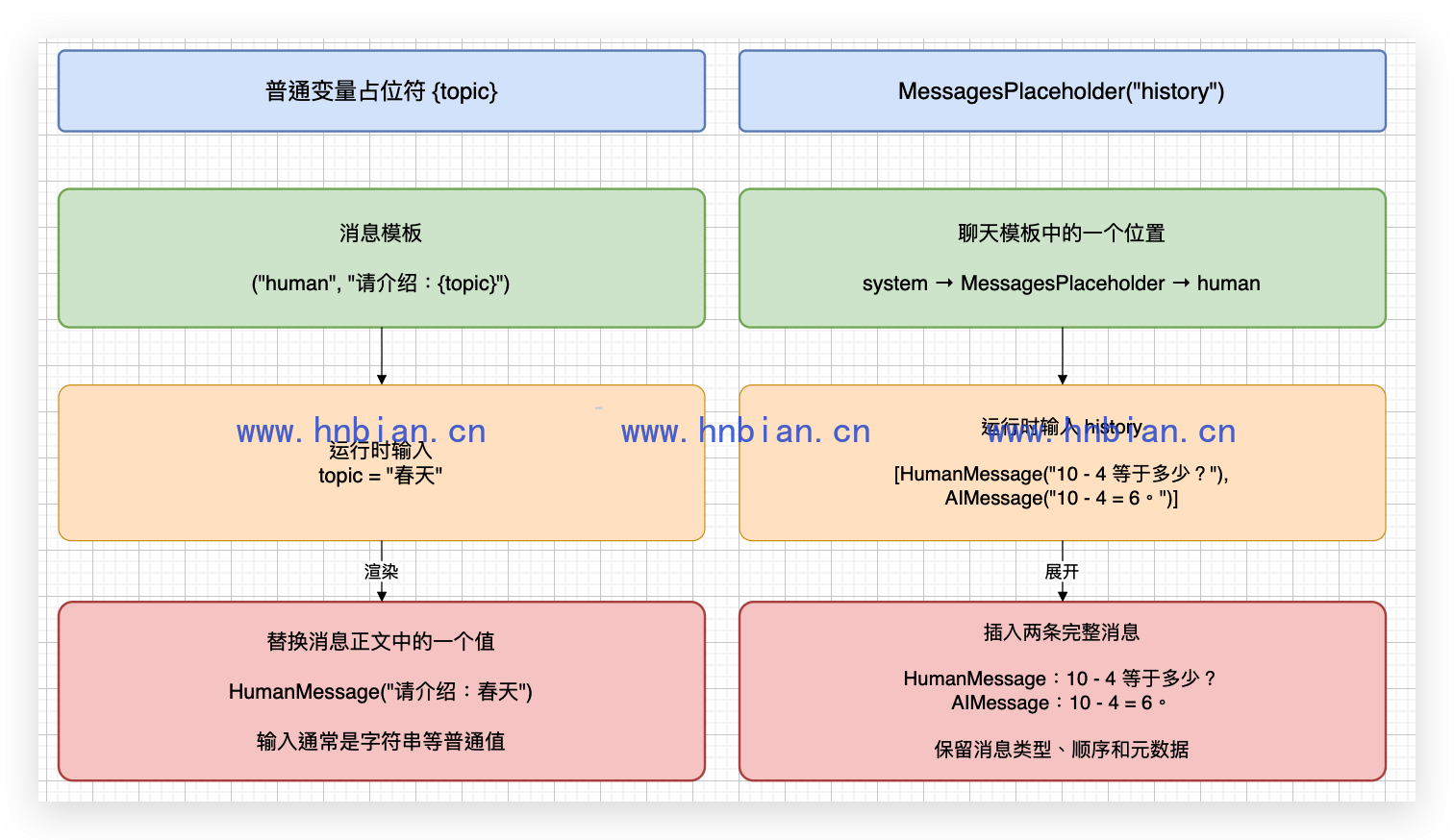
6.1 两种占位符的总体区别
变量占位符和消息占位符都会在模板渲染时接收外部输入,但它们替换的单位不同:
| 类型 | 常见写法 | 传入内容 | 替换单位 |
|---|---|---|---|
| 变量占位符 | {topic} |
一个变量值 | 一条消息中的部分文字 |
| 消息占位符 | MessagesPlaceholder("history") |
消息列表 | 零条、一条或多条完整消息 |
例如,{topic} 只会替换消息正文中的一个片段,原来的消息角色和位置不会改变;MessagesPlaceholder 会在指定位置展开消息列表,每条消息都保留自己的角色、顺序和元数据。
下面分别介绍两种占位符的作用和使用方式。
6.2 变量占位符:替换消息中的动态内容
6.2.1 作用与使用方式
变量占位符就是模板字符串中使用大括号声明的变量,例如 {role}、{topic}。它适合替换一条消息中的角色名称、主题、语言、用户问题等动态内容。
04_messages_placeholder.py 中的示例一专门演示变量占位符。模板始终生成一条 system 消息和一条 human 消息,只是消息正文中的四个变量会在运行时被替换:
from langchain_core.prompts import ChatPromptTemplate

print("示例一:变量占位符替换消息中的动态内容")
variable_prompt = ChatPromptTemplate.from_messages(
    [
        ("system", "你是{role},回答要适合{audience}阅读。"),
        ("human", "请用{language}介绍{topic},并给出一个使用场景。"),
    ]
)

variable_messages = variable_prompt.format_messages(
    role="LangChain 讲师",
    audience="初学者",
    language="中文",
    topic="变量占位符",
)

print("input_variables =", variable_prompt.input_variables)
for message in variable_messages:
    print(type(message).__name__, message.content)
真实输出:
示例一:变量占位符替换消息中的动态内容
input_variables = ['audience', 'language', 'role', 'topic']
SystemMessage 你是LangChain 讲师,回答要适合初学者阅读。
HumanMessage 请用中文介绍变量占位符,并给出一个使用场景。
6.2.2 代码说明
ChatPromptTemplate 会自动识别四组大括号,并把 audience、language、role、topic 记录到 input_variables。调用 format_messages() 时必须提供这些变量,LangChain 才能生成最终消息。
变量占位符有以下特点:
- 替换的是消息正文中的文字,不会增加或删除消息。
- 变量所在消息的角色不会改变,例如 human 模板渲染后仍然是
HumanMessage。 - 同一个变量可以在模板中出现多次,调用时只需要传入一次。
- 缺少必填变量会触发
KeyError。 - 如果需要在最终文本中显示普通大括号,应写成
{{topic}}。
这里的占位符属于消息模板的一部分,并不是一个需要单独实例化的类。还要注意,已经创建好的 HumanMessage(content="你好,{name}") 是普通消息对象,其中的 {name} 不会再被替换。
6.3 消息占位符:插入完整消息列表
6.3.1 作用与使用方式
消息占位符用于在聊天模板中预留一个消息列表的位置,最常见的用途是插入历史对话、Few-shot 消息或外部生成的多条消息。
显式写法是:
MessagesPlaceholder(variable_name="history")history 不能直接传入一段普通字符串,而应该传入消息列表。示例二同时验证两种情况:不传必填的 history 时捕获错误;传入一轮历史问答后,将其插入 system 消息和当前问题之间。
from langchain_core.messages import AIMessage, HumanMessage
from langchain_core.prompts import ChatPromptTemplate, MessagesPlaceholder

print("示例二:显式消息占位符默认必填")
required_prompt = ChatPromptTemplate.from_messages(
    [
        ("system", "你是一个友好的数学老师。"),
        MessagesPlaceholder(variable_name="history"),
        ("human", "{question}"),
    ]
)

# 显式 MessagesPlaceholder 默认必填,缺少 history 会触发 KeyError。
try:
    required_prompt.format_messages(
        question="刚才的结果再加 8 等于多少?"
    )
except KeyError as error:
    print("不传 history:", type(error).__name__, str(error).splitlines()[0])

# 传入两条历史消息后,它们会在当前位置展开并保留各自的角色。
required_messages = required_prompt.format_messages(
    history=[
        HumanMessage("10 - 4 等于多少?"),
        AIMessage("10 - 4 = 6。"),
    ],
    question="刚才的结果再加 8 等于多少?",
)

print("传入 history:")
for message in required_messages:
    print(type(message).__name__, message.content)
真实输出:
示例二:显式消息占位符默认必填
不传 history: KeyError 'history'
传入 history:
SystemMessage 你是一个友好的数学老师。
HumanMessage 10 - 4 等于多少?
AIMessage 10 - 4 = 6。
HumanMessage 刚才的结果再加 8 等于多少?
6.3.2 代码说明
不传 history 的第一次调用说明显式消息占位符默认必填。第二次调用提供了两条历史消息,MessagesPlaceholder 没有把它们转换成一段拼接文本,而是在模板中展开了两条独立消息。最终顺序是:
- 模板中固定的 system 消息。
history中的 HumanMessage。history中的 AIMessage。- 模板中表示当前问题的 human 消息。
因此,历史消息原有的角色和对话顺序都得以保留。history 也可以包含更多消息;传入多少条,模板就在这个位置展开多少条。
6.4 消息占位符的必填与可选写法
消息占位符既有元组简写,也可以显式创建 MessagesPlaceholder。示例二已经验证显式写法默认必填,下面继续用两个完整示例验证两种可选写法。
6.4.1 示例三:元组简写默认可选
使用 ("placeholder", "{history}") 简写时,history 会自动进入 optional_variables。不传历史消息也可以正常渲染,消息占位符会展开为空列表:
from langchain_core.prompts import ChatPromptTemplate

print("示例三:简写消息占位符默认可选")
shorthand_prompt = ChatPromptTemplate.from_messages(
    [
        ("system", "你是一个友好的数学老师。"),
        ("placeholder", "{history}"),
        ("human", "{question}"),
    ]
)

# 没有历史消息时可以不传 history,模板会把它当作空列表。
shorthand_messages = shorthand_prompt.format_messages(
    question="第一次提问:12 除以 3 等于多少?"
)

print("input_variables =", shorthand_prompt.input_variables)
print("optional_variables =", shorthand_prompt.optional_variables)
for message in shorthand_messages:
    print(type(message).__name__, message.content)
真实输出:
示例三:简写消息占位符默认可选
input_variables = ['question']
optional_variables = ['history']
SystemMessage 你是一个友好的数学老师。
HumanMessage 第一次提问:12 除以 3 等于多少?
输出中没有历史 HumanMessage 或 AIMessage,说明缺少 history 时,这个位置确实被当作空消息列表处理;模板中固定的 system 消息和当前问题仍然正常生成。
6.4.2 示例四:显式设置 optional=True
如果希望保留 MessagesPlaceholder 的显式写法,同时允许没有历史消息,需要设置 optional=True:
from langchain_core.prompts import ChatPromptTemplate, MessagesPlaceholder

print("示例四:显式消息占位符设置为可选")
optional_prompt = ChatPromptTemplate.from_messages(
    [
        ("system", "你是一个友好的数学老师。"),
        MessagesPlaceholder(variable_name="history", optional=True),
        ("human", "{question}"),
    ]
)

# optional=True 后,即使不传 history 也能正常渲染模板。
optional_messages = optional_prompt.format_messages(
    question="没有历史对话时,5 + 6 等于多少?"
)

print("input_variables =", optional_prompt.input_variables)
print("optional_variables =", optional_prompt.optional_variables)
for message in optional_messages:
    print(type(message).__name__, message.content)
真实输出:
示例四:显式消息占位符设置为可选
input_variables = ['question']
optional_variables = ['history']
SystemMessage 你是一个友好的数学老师。
HumanMessage 没有历史对话时,5 + 6 等于多少?
optional=True 的效果与元组简写相同:history 不再是必填变量,没有历史对话时按空列表处理。三种消息占位符写法可以归纳为:
| 写法 | 默认是否必填 |
|---|---|
("placeholder", "{history}") |
否,缺少时使用空列表 |
MessagesPlaceholder("history") |
是,缺少时触发 KeyError |
MessagesPlaceholder("history", optional=True) |
否,缺少时使用空列表 |
至此,本章已经展示四个可独立运行的示例:
- 变量占位符替换四个动态值。
- 显式必填消息占位符分别验证缺少和传入
history。 - 元组简写消息占位符在没有历史消息时正常渲染。
- 显式可选消息占位符在没有历史消息时正常渲染。
四个示例的完整代码都位于 04_messages_placeholder.py,运行方式:
python langchain/p05_prompt_templates/04_messages_placeholder.py7. 消息模板与 partial()
7.1 三类消息模板
LangChain 为常见角色提供了对应模板类:
| 模板类 | 生成的消息 |
|---|---|
| SystemMessagePromptTemplate | SystemMessage |
| HumanMessagePromptTemplate | HumanMessage |
| AIMessagePromptTemplate | AIMessage |
7.2 使用 partial() 预填变量
partial() 用来提前固定一部分变量,返回一个新的模板。后续调用只需要提供剩余变量。
代码文件为 05_partial_and_message_templates.py:
# 这个文件演示 partial 和消息模板:预先固定一部分变量,调用时只传剩余变量。
from langchain_core.prompts import (
    AIMessagePromptTemplate,
    ChatPromptTemplate,
    HumanMessagePromptTemplate,
    SystemMessagePromptTemplate,
)

# 分别创建 system、human、ai 三类消息模板。
system_template = SystemMessagePromptTemplate.from_template("你是{role},回答要适合{audience}阅读。")
greeting_template = HumanMessagePromptTemplate.from_template("你好,请介绍一下你自己。")
ai_template = AIMessagePromptTemplate.from_template("你好,我会用简单、清楚的方式回答问题。")
question_template = HumanMessagePromptTemplate.from_template("请回答:{question}")

prompt = ChatPromptTemplate.from_messages(
    [
        system_template,
        greeting_template,
        ai_template,
        question_template,
    ]
)

# partial 会预填固定变量,后面就不用每次重复传。
beginner_prompt = prompt.partial(role="生活常识老师", audience="初学者")

result = beginner_prompt.invoke({"question": "为什么天空看起来是蓝色的?"})
print("partial 后的聊天提示词:")
print(result)
print("剩余必填变量:", beginner_prompt.input_variables)
运行:
python langchain/p05_prompt_templates/05_partial_and_message_templates.py真实输出:
partial 后的聊天提示词:
messages=[
SystemMessage(content='你是生活常识老师,回答要适合初学者阅读。', additional_kwargs={}, response_metadata={}),    HumanMessage(content='你好,请介绍一下你自己。', additional_kwargs={}, response_metadata={}), AIMessage(content='你好,我会用简单、清楚的方式回答问题。', additional_kwargs={}, response_metadata={}), HumanMessage(content='请回答:为什么天空看起来是蓝色的?', additional_kwargs={}, response_metadata={})
]
剩余必填变量: ['question']
role 和 audience 已经由 partial() 固定,所以模板只剩下 question 需要在运行时传入。
8. ICL:在上下文中提供示例
8.1 ICL 不会修改模型参数
ICL 全称是 In-Context Learning,可以理解为“在当前上下文中学习”。
它的基本做法是:
- 在提示词中放入少量输入和答案示例。
- 再放入一个新的问题。
- 让模型根据示例中的格式或规律回答新问题。
ICL 不是训练,也不是微调。模型权重没有变化,示例只存在于当前输入中。下一次调用如果不再提供这些示例,模型也不会自动记住它们。
Few-shot 模板只是把示例按照指定格式渲染,再和说明、当前问题一起放入本次请求:
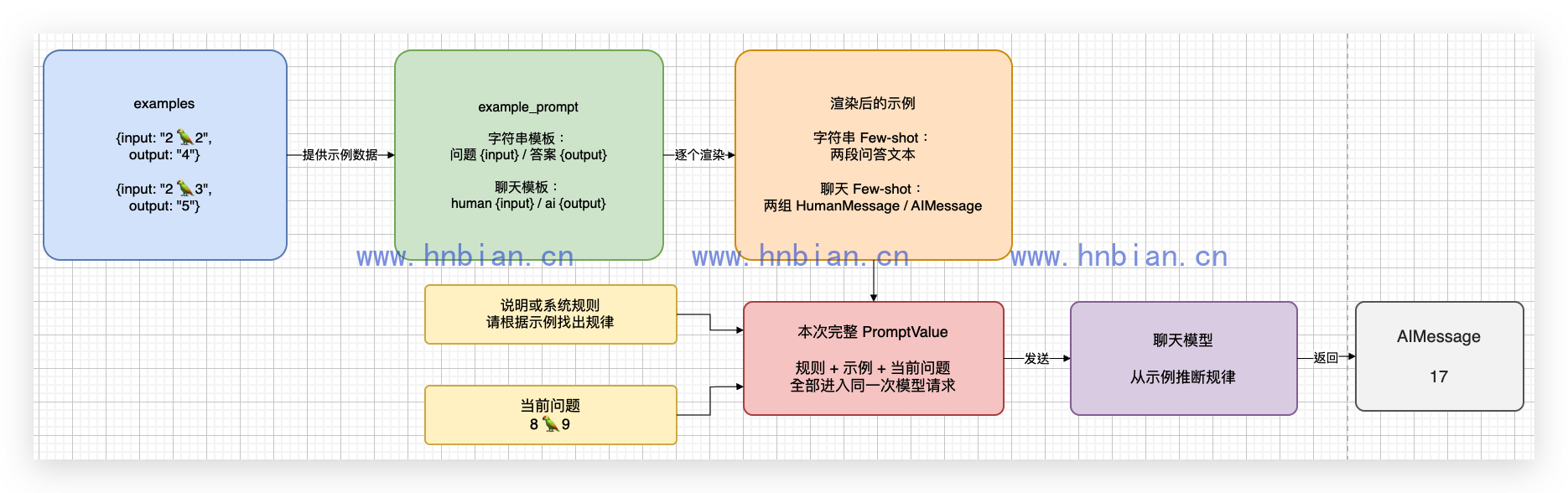
字符串 Few-shot 会把示例渲染成问答文本,聊天 Few-shot 会渲染成 human/ai 消息对。两种方式都只改变当前请求的上下文,不会修改模型参数。
8.2 FewShotPromptTemplate 的组成
字符串 Few-shot 模板常见组成:
| 参数 | 作用 |
|---|---|
| examples | 保存多个示例字典 |
| example_prompt | 决定单个示例怎样渲染 |
| prefix | 放在所有示例之前的说明 |
| suffix | 放在示例之后的最终问题 |
| input_variables | 运行时需要提供的变量 |
| example_separator | 示例之间的分隔符 |
代码文件为 06_few_shot_prompt_template.py:
# 这个文件演示 FewShotPromptTemplate:把少量示例拼进字符串提示词中,让模型按示例回答。
from langchain_core.prompts import FewShotPromptTemplate, PromptTemplate

# examples 是示例列表,每个示例的 key 要和 example_prompt 中的变量名一致。
examples = [
    {"question": "苹果 -> 红色,香蕉 -> ?", "answer": "黄色"},
    {"question": "天空 -> 蓝色,草地 -> ?", "answer": "绿色"},
]

# 单个示例怎么展示,由 example_prompt 决定。
base_template = PromptTemplate.from_template("问题:{question}\n答案:{answer}")

# FewShotPromptTemplate 会把多个示例和最终问题拼成完整提示词。
final_template = FewShotPromptTemplate(
    examples=examples,
    example_prompt=base_template,
    prefix="请根据下面的示例回答颜色:",
    suffix="问题:{input}\n答案:",
    input_variables=["input"],
)

result = final_template.format(input="牛奶 -> 白色,煤炭 -> ?")

print("FewShotPromptTemplate 结果:")
print(result)
运行:
python langchain/p05_prompt_templates/06_few_shot_prompt_template.py真实输出:
FewShotPromptTemplate 结果:
请根据下面的示例回答颜色:

问题:苹果 -> 红色,香蕉 -> ?
答案:黄色

问题:天空 -> 蓝色,草地 -> ?
答案:绿色

问题:牛奶 -> 白色,煤炭 -> ?
答案:
示例字典中的 question、answer 必须与 base_template 中的变量名一致。最终用户输入使用 input,因此调用时传入 input,而不是 question。
9. 聊天提示词模板中的 ICL
字符串 Few-shot 最终得到一段文本。聊天 Few-shot 则把每个示例组织成 human/ai 消息对。
下面使用一个鹦鹉符号表示未知运算,并提供两个示例:
2 🦜 2 -> 4
2 🦜 3 -> 5
它们共同说明鹦鹉符号代表加法。
代码文件为 07_few_shot_chat_prompt_template.py:
# 这个文件演示 FewShotChatMessagePromptTemplate:渲染聊天 ICL 的完整消息列表。

from langchain_core.messages import HumanMessage
from langchain_core.prompts import (
    ChatPromptTemplate,
    FewShotChatMessagePromptTemplate,
    MessagesPlaceholder,
)

# 每个示例都包含一个用户问题和一个助手回答。
examples = [
    {"input": "2 🦜 2", "output": "4"},
    {"input": "2 🦜 3", "output": "5"},
]

# 单个聊天示例由一组 human/ai 消息组成。
example_prompt = ChatPromptTemplate.from_messages(
    [
        ("human", "{input}"),
        ("ai", "{output}"),
    ]
)

# FewShotChatMessagePromptTemplate 会把多个聊天示例插入到主聊天模板中。
few_shot_prompt = FewShotChatMessagePromptTemplate(
    examples=examples,
    example_prompt=example_prompt,
)

final_prompt = ChatPromptTemplate.from_messages(
    [
        ("system", "请根据示例找出符号规律,只回答结果。"),
        few_shot_prompt,
        MessagesPlaceholder(variable_name="question"),
    ]
)

result = final_prompt.invoke({"question": [HumanMessage("8 🦜 9")]})
print("FewShotChatMessagePromptTemplate 结果:")
print(result)
运行:
python langchain/p05_prompt_templates/07_few_shot_chat_prompt_template.py真实输出:
FewShotChatMessagePromptTemplate 结果:
messages=[
SystemMessage(content='请根据示例找出符号规律,只回答结果。', additional_kwargs={}, response_metadata={}), HumanMessage(content='2 🦜 2', additional_kwargs={}, response_metadata={}),
AIMessage(content='4', additional_kwargs={}, response_metadata={}),
HumanMessage(content='2 🦜 3', additional_kwargs={}, response_metadata={}),
AIMessage(content='5', additional_kwargs={}, response_metadata={}),
HumanMessage(content='8 🦜 9', additional_kwargs={}, response_metadata={})
]
最终消息顺序是:
- 系统规则。
- 第一组 human/ai 示例。
- 第二组 human/ai 示例。
- 用户真正的问题。
这里仍然只是渲染模板,还没有证明模型真的按照示例得到了 17。
10. ICL 案例 1
代码文件为 08_few_shot_chat_with_model.py。它和上一个脚本使用相同模板,只增加本地模型并执行链。
# 这个文件把聊天 ICL 模板真正交给本地 Qwen3,验证模型能否学会示例规律。
# 运行前需要先启动本地 mlx_lm.server。

import httpx
from langchain_core.messages import HumanMessage
from langchain_core.prompts import (
    ChatPromptTemplate,
    FewShotChatMessagePromptTemplate,
    MessagesPlaceholder,
)
from langchain_openai import ChatOpenAI

llm = ChatOpenAI(
    base_url="http://127.0.0.1:18080/v1",
    api_key="not-needed",
    model="Qwen3-14B-AWQ-4bit-MLX",
    temperature=0,
    max_tokens=32,
)

# 两个示例共同说明鹦鹉符号代表加法。
examples = [
    {"input": "2 🦜 2", "output": "4"},
    {"input": "2 🦜 3", "output": "5"},
]

example_prompt = ChatPromptTemplate.from_messages(
    [
        ("human", "{input}"),
        ("ai", "{output}"),
    ]
)

few_shot_prompt = FewShotChatMessagePromptTemplate(
    examples=examples,
    example_prompt=example_prompt,
)

final_prompt = ChatPromptTemplate.from_messages(
    [
        ("system", "请根据示例找出符号规律,只回答结果。"),
        few_shot_prompt,
        MessagesPlaceholder(variable_name="question"),
    ]
)

prompt_result = final_prompt.invoke({"question": [HumanMessage("8 🦜 9")]})
print("prompt_result:"+str(prompt_result))

# 先渲染提示词,再把完整消息列表交给本地模型。
chain = final_prompt | llm
response = chain.invoke(prompt_result.to_messages())

print("返回消息类型:", type(response).__name__)
print("本地 Qwen3 回答:", response.content)
运行:
python langchain/p05_prompt_templates/08_few_shot_chat_with_model.py本次真实输出:
prompt_result:messages=[
SystemMessage(content='请根据示例找出符号规律,只回答结果。', additional_kwargs={}, response_metadata={}), HumanMessage(content='2 🦜 2', additional_kwargs={}, response_metadata={}),
AIMessage(content='4', additional_kwargs={}, response_metadata={}),
HumanMessage(content='2 🦜 3', additional_kwargs={}, response_metadata={}),
AIMessage(content='5', additional_kwargs={}, response_metadata={}),
HumanMessage(content='8 🦜 9', additional_kwargs={}, response_metadata={})]

返回消息类型: AIMessage
本地 Qwen3 回答: 17
这次结果可以确认三件事:
- Few-shot 示例被正确插入消息列表。
- 完整聊天模板能够通过管道交给本地 Qwen3。
- 模型根据示例把鹦鹉符号理解为加法,得到 8 + 9 = 17。
这仍然不是训练。把示例从下一次请求中移除后,模型不一定继续使用相同符号规则。
11. ICL 案例 2
前两个 ICL 示例分别演示了字符串和聊天消息的组装,但它们的任务都比较简单。下面补充一个更接近实际需求的案例:向模型提供三组“分解问题、中间答案、最终答案”,再询问“巴伦·特朗普的父亲是谁?”。
希望模型学习的是回答结构,而不是只生硬地返回一个名字:
人物关系问题
-> 找到中间人物
-> 核对中间人物与目标人物的关系
-> 给出最终答案
需要注意,ICL 只能示范回答方式,不能保证模型记忆中的人物事实一定准确。本次实测中,如果只提供问题,模型曾把巴伦的母亲错误回答成“劳伦·特朗普”。因此代码把两类上下文分开处理:
examples用来示范如何分解问题和组织答案。facts为本次问题提供可核对的事实依据。
字幕演示中的现场回答还把巴伦的母亲口误为伊万卡。正确人物关系是:巴伦·特朗普的母亲是梅拉尼娅·特朗普,父亲是唐纳德·特朗普。代码文件为 09_icl_relationship_reasoning.py:
# 这个文件演示人物关系 ICL:让模型模仿示例,分解问题并给出中间答案和最终结论。
# 运行前需要先启动本地 mlx_lm.server。

import httpx
from langchain_core.prompts import FewShotPromptTemplate, PromptTemplate
from langchain_openai import ChatOpenAI

# 三个示例使用相同的结构展示“分解问题 -> 中间答案 -> 最终答案”。
examples = [
    {
        "question": "穆罕默德·阿里和艾伦·图灵谁更长寿?",
        "answer": """是否需要分解问题:是
分解问题 1:穆罕默德·阿里去世时多少岁?
中间答案 1:74 岁。
分解问题 2:艾伦·图灵去世时多少岁?
中间答案 2:41 岁。
最终答案:穆罕默德·阿里更长寿。""",
    },
    {
        "question": "乔治·华盛顿的外祖父是谁?",
        "answer": """是否需要分解问题:是
分解问题 1:乔治·华盛顿的母亲是谁?
中间答案 1:玛丽·鲍尔·华盛顿。
分解问题 2:玛丽·鲍尔·华盛顿的父亲是谁?
中间答案 2:约瑟夫·鲍尔。
最终答案:乔治·华盛顿的外祖父是约瑟夫·鲍尔。""",
    },
    {
        "question": "《大白鲨》和《007:大战皇家赌场》的导演来自同一个国家吗?",
        "answer": """是否需要分解问题:是
分解问题 1:《大白鲨》的导演是谁,来自哪个国家?
中间答案 1:史蒂文·斯皮尔伯格,来自美国。
分解问题 2:《007:大战皇家赌场》的导演是谁,来自哪个国家?
中间答案 2:马丁·坎贝尔,来自新西兰。
最终答案:不是,两位导演来自不同国家。""",
    },
]

# example_prompt 决定每个示例怎样渲染。
example_prompt = PromptTemplate.from_template("问题:{question}\n答案:{answer}")

# FewShotPromptTemplate 会依次拼接任务说明、三个示例和用户的新问题。
final_prompt = FewShotPromptTemplate(
    examples=examples,
    example_prompt=example_prompt,
    prefix=(
        "请严格模仿下面的示例回答问题:无论问题是否看似简单,"
        "都要先分解出至少两个可核对的子问题,"
        "逐项给出简短的中间答案,最后给出结论。"
        "不要虚构事实;信息不足时请明确说明。"
    ),
    suffix=(
        "问题:{input}\n"
        "请完整填写以下所有字段,不得省略:\n"
        "是否需要分解问题:\n"
        "分解问题 1:\n"
        "中间答案 1:\n"
        "分解问题 2:\n"
        "中间答案 2:\n"
        "最终答案:"
    ),
    input_variables=["input"],
    example_separator="\n\n",
)

values = {
    "input": "唐朝与宋朝哪个朝代持续时间更长?",
}
formatted_prompt = final_prompt.format(**values)
print("发送给模型的完整提示词:")
print(formatted_prompt)

llm = ChatOpenAI(
    base_url="http://127.0.0.1:18080/v1",
    api_key="not-needed",
    model="Qwen3-14B-AWQ-4bit-MLX",
    temperature=0,
    max_tokens=512,
)

# system 消息约束输出完整性,human 消息承载渲染后的 Few-shot 上下文。
response = llm.invoke(
    [
        (
            "system",
            "你必须执行问题分解任务,不要判断问题是否过于简单。"
            "“是否需要分解问题”必须回答“是”,两个分解问题及其中间答案都必须填写。",
        ),
        ("human", formatted_prompt),
    ]
)

print("\n本地 Qwen3 回答:")
print(response.content)
运行:
python langchain/p05_prompt_templates/09_icl_relationship_reasoning.py本次真实回答:
本地 Qwen3 回答:
是否需要分解问题:是
分解问题 1:巴伦·特朗普的母亲是谁?
中间答案 1:梅拉尼娅·特朗普。
分解问题 2:梅拉尼娅·特朗普的丈夫是谁?
中间答案 2:唐纳德·特朗普。
最终答案:巴伦·特朗普的父亲是唐纳德·特朗普。
三个 Few-shot 示例让模型学习统一的字段、顺序和分解方式;facts 则让当前回答有明确依据。两者解决的是不同问题:前者约束“怎样回答”,后者补充“根据什么事实回答”。
12. 模板语法
12.1 三种模板语法
PromptTemplate 和 ChatPromptTemplate 支持通过 template_format 选择模板语法。
| 格式 | 变量示例 | 建议 |
|---|---|---|
| f-string | {question} | 默认格式,本文全部使用 |
| mustache | 适合已有 Mustache 模板的场景 | |
| jinja2 | 功能更丰富,但不要使用不可信模板 |
官方 PromptTemplate 参考明确建议优先使用默认 f-string,不要接受来自不可信来源的 Jinja2 模板。本文没有使用 Mustache 或 Jinja2,以免在基础阶段混淆占位符语法。
12.2 模板类
以下列表来自本机 langchain_core.prompts 实际导出结果,共 14 个模板或占位符相关类。
本文重点使用
| 类 | 作用 |
|---|---|
| PromptTemplate | 生成字符串提示词 |
| ChatPromptTemplate | 生成聊天消息列表 |
| MessagesPlaceholder | 插入一组完整消息 |
| FewShotPromptTemplate | 生成字符串 Few-shot 提示词 |
| FewShotChatMessagePromptTemplate | 生成聊天消息 Few-shot 示例 |
| SystemMessagePromptTemplate | 生成系统消息 |
| HumanMessagePromptTemplate | 生成用户消息 |
| AIMessagePromptTemplate | 生成 AI 消息 |
其他具体模板
| 类 | 作用 | 本文处理方式 |
|---|---|---|
| ChatMessagePromptTemplate | 生成自定义 role 的 ChatMessage | 了解用途 |
| DictPromptTemplate | 递归渲染字典值中的变量 | 不展开代码 |
| FewShotPromptWithTemplates | prefix、suffix 也使用模板对象的 Few-shot 模板 | 不展开代码 |
抽象基础类
| 类 | 作用 |
|---|---|
| BasePromptTemplate | 所有提示词模板的基础抽象 |
| BaseChatPromptTemplate | 聊天提示词模板基础抽象 |
| StringPromptTemplate | 返回字符串的模板基础类 |
初学时不需要直接实例化抽象类,也不需要为了“全部学完”给每个类写一段代码。先掌握本文八个核心类,就已经覆盖提示词模板的主线用法。
13. 常见错误与使用边界
13.1 变量名和传参名不一致
模板使用 {question},调用时却传 input,会产生缺少变量错误。示例字典的 key 也必须和 example_prompt 中的变量一致。
13.2 把普通字符串传给 MessagesPlaceholder
MessagesPlaceholder 需要消息列表,例如:
{"history": [HumanMessage("你好"), AIMessage("你好,有什么可以帮你?")]}它不是普通字符串占位符。
13.3 在已实例化的消息对象中写变量
下面的 {name} 只是普通文字,不会被替换:
HumanMessage(content="你好,我是{name}")需要使用:
HumanMessagePromptTemplate.from_template("你好,我是{name}")13.4 把模板渲染成功当成模型回答成功
prompt.invoke() 只负责生成 PromptValue,不会自动调用模型。必须继续执行:
chain = prompt | llm
response = chain.invoke(values)
本文分别保留渲染脚本和真实模型脚本,就是为了区分这两个阶段。
13.5 示例越多不代表效果一定越好
Few-shot 示例也会占用上下文 Token。示例应尽量清楚、与目标任务相关,并保持输入输出格式一致。大量无关或互相矛盾的示例反而会干扰模型。
13.6 ICL 不是训练和长期记忆
ICL 只在当前请求上下文中生效。它不会修改模型权重,也不会让模型永久记住符号规则。
13.7 不要过早建立复杂模板库
当项目中的模板数量持续增加时,可以建立专门的模板模块集中管理。但本文只有九个示例脚本,直接写在对应文件中更容易理解,因此不创建公共模板类或 common.py。
14. 小结
提示词模板的核心不是少写几个字符串,而是把固定结构、动态变量、消息历史和 Few-shot 示例组织成可复用对象。
PromptTemplate 适合普通字符串,ChatPromptTemplate 适合现代聊天模型;MessagesPlaceholder 插入完整消息列表,partial() 固定部分变量;两类 Few-shot 模板分别处理字符串示例和聊天消息示例。
本文不仅打印了模板结构,还真实验证了模板组合和两类 ICL:本地 Qwen3 成功生成相声报幕词,根据鹦鹉符号示例返回 17,并在人物关系案例中按照固定结构分解问题后得出巴伦·特朗普的父亲是唐纳德·特朗普。