上一篇比较了 FAISS、Chroma 和 Milvus。这一篇先使用最轻量的 FAISS,不启动数据库服务,并通过 LangChain 的 FAISS 封装管理向量、原文和元数据。
我们会让本地 Qwen3-Embedding-0.6B 生成 1024 维向量,使用 IndexFlatL2 完成 Top-K 检索,再把索引与文档数据写入磁盘。保存和加载会放在两个独立脚本中,模拟程序结束后重新读取数据并检索。随后继续演示 metadata 过滤、新增、修改和删除,最后用手工二维向量对比 L2 距离与余弦相似度,避免把两种分数方向混淆。
1. 整体流程
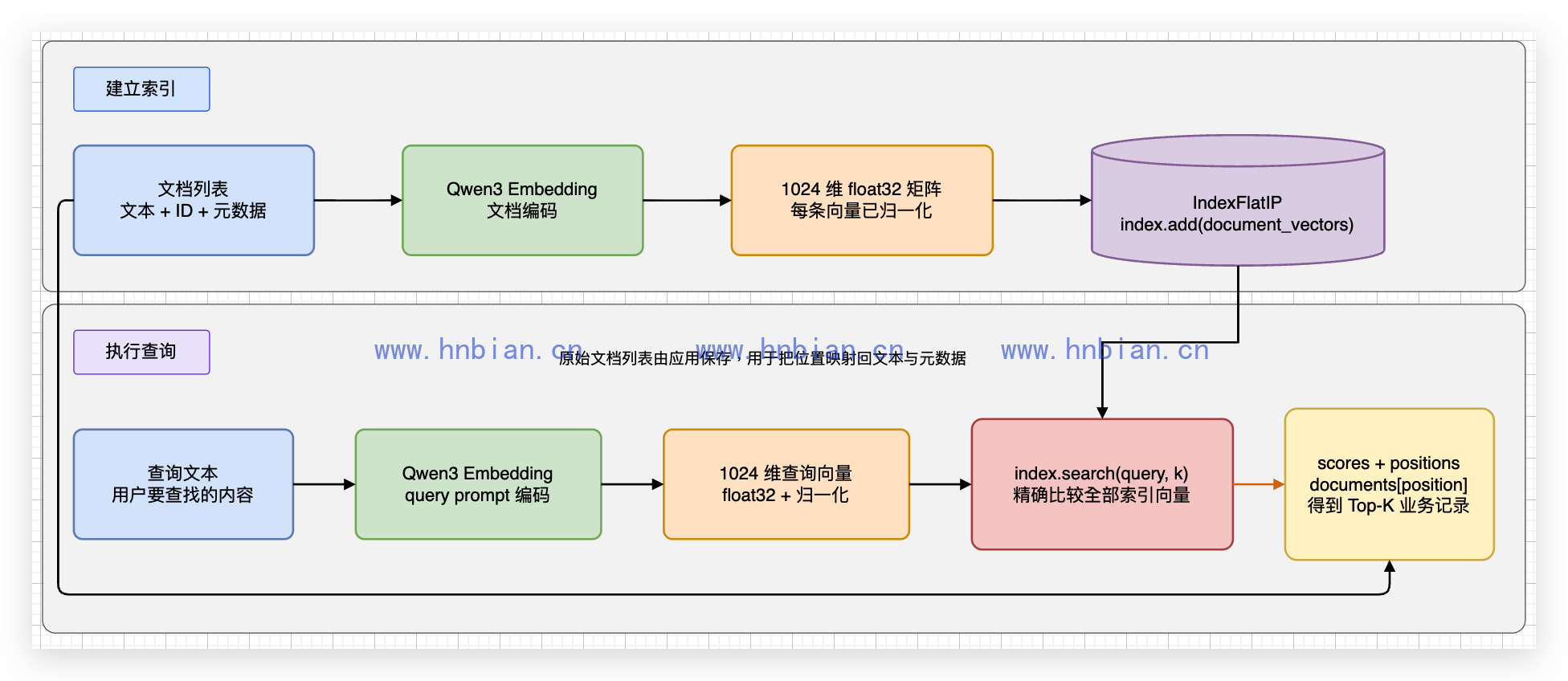
这张图需要分成两条路径理解:
- 建立索引时,文档先生成归一化向量,再通过 LangChain 封装写入底层 IndexFlatL2。
- 执行查询时,查询文本单独生成查询向量,再通过 index.search() 与索引中的文档向量比较。查询向量不会写入索引。
IndexFlatL2 会逐个比较索引中的全部向量,因此这里完成的是精确检索,不是近似最近邻检索。底层搜索结果包含距离和位置编号,LangChain 再通过位置映射从 Docstore 中取回文本与元数据。
FAISS 原生索引只保存向量及其位置编号。LangChain 的 FAISS 封装另外管理 Document 和“索引位置到文档 ID”的映射,调用 save_local() 后会保存两个文件:
life_notes/index.faiss  -> FAISS 向量索引
life_notes/index.pkl    -> Docstore 和位置映射
两个文件是同一次保存产生的配套数据,必须一起保留。只有 index.faiss 无法恢复原文和元数据,只有 index.pkl 也无法进行向量检索。
2. 为什么单独创建 Conda 环境
本机是 Apple Silicon,安装的是 CPU 版 FAISS。FAISS 官方安装说明推荐使用 Conda 包,GPU 包面向 CUDA 环境,不适用于 M1 Max 的 Metal GPU。
本项目把 FAISS 放到独立的 .conda_faiss,不与 Chroma 和 PyMilvus 混装。这样可以避开 macOS 上多个 OpenMP 运行库同时加载时出现的错误:
OMP: Error #15: Initializing libomp.dylib,
but found libomp.dylib already initialized.
不要用 KMP_DUPLICATE_LIB_OK=TRUE 掩盖这个错误。环境隔离更容易保证结果稳定。
environment.yml 内容如下:
name: llm_learning_faiss
channels:
  - pytorch
  - conda-forge
dependencies:
  - python=3.12
  - faiss-cpu=1.13.2
  - pip
  - pip:
      - numpy==2.2.6
      - sentence-transformers==5.1.2
      - transformers==4.57.6
进入项目目录并创建环境:
cd source/_posts/llm_learning

conda env create \
  --prefix .conda_faiss \
  --file rag/p05_faiss_native/environment.yml

conda activate "$(pwd)/.conda_faiss"
python -m pip check
3. 创建 FAISS 索引并检索
3.1 代码示例
代码文件为 01_create_and_search_index.py:
# 这个文件使用 LangChain 的 FAISS 封装完成 Top-K 语义检索。
#
# 向量数据 ≠ 关系型数据库:
#   - FAISS 索引里只有浮点向量 + 整数位置(0, 1, 2, ...)
#   - 看不到原文、id、category 等字段
#   - LangChain 用 InMemoryDocstore 存原文,用 index_to_docstore_id 把「位置 → 文档 ID」对上号
#
# 依赖:conda 环境见 environment.yml(faiss-cpu + langchain-community 等)
#
# 初始化方式(四步):
#   1. 创建 HuggingFaceEmbeddings(负责把文本转向量)
#   2. 创建空 FAISS 索引 IndexFlatL2(L2 欧氏距离,越小越相似)
#   3. FAISS(...) 包装:索引 + docstore + 映射表
#   4. add_documents 写入;similarity_search_with_score 检索

from pathlib import Path

import faiss
import torch
from langchain_community.docstore.in_memory import InMemoryDocstore
from langchain_community.vectorstores import FAISS
from langchain_core.documents import Document
from langchain_huggingface import HuggingFaceEmbeddings

MODEL_PATH = Path("/Users/bianhn/git/llm/qwen3-embedding/model")

# 示例知识库:dict 只是方便阅读;写入 FAISS 时会转成 LangChain Document。
documents = [
    {"id": "doc-1", "text": "西湖边有步道和树荫,很适合周末散步。", "category": "travel"},
    {"id": "doc-2", "text": "苹果富含膳食纤维,是常见的健康水果。", "category": "food"},
    {"id": "doc-3", "text": "汽车需要定期更换机油并检查轮胎。", "category": "car"},
    {"id": "doc-4", "text": "杭州植物园环境安静,适合慢慢游览。", "category": "travel"},
]
query = "周末想找一个适合散步的地方"

device = "mps" if torch.backends.mps.is_available() else "cpu"

# embedding_function:LangChain 在 add_documents / similarity_search 内部自动调用。
# embed_documents → 文档向量;embed_query → 查询向量(Qwen3 带 query prompt)。
embeddings_model = HuggingFaceEmbeddings(
    model_name=str(MODEL_PATH),
    model_kwargs={"device": device},
    encode_kwargs={"normalize_embeddings": True},
    query_encode_kwargs={
        "prompt_name": "query",
        "normalize_embeddings": True,
    },
)

# --- 步骤 1:先创建空 FAISS 索引 ---
# IndexFlatL2:暴力精确搜索,按 L2 距离排序
# 维度不能写死:用 embed_query 试探一条文本,得到实际维度(Qwen3 为 1024)。
index = faiss.IndexFlatL2(len(embeddings_model.embed_query("Hello world!")))

# --- 步骤 2:LangChain FAISS 包装 ---
# embedding_function  向量化入口
# index                 底层 faiss 索引(此时为空,ntotal=0)
# docstore              内存文档仓库,key 是 UUID,value 是 Document 对象
# index_to_docstore_id  FAISS 向量位置 → docstore 中的 UUID(add_documents 时自动填充)
vector_store = FAISS(
    embedding_function=embeddings_model,
    index=index,
    docstore=InMemoryDocstore(),
    index_to_docstore_id={},
)

# --- 步骤 3:写入文档 ---
# page_content 参与向量化;metadata 不参与向量计算,但检索结果里可以取回。
langchain_documents = [
    Document(
        page_content=item["text"],
        metadata={"id": item["id"], "category": item["category"]},
    )
    for item in documents
]
# 内部流程:embed_documents → index.add(向量) → docstore 存原文 → 更新 index_to_docstore_id
vector_store.add_documents(langchain_documents)

# --- 步骤 4:语义检索 ---
# similarity_search_with_score:embed_query → index.search → 按距离取 top-k → 从 docstore 取原文
# 返回 [(Document, distance), ...];IndexFlatL2 的 distance 越小表示越相似。
k = min(3, len(langchain_documents))
search_results = vector_store.similarity_search_with_score(query, k=k)

print(f"运行设备:{device}")
print(f"向量维度:{index.d}")  # 每条向量的浮点数个数
print(f"索引向量数:{index.ntotal}")  # 已写入 FAISS 的向量条数
print(f"查询:{query}")

for rank, (document, distance) in enumerate(search_results, start=1):
    print(
        f"{rank}. distance={distance:.4f} id={document.metadata['id']} "
        f"category={document.metadata['category']} text={document.page_content}"
    )
3.2 位置编号
当前示例按下面的顺序写入四条向量:
位置 0 -> doc-1
位置 1 -> doc-2
位置 2 -> doc-3
位置 3 -> doc-4
底层 FAISS 返回的是向量位置,不是 doc-1 这类业务 ID。LangChain 会通过 index_to_docstore_id 将向量位置映射到 Docstore 中的 Document,再返回原文和 metadata;更复杂的项目仍然需要自行维护业务 ID 的唯一性和数据一致性。
运行代码:
python rag/p05_faiss_native/01_create_and_search_index.py输出为:
运行设备:mps
向量维度:1024
索引向量数:4
查询:周末想找一个适合散步的地方
1. distance=0.7005 id=doc-1 category=travel text=西湖边有步道和树荫,很适合周末散步。
2. distance=1.0680 id=doc-4 category=travel text=杭州植物园环境安静,适合慢慢游览。
3. distance=1.5635 id=doc-2 category=food text=苹果富含膳食纤维,是常见的健康水果。
第一名与查询都提到了周末散步,第二名虽然没有出现“散步”,但“环境安静、慢慢游览”的语义仍然接近。
4. 将向量库保存到本地
内存中的 FAISS 索引和 InMemoryDocstore 都会随着 Python 进程退出而消失。LangChain 的 save_local() 会将它们分别写入 index.faiss 和 index.pkl,使下一个程序可以从磁盘恢复完整向量库。
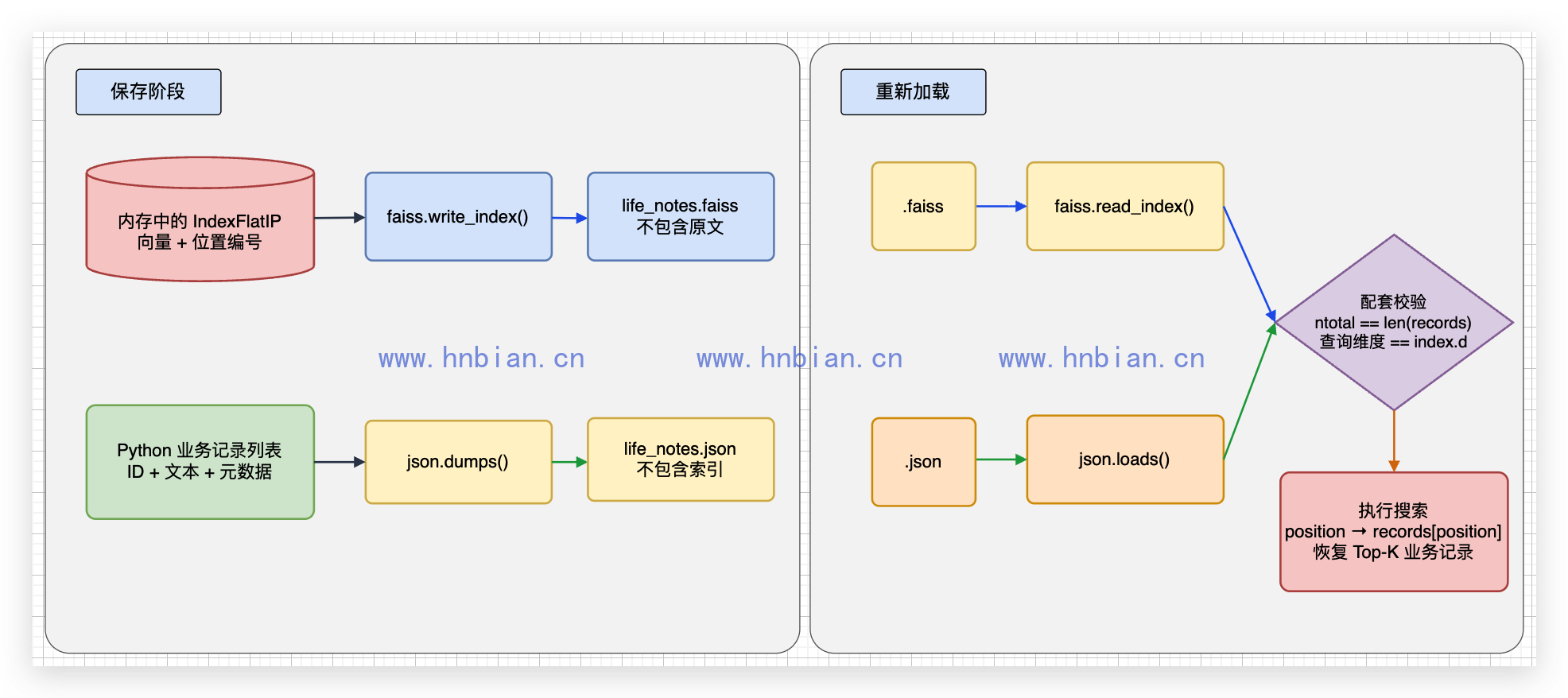
这个章节只完成三件事:创建向量库、写入四条 Document、保存到本地。脚本不会重新加载数据,也不会执行查询。运行结束后,后续章节只能依赖磁盘中的两个文件继续工作,这样才能验证持久化是否真正生效。
代码文件为 02_save_index.py:
# 这个文件负责创建 LangChain FAISS 向量库,并将其保存到本地。
#
# 与 01 使用相同的 FAISS 初始化方式(IndexFlatL2 + InMemoryDocstore + HuggingFaceEmbeddings)。
#
# save_local() 会写出两个配套文件(必须一起保留):
#   index.faiss  — 向量索引
#   index.pkl    — docstore + index_to_docstore_id(pickle,本地可信数据才可反序列化)

from pathlib import Path

import faiss
import torch
from langchain_community.docstore.in_memory import InMemoryDocstore
from langchain_community.vectorstores import FAISS
from langchain_core.documents import Document
from langchain_huggingface import HuggingFaceEmbeddings

PROJECT_ROOT = Path(__file__).resolve().parents[2]
MODEL_PATH = Path("/Users/bianhn/git/llm/qwen3-embedding/model")
STORE_DIR = PROJECT_ROOT / "data" / "faiss"

documents = [
    {"id": "doc-1", "text": "西湖边有步道和树荫,很适合周末散步。", "category": "travel"},
    {"id": "doc-2", "text": "苹果富含膳食纤维,是常见的健康水果。", "category": "food"},
    {"id": "doc-3", "text": "汽车需要定期更换机油并检查轮胎。", "category": "car"},
    {"id": "doc-4", "text": "杭州植物园环境安静,适合慢慢游览。", "category": "travel"},
]

device = "mps" if torch.backends.mps.is_available() else "cpu"

embeddings_model = HuggingFaceEmbeddings(
    model_name=str(MODEL_PATH),
    model_kwargs={"device": device},
    encode_kwargs={"normalize_embeddings": True},
    query_encode_kwargs={
        "prompt_name": "query",
        "normalize_embeddings": True,
    },
)


def build_vector_store(docs: list[dict]) -> FAISS:
    """按 01 相同方式创建 FAISS 向量库:空索引 → 包装 → add_documents。"""
    index = faiss.IndexFlatL2(len(embeddings_model.embed_query("Hello world!")))
    vector_store = FAISS(
        embedding_function=embeddings_model,
        index=index,
        docstore=InMemoryDocstore(),
        index_to_docstore_id={},
    )
    langchain_documents = [
        Document(
            page_content=item["text"],
            metadata={"id": item["id"], "category": item["category"]},
        )
        for item in docs
    ]
    vector_store.add_documents(langchain_documents)
    return vector_store


# 构建向量库并保存。save_local 会在目录中生成 index.faiss 和 index.pkl。
vector_store = build_vector_store(documents)
STORE_DIR.mkdir(parents=True, exist_ok=True)
vector_store.save_local(str(STORE_DIR))

index_file = STORE_DIR / "index.faiss"
docstore_file = STORE_DIR / "index.pkl"
if not index_file.is_file() or not docstore_file.is_file():
    raise FileNotFoundError("FAISS 向量库文件保存不完整")

print(f"保存目录:{STORE_DIR}")
print(f"保存向量数:{vector_store.index.ntotal}")
print(f"索引文件:{index_file.name}")
print(f"文档与映射文件:{docstore_file.name}")
运行代码:
python rag/p05_faiss_native/02_save_index.py真实输出为:
保存目录:/Users/bianhn/Documents/git/llm-learning/data/faiss
保存向量数:4
索引文件:index.faiss
文档与映射文件:index.pkl
此时第一个 Python 进程已经完成任务。index.faiss 保存四条向量,index.pkl 保存 Docstore 和 index_to_docstore_id。下一节会启动另一个脚本读取这两个文件。
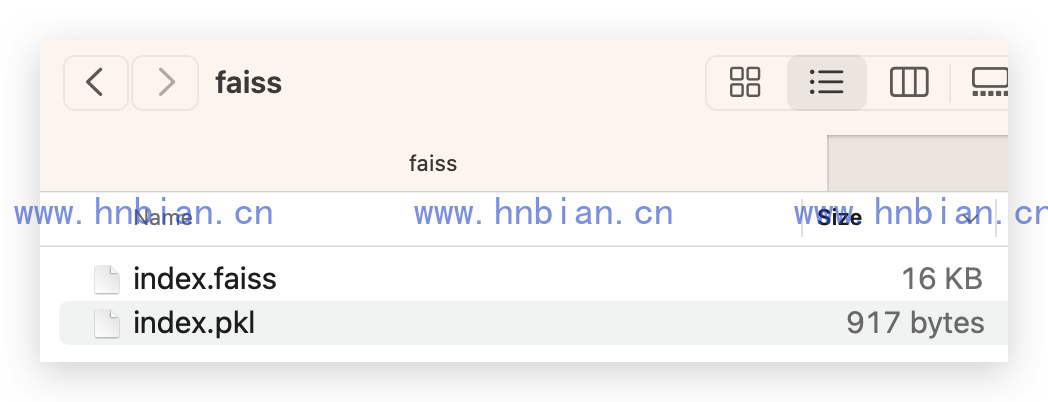
5. 重新加载向量库并检索排序
加载脚本不再定义原始 documents,也不会重新调用 add_documents()。它只创建查询阶段需要的 Embedding 模型,然后从 STORE_DIR 读取上一节保存的向量库。
load_local() 必须再次接收 embeddings_model,因为 index.faiss 中只有已经生成的文档向量;收到新查询后,程序仍然需要调用 embed_query() 生成查询向量。
代码文件为 03_load_and_search_index.py:
# 这个文件只负责从本地加载上一节保存的 FAISS 向量库,再执行 Top-K 检索。
# 运行前必须先执行 02_save_index.py,生成 index.faiss 和 index.pkl。

from pathlib import Path

import torch
from langchain_community.vectorstores import FAISS
from langchain_huggingface import HuggingFaceEmbeddings

PROJECT_ROOT = Path(__file__).resolve().parents[2]
MODEL_PATH = Path("/Users/bianhn/git/llm/qwen3-embedding/model")
STORE_DIR = PROJECT_ROOT / "data" / "faiss"
INDEX_FILE = STORE_DIR / "index.faiss"
DOCSTORE_FILE = STORE_DIR / "index.pkl"

query = "我想去安静的地方走一走"
device = "mps" if torch.backends.mps.is_available() else "cpu"

if not INDEX_FILE.is_file() or not DOCSTORE_FILE.is_file():
    raise FileNotFoundError("请先运行 02_save_index.py 生成完整的 FAISS 向量库")

# 加载后需要用同一个 Embedding 模型把新查询转换成兼容的向量。
embeddings_model = HuggingFaceEmbeddings(
    model_name=str(MODEL_PATH),
    model_kwargs={"device": device},
    encode_kwargs={"normalize_embeddings": True},
    query_encode_kwargs={
        "prompt_name": "query",
        "normalize_embeddings": True,
    },
)

# index.pkl 使用 Python pickle 格式,只能加载由自己生成并确认可信的本地文件。
loaded_vector_store = FAISS.load_local(
    str(STORE_DIR),
    embeddings_model,
    allow_dangerous_deserialization=True,
)

if loaded_vector_store.index.ntotal == 0:
    raise ValueError("重新加载后的 FAISS 索引中没有向量")
if loaded_vector_store.index.ntotal != len(
    loaded_vector_store.index_to_docstore_id
):
    raise ValueError("FAISS 索引与文档位置映射的记录数不一致")

# IndexFlatL2 返回距离,并已经按照从小到大排列 Top-K 结果。
k = min(2, loaded_vector_store.index.ntotal)
search_results = loaded_vector_store.similarity_search_with_score(query, k=k)

print(f"读取目录:{STORE_DIR}")
print(f"重新加载后的向量数:{loaded_vector_store.index.ntotal}")
print(f"查询:{query}")

for rank, (document, distance) in enumerate(search_results, start=1):
    print(
        f"{rank}. distance={distance:.4f} id={document.metadata['id']} "
        f"category={document.metadata['category']} text={document.page_content}"
    )
先执行保存脚本,再单独执行加载和查询脚本:
python rag/p05_faiss_native/02_save_index.py
python rag/p05_faiss_native/03_load_and_search_index.py
第二个脚本的真实输出为:
读取目录:data/p05_faiss_native/life_notes
重新加载后的向量数:4
查询:我想去安静的地方走一走
1. distance=0.8624 id=doc-4 category=travel text=杭州植物园环境安静,适合慢慢游览。
2. distance=1.0129 id=doc-1 category=travel text=西湖边有步道和树荫,很适合周末散步。
IndexFlatL2 的距离越小越接近,因此检索结果已经按照 distance 从小到大排列。第一名是“杭州植物园”,第二名是“西湖”;这也证明第二个进程成功恢复了向量、Document 和位置映射,而不是重新构建索引。
6. 过滤、新增、修改和删除
FAISS 原生索引只理解向量、位置和距离,不理解 category、业务 ID 或 Document。本文使用的 LangChain FAISS 封装在 FAISS 外面增加了 Docstore 和 index_to_docstore_id,因此可以继续完成 metadata 过滤、按 ID 删除等操作。
6.1 使用稳定的 VectorStore ID
前面的基础示例没有向 add_documents() 传入 ids,LangChain 会自动生成 UUID。自动 ID 可以用于一次性检索,但后续很难根据业务 ID 精确修改或删除。
常见数据操作应该显式传入稳定 ID:
document_ids = [document.metadata["id"] for document in documents]
loaded_vector_store.add_documents(documents, ids=document_ids)
这里同时把 doc-1 等 ID 保存在 metadata 中。两处 ID 的用途不同:
- 传给 ids 的值是 VectorStore ID,delete()、get_by_ids() 等方法使用它。
- metadata[“id”] 是随 Document 返回的业务字段,可以展示或参与 metadata 过滤。
6.2 metadata 过滤查询
similarity_search_with_score() 可以接收 filter:
filtered_results = loaded_vector_store.similarity_search_with_score(
    query,
    k=2,
    filter={"category": "travel"},
    fetch_k=loaded_vector_store.index.ntotal,
)
这里不能把 filter 理解成关系型数据库的 WHERE 条件。当前 LangChain FAISS 实现会先从向量索引取出 fetch_k 条候选,再检查每条 Document 的 metadata,最后返回最多 k 条结果。
如果 fetch_k 太小,最相似的几条候选又恰好不满足过滤条件,最终结果可能少于 k 条。本文只有四条数据,因此使用 index.ntotal 检查全部候选;数据量较大时需要根据过滤比例、延迟和召回效果设置合理的 fetch_k。
除了简单的相等条件,还可以传入一个接收 metadata 的函数:
filter=lambda metadata: metadata.get("category") == "travel"无论使用字典还是函数,过滤都由 LangChain 在候选 Document 上完成,不是 FAISS 索引原生的标量过滤。
6.3 新增 Document
新增操作与第一次写入相同,关键是使用一个尚未存在的 ID:
new_document = Document(
    page_content="湘湖有湖畔步道,游客相对较少,适合休闲散步。",
    metadata={"id": "doc-5", "category": "travel"},
)
loaded_vector_store.add_documents([new_document], ids=["doc-5"])
add_documents() 会生成新文本的 Embedding,将向量写入 FAISS,再把 Document 和 ID 映射写入内存。
6.4 修改 Document
LangChain 的 FAISS 封装没有 update_document()。文本发生变化时,旧 Embedding 已经不能表示新文本,所以不能只替换 Docstore 中的 page_content。本文使用“删除旧记录,再用同一个 ID 重新写入”的方式:
updated_document = Document(
    page_content="杭州植物园有安静的林间步道,适合周末散步和慢慢游览。",
    metadata={"id": "doc-4", "category": "travel"},
)
loaded_vector_store.delete(ids=["doc-4"])
loaded_vector_store.add_documents([updated_document], ids=["doc-4"])
重新写入时,Embedding 模型会为新文本生成新向量。需要注意,删除和新增是两个操作,不具备数据库事务的原子性;如果程序在中间失败,需要由应用重试或从旧版本恢复。
只修改 metadata 时也可以使用相同做法。这样能确保 FAISS 向量、Document 和位置映射继续保持一致。
6.5 删除 Document
delete() 接收的是 VectorStore ID:
loaded_vector_store.delete(ids=["doc-3"])LangChain 会从底层索引删除对应向量、从 Docstore 删除 Document,并重新整理 index_to_docstore_id。删除不存在的 ID 会抛出 ValueError,因此删除前可以使用 get_by_ids() 检查,或者在业务层明确处理异常。
6.6 完整代码
代码文件为 05_common_operations.py:
# 这个文件演示 LangChain FAISS 的常见数据操作:
#   1. metadata 过滤查询
#   2. 新增 Document
#   3. 修改 Document(删除旧向量,再使用同一 ID 重新写入)
#   4. 删除 Document
#   5. 保存操作后的向量库
#
# FAISS 本身只管理向量和位置,过滤、Document 与 ID 映射由 LangChain 封装处理。

from pathlib import Path

import faiss
import torch
from langchain_community.docstore.in_memory import InMemoryDocstore
from langchain_community.vectorstores import FAISS
from langchain_core.documents import Document
from langchain_huggingface import HuggingFaceEmbeddings

PROJECT_ROOT = Path(__file__).resolve().parents[2]
MODEL_PATH = Path("/Users/bianhn/git/llm/qwen3-embedding/model")
STORE_DIR = (
    PROJECT_ROOT
    / "data"
    / "faiss"
)

documents = [
    Document(
        page_content="西湖边有步道和树荫,很适合周末散步。",
        metadata={"id": "doc-1", "category": "travel"},
    ),
    Document(
        page_content="苹果富含膳食纤维,是常见的健康水果。",
        metadata={"id": "doc-2", "category": "food"},
    ),
    Document(
        page_content="汽车需要定期更换机油并检查轮胎。",
        metadata={"id": "doc-3", "category": "car"},
    ),
    Document(
        page_content="杭州植物园环境安静,适合慢慢游览。",
        metadata={"id": "doc-4", "category": "travel"},
    ),
]

device = "mps" if torch.backends.mps.is_available() else "cpu"

embeddings_model = HuggingFaceEmbeddings(
    model_name=str(MODEL_PATH),
    model_kwargs={"device": device},
    encode_kwargs={"normalize_embeddings": True},
    query_encode_kwargs={
        "prompt_name": "query",
        "normalize_embeddings": True,
    },
)

# 使用业务 ID 作为 VectorStore ID,后续才能稳定地按 ID 查询、删除和替换。
index = faiss.IndexFlatL2(len(embeddings_model.embed_query("Hello world!")))
vector_store = FAISS(
    embedding_function=embeddings_model,
    index=index,
    docstore=InMemoryDocstore(),
    index_to_docstore_id={},
)
document_ids = [document.metadata["id"] for document in documents]
vector_store.add_documents(documents, ids=document_ids)

# --- 操作 1:metadata 过滤查询 ---
# FAISS 先取 fetch_k 条向量候选,LangChain 再按照 metadata 过滤,最后返回 k 条。
query = "周末想找一个适合散步的地方"
filtered_results = vector_store.similarity_search_with_score(
    query,
    k=2,
    filter={"category": "travel"},
    fetch_k=vector_store.index.ntotal,
)

print("1. category=travel 的过滤查询:")
for rank, (document, distance) in enumerate(filtered_results, start=1):
    print(
        f"   {rank}. distance={distance:.4f} id={document.metadata['id']} "
        f"text={document.page_content}"
    )

# --- 操作 2:新增 Document ---
new_document = Document(
    page_content="湘湖有湖畔步道,游客相对较少,适合休闲散步。",
    metadata={"id": "doc-5", "category": "travel"},
)
vector_store.add_documents([new_document], ids=["doc-5"])
print(f"\n2. 新增 doc-5 后的向量数:{vector_store.index.ntotal}")

# --- 操作 3:修改 Document ---
# FAISS 没有按业务字段原地修改向量的接口。
# 文本变化后,旧向量也已经失效,因此先按 VectorStore ID 删除,再重新生成向量并写入。
updated_document = Document(
    page_content="杭州植物园有安静的林间步道,适合周末散步和慢慢游览。",
    metadata={"id": "doc-4", "category": "travel"},
)
vector_store.delete(ids=["doc-4"])
vector_store.add_documents([updated_document], ids=["doc-4"])

updated_results = vector_store.get_by_ids(["doc-4"])
if not updated_results:
    raise ValueError("修改后的 doc-4 不存在")
print(f"3. 修改 doc-4:{updated_results[0].page_content}")

# --- 操作 4:删除 Document ---
vector_store.delete(ids=["doc-3"])
if vector_store.get_by_ids(["doc-3"]):
    raise ValueError("doc-3 删除失败")
print(f"4. 删除 doc-3 后的向量数:{vector_store.index.ntotal}")

# --- 操作 5:再次过滤检索并保存 ---
# 更新和删除会改变内存状态;需要再次 save_local,修改才会写入磁盘。
final_results = vector_store.similarity_search_with_score(
    query,
    k=3,
    filter={"category": "travel"},
    fetch_k=vector_store.index.ntotal,
)

print("\n5. 增删改后的 travel 检索结果:")
for rank, (document, distance) in enumerate(final_results, start=1):
    print(
        f"   {rank}. distance={distance:.4f} id={document.metadata['id']} "
        f"text={document.page_content}"
    )

STORE_DIR.mkdir(parents=True, exist_ok=True)
vector_store.save_local(str(STORE_DIR))
print(f"\n操作后的向量库已保存到:{STORE_DIR}")
运行:
python rag/p05_faiss_native/05_common_operations.py真实输出为:
1. category=travel 的过滤查询:
   1. distance=0.7005 id=doc-1 text=西湖边有步道和树荫,很适合周末散步。
   2. distance=1.0680 id=doc-4 text=杭州植物园环境安静,适合慢慢游览。

2. 新增 doc-5 后的向量数:5
3. 修改 doc-4:杭州植物园有安静的林间步道,适合周末散步和慢慢游览。
4. 删除 doc-3 后的向量数:4

5. 增删改后的 travel 检索结果:
   1. distance=0.7005 id=doc-1 text=西湖边有步道和树荫,很适合周末散步。
   2. distance=0.7438 id=doc-4 text=杭州植物园有安静的林间步道,适合周末散步和慢慢游览。
   3. distance=1.1129 id=doc-5 text=湘湖有湖畔步道,游客相对较少,适合休闲散步。

操作后的向量库已保存到:/Users/bianhn/Documents/git/llm-learning/data/faiss
新增一条、删除一条以后,索引中仍然有四条向量。修改后的 doc-4 获得了新的 Embedding,检索距离从修改前的 1.0680 变成 0.7438。所有操作最初只影响内存,最后再次调用 save_local(),才会把变更后的 index.faiss 和 index.pkl 写入新目录。
7. 对比 L2 距离和余弦相似度
为了看清两种度量的差异,下面使用两个手工二维向量:
查询向量:[1.0, 0.0]
向量 A:[3.0, 0.0],方向完全相同,但距离较远
向量 B:[0.8, 0.6],方向相近,而且距离较近
代码文件为 04_compare_l2_and_cosine.py:
# 这个文件使用手工二维向量,对比 L2 距离和余弦相似度的排序差异。
#
# 背景:前面三个示例使用 IndexFlatL2(欧氏距离);若向量已归一化,也可用 IndexFlatIP(内积≈余弦)。
# 本文件用极简 2D 例子说明:两种度量「谁更近」的结论可能不同。
#
# 手工向量只用于讲解距离度量,不是 Embedding 模型的真实输出。

import faiss
import numpy as np

# 两条候选向量 + 一条查询向量(方便在纸上画图理解)。
labels = ["同方向但更远", "方向相近且距离近"]
vectors = np.array(
    [
        [3.0, 0.0],  # 与 query [1,0] 同方向,但模长更大(离原点更远)
        [0.8, 0.6],  # 方向偏转,但欧氏意义上离 query 更近
    ],
    dtype="float32",
)
query = np.array([[1.0, 0.0]], dtype="float32")

# --- 方式 1:IndexFlatL2(前面示例使用的类型)---
# 按欧氏距离排序;FAISS 返回的是平方 L2 距离,数值越小越接近。
l2_index = faiss.IndexFlatL2(2)
l2_index.add(vectors)
l2_distances, l2_positions = l2_index.search(query, k=2)

# --- 方式 2:IndexFlatIP + 归一化(等价于余弦相似度)---
# 先把向量缩放到长度 1,再算内积;分数越大表示方向越接近。
cosine_vectors = vectors.copy()
cosine_query = query.copy()
faiss.normalize_L2(cosine_vectors)
faiss.normalize_L2(cosine_query)

cosine_index = faiss.IndexFlatIP(2)
cosine_index.add(cosine_vectors)
cosine_scores, cosine_positions = cosine_index.search(cosine_query, k=2)

print("L2 距离排序(越小越接近):")
print("  → 通常优先选「几何距离近」的向量,[0.8, 0.6] 会排在 [3, 0] 前面")
for position, distance in zip(l2_positions[0], l2_distances[0]):
    print(f"  {labels[int(position)]}: {distance:.4f}")

print("\n余弦相似度排序(越大越接近):")
print("  → 只看方向不看长度,[3, 0] 归一化后与 query 同向,得分最高")
for position, score in zip(cosine_positions[0], cosine_scores[0]):
    print(f"  {labels[int(position)]}: {score:.4f}")

print("\n结论:Embedding 检索若已 normalize_embeddings=True,用 L2 或内积排序通常一致;")
print("      本例故意用未归一化的原始向量,让两种度量的排序差异显现出来。")
真实输出为:
L2 距离排序(越小越接近):
  → 通常优先选「几何距离近」的向量,[0.8, 0.6] 会排在 [3, 0] 前面
  方向相近且距离近: 0.4000
  同方向但更远: 4.0000

余弦相似度排序(越大越接近):
  → 只看方向不看长度,[3, 0] 归一化后与 query 同向,得分最高
  同方向但更远: 1.0000
  方向相近且距离近: 0.8000

结论:Embedding 检索若已 normalize_embeddings=True,用 L2 或内积排序通常一致;
      本例故意用未归一化的原始向量,让两种度量的排序差异显现出来。
L2 更关注空间中的直线距离,余弦更关注方向。选择索引时必须先确定模型和业务使用的度量,不能只看一个分数大小。
8. 常见问题
8.1 ModuleNotFoundError: No module named ‘faiss’
先确认激活的是 .conda_faiss:
conda activate "$(pwd)/.conda_faiss"
which python
python -c "import faiss; print(faiss.__version__)"
8.2 向量维度不一致
创建索引时的维度必须与写入向量一致:
dimension = len(embeddings_model.embed_query("Hello world!"))
index = faiss.IndexFlatL2(dimension)
本文实测维度为 1024。
8.3 分数方向理解反了
IndexFlatIP:越大越接近
IndexFlatL2:越小越接近
8.4 index.faiss 和 index.pkl 不属于同一次保存
index.faiss 保存向量,index.pkl 保存 Docstore 和位置映射。如果只覆盖其中一个文件,向量位置可能无法对应正确的 Document。两个文件应该作为同一个版本整体保存、复制和恢复;不要从不同目录或不同构建批次中拼接。
8.5 Top-K 大于索引中的向量数
当 k 大于 index.ntotal 时,FAISS 会使用 -1 填充没有结果的位置。如果直接把 -1 当作 Python 列表下标,会错误地读取最后一条记录。本文使用下面的写法限制查询数量:
k = min(3, index.ntotal)