1. kafka-manager介绍
CMAK(Cluster Manager for Apache Kafka,以前称为Kafka Manager),是用于管理Apache Kafka群集的工具。在监控介绍阶段我们介绍一下kafka Manager 的部署与使用
CMAK支持以下内容:
- 管理多个集群
- 检查集群状态(主题,使用者,偏移量,代理,副本分发,分区分发)
- 运行副本leader选择
- 生成带有选项的分区分配,以选择要使用的broker
- 可以对分区重新分配
- 创建主题
- 删除主题(仅在0.8.2+上受支持,并记住在代理配置中设置delete.topic.enable = true)
- 批量生成多个topic的分区分配,并可以选择要使用的broker
- 批量运行分区的多个主题的重新分配
- 为topic增加主题
- 更新现有主题的配置等功能
2. 安装 sbt
[root@node1 ~]# curl https://bintray.com/sbt/rpm/rpm > bintray-sbt-rpm.repo

curl: (35) SSL connect error

# 无法在服务器使用curl命令访问https域名,
# 原因是nss版本有点旧了,yum -y update nss更新一下,重新curl即可!
root@node1 ~]# yum -y update nss
Loaded plugins: fastestmirror, refresh-packagekit, security
Loading mirror speeds from cached hostfile
 * base: mirrors.aliyun.com
 * extras: mirrors.ustc.edu.cn
 * updates: mirrors.aliyun.com
 ...
Complete!

 [root@node1 ~]# curl https://bintray.com/sbt/rpm/rpm > bintray-sbt-rpm.repo
   % Total    % Received % Xferd  Average Speed   Time    Time     Time  Current
                                  Dload  Upload   Total   Spent    Left  Speed
 160   160    0   160    0     0     56      0 --:--:--  0:00:02 --:--:--   131

[root@node1 ~]# mv bintray-sbt-rpm.repo /etc/yum.repos.d/
[root@node1 ~]#
[root@node1 ~]# yum install sbt
Loaded plugins: fastestmirror, refresh-packagekit, security
Loading mirror speeds from cached hostfile
 * base: mirrors.aliyun.com
 * extras: mirrors.ustc.edu.cn
 * updates: mirrors.aliyun.com
 ...
Total download size: 1.2 M
Installed size: 1.4 M
Is this ok [y/N]: y
...
Installed:
  sbt.noarch 0:1.3.8-0

Complete!

[root@node1 ~]# sbt --version
[info] [launcher] getting org.scala-sbt sbt 1.3.8  (this may take some time)...
# 这里可能要等比较久的时间
:: loading settings :: url = jar:file:/usr/share/sbt/bin/sbt-launch.jar!/org/apache/ivy/core/settings/ivysettings.xml
downloading https://repo1.maven.org/maven2/org/scala-lang/scala-library/2.12.10/scala-library-2.12.10.jar ...
	[SUCCESSFUL ] org.scala-lang#scala-library;2.12.10!scala-library.jar (131625ms)
	...
	6 artifacts copied, 0 already retrieve
sbt version in this project: 1.3.8
sbt script version: 1.3.8
3. 安装git
[root@node1 opt]# yum install git
Loaded plugins: fastestmirror, refresh-packagekit, security
...
Total download size: 4.7 M
Installed size: 15 M
Is this ok [y/N]: y
...
Complete!

[root@node1 opt]# git --version
git version 1.7.1

#配置git

[root@node1 opt]# git config --global user.name "yourname"
[root@node1 opt]# git config --global user.email yourname@email.com
[root@node1 opt]#
[root@node1 opt]# git config --list
user.name=yourname
user.email=yourname@email.com
4. 下载CMAK 并编译
或从releases 页下载编译好的安装包:https://github.com/yahoo/CMAK/releases
# 下载源码
[root@node1 opt]# git clone https://github.com/yahoo/CMAK.git
Initialized empty Git repository in /opt/CMAK/.git/
remote: Enumerating objects: 153, done.
remote: Counting objects: 100% (153/153), done.
remote: Compressing objects: 100% (113/113), done.
remote: Total 5975 (delta 59), reused 79 (delta 26), pack-reused 5822
Receiving objects: 100% (5975/5975), 3.85 MiB | 780 KiB/s, done.
Resolving deltas: 100% (3826/3826), done.


#查看下载的文件夹
[root@node1 opt]# ll
drwxr-xr-x. 10 root root    4096 2月  23 23:40 CMAK

[root@node1 opt]# cd CMAK
# 这里编译的是2.0.0 版本 使用git 切换到了 2.0.0 tag
[root@node1 CMAK]# git checkout -B 3.0.0.0
切换到一个新分支 '2.0.0.0'


[root@node1 CMAK]# ll
总用量 84
drwxr-xr-x. 9 root root  4096 2月  23 23:40 app
-rw-r--r--. 1 root root  4373 2月  23 23:40 build.sbt
drwxr-xr-x. 2 root root  4096 2月  23 23:40 conf
drwxr-xr-x. 2 root root  4096 2月  23 23:40 img
-rw-r--r--. 1 root root 11307 2月  23 23:40 LICENSE
drwxr-xr-x. 2 root root  4096 2月  23 23:40 project
drwxr-xr-x. 5 root root  4096 2月  23 23:40 public
-rw-r--r--. 1 root root  9781 2月  23 23:40 README.md
-rwxr-xr-x. 1 root root 20971 2月  23 23:40 sbt
drwxr-xr-x. 4 root root  4096 2月  23 23:40 src
drwxr-xr-x. 5 root root  4096 2月  23 23:40 test

# 编译代码
[root@node1 CMAK]# sbt clean dist
[info] [launcher] getting org.scala-sbt sbt 1.2.8  (this may take some time)...
downloading https://repo1.maven.org/maven2/org/scala-sbt/sbt/1.2.8/sbt-1.2.8.jar ...
:: loading settings :: url = jar:file:/usr/share/sbt/bin/sbt-launch.jar!/org/apache/ivy/core/settings/ivysettings.xml
	[SUCCESSFUL ] org.scala-sbt#sbt;1.2.8!sbt.jar (6541ms)
...
[info] Packaging /opt/CMAK/target/scala-2.12/kafka-manager_2.12-2.0.0.0-web-assets.jar ...
[info] Done packaging.
[info] Packaging /opt/CMAK/target/scala-2.12/kafka-manager_2.12-2.0.0.0-sans-externalized.jar ...
[info] Done packaging.
[success] All package validations passed

[info] Your package is ready in /opt/CMAK/target/universal/kafka-manager-2.0.0.0.zip
[success] Total time: 2207 s, completed 2020-2-23 1:30:57


# 第一次运行报错了
[root@node1 kafka-manager-2.0.0.0]# bin/kafka-manager -Dconfig.file=/path/to/application.conf
Oops, cannot start the server.
java.lang.RuntimeException: No application loader is configured. Please configure an application loader either using the play.application.loader configuration property, or by depending on a module that configures one. You can add the Guic/**
e support module by adding "libraryDependencies += guice" to your build.sbt.
	at scala.sys.package$.error(package.scala:30)
	at play.api.ApplicationLoader$.play$api$ApplicationLoader$$loaderNotFound(ApplicationLoader.scala:44)
	at play.api.ApplicationLoader$.apply(ApplicationLoader.scala:70)
	at play.core.server.ProdServerStart$.start(ProdServerStart.scala:50)
	at play.core.server.ProdServerStart$.main(ProdServerStart.scala:25)
	at play.core.server.ProdServerStart.main(ProdServerStart.scala)

# 添加如下代码到kafka-manager-2.0.0.0 文件夹下的build.sbt 文件中
vim build.sbt
libraryDependencies += guice //GUICE IS ADDED HERE


# 第二次启动报错
[root@node1 kafka-manager-2.0.0.0]# bin/kafka-manager -Dconfig.file=/path/to/application.conf
Oops, cannot start the server.
com.google.inject.CreationException: Unable to create injector, see the following errors:

1) Could not find a suitable constructor in controllers.ApiHealth. Classes must have either one (and only one) constructor annotated with @Inject or a zero-argument constructor that is not private.
  at controllers.ApiHealth.class(ApiHealth.scala:8)
  while locating controllers.ApiHealth
    for the 11th parameter of router.Routes.<init>(Routes.scala:61)
  at play.api.inject.RoutesProvider$.bindingsFromConfiguration(BuiltinModule.scala:121):
Binding(class router.Routes to self) (via modules: com.google.inject.util.Modules$OverrideModule -> play.api.inject.guice.GuiceableModuleConversions$$anon$4)

# 第三次启动 将启动参数去掉
[root@node1 kafka-manager-2.0.0.0]# bin/kafka-manager # 默认端口 9000 可以使用 -Dhttp.port=9000 参数修改端口
2020-02-23 11:31:59,650 - [WARN] application - application.conf @ file:/opt/kafka-manager-2.0.0.0/conf/application.conf: 12: play.crypto.secret is deprecated, use play.http.secret.key instead
2020-02-23 11:32:00,076 - [WARN] o.a.c.r.ExponentialBackoffRetry - maxRetries too large (100). Pinning to 29
2020-02-23 11:32:00,234 - [INFO] k.m.a.KafkaManagerActor - Starting curator...
...
2020-02-23 11:32:03,592 - [INFO] k.m.a.KafkaManagerActor - Starting kafka manager path cache...
2020-02-23 11:32:03,605 - [INFO] k.m.a.KafkaManagerActor - Adding kafka manager path cache listener...
2020-02-23 11:32:04,623 - [INFO] k.m.a.KafkaManagerActor - Updating internal state...
...- 打开浏览器访问kafka-manager
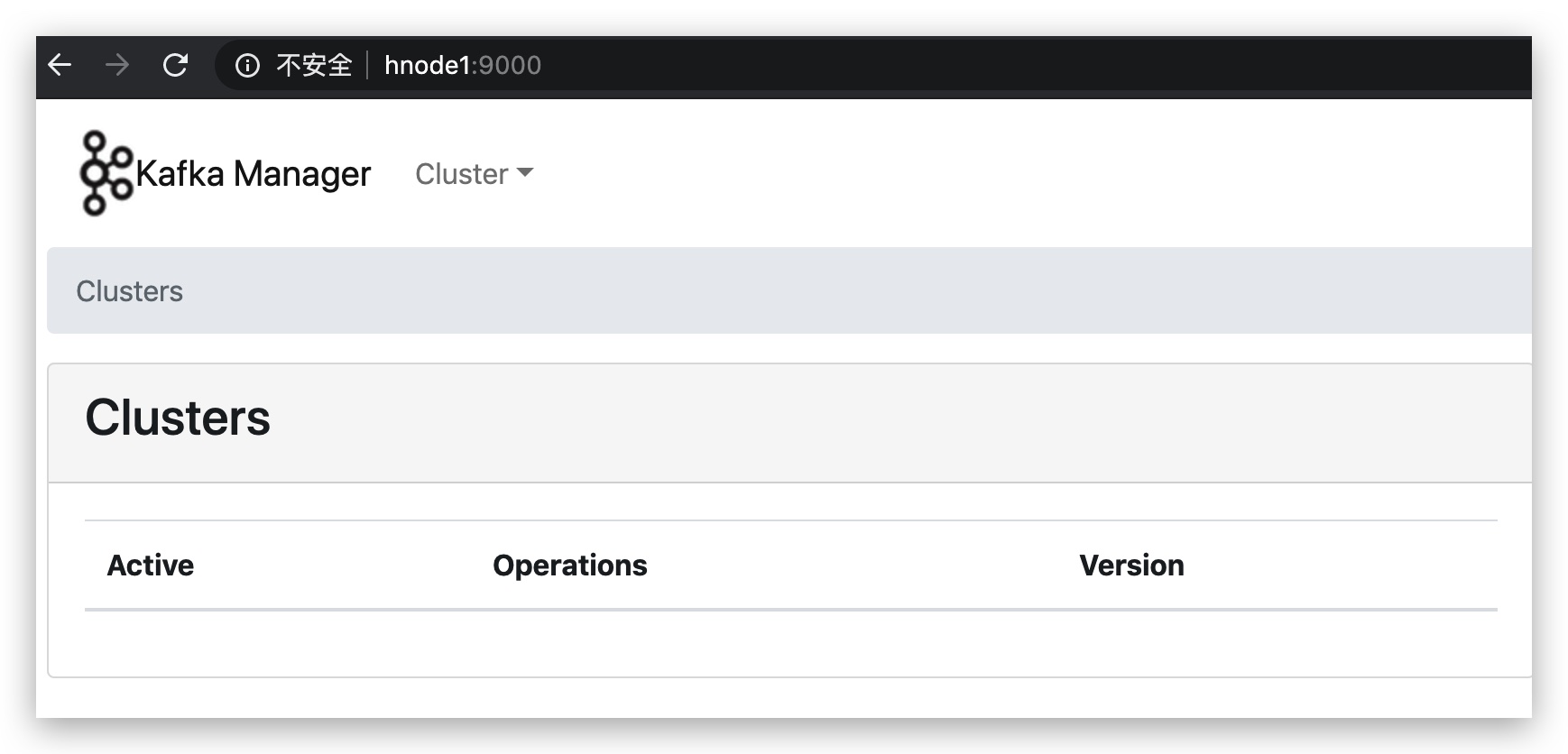
5. 打开kafka JMX
# 重启kafka 加上JMX 参数
[root@node3 kafka_2.12-1.0.2]# JMX_PORT=9988 bin/kafka-server-start.sh -daemon config/server.properties
[root@node3 kafka_2.12-1.0.2]#
[root@node3 kafka_2.12-1.0.2]#
[root@node3 kafka_2.12-1.0.2]# jps -l
67417 sun.tools.jps.Jps
67389 kafka.Kafka
24879 org.apache.zookeeper.server.quorum.QuorumPeerMain

# 去Zookeeper中查看JMX是否设置成功

[root@node3 kafka_2.12-1.0.2]# zkCli.sh #进入zk命令行
...
[zk: localhost:2181(CONNECTED) 4] get /brokers/ids/0
{"listener_security_protocol_map":{"PLAINTEXT":"PLAINTEXT","SSL":"SSL"},"endpoints":["PLAINTEXT://172.16.72.150:9092","SSL://172.16.72.150:9093"],"jmx_port":9988,"host":"172.16.72.150","timestamp":"1582429620276","port":9092,"version":4}
[zk: localhost:2181(CONNECTED) 5] get /brokers/ids/1
{"listener_security_protocol_map":{"PLAINTEXT":"PLAINTEXT"},"endpoints":["PLAINTEXT://172.16.72.151:9092"],"jmx_port":9988,"host":"172.16.72.151","timestamp":"1582429631401","port":9092,"version":4}
[zk: localhost:2181(CONNECTED) 6] get /brokers/ids/2
{"listener_security_protocol_map":{"PLAINTEXT":"PLAINTEXT"},"endpoints":["PLAINTEXT://172.16.72.152:9092"],"jmx_port":9988,"host":"172.16.72.152","timestamp":"1582429639586","port":9092,"version":4}
6. 设置kafka-manager
6.1 添加集群
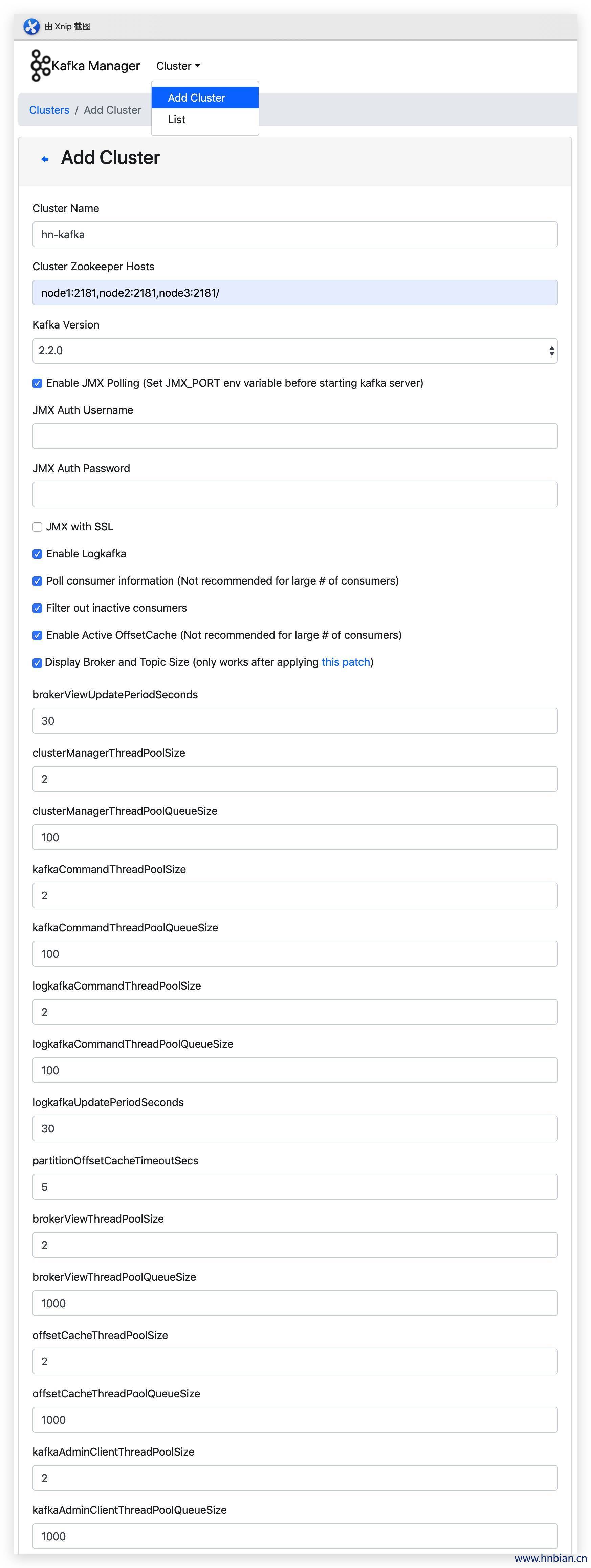
参数说明:
新建集群时各参数说明:
| 参数 | 说明 |
|---|---|
| Cluster Name | 用户自定义 |
| Cluster Name | 需与zookeeper.connect(在Amabri Service 页面中,选择Kafka服务,在zookeeper.connect中进行选择)中相对应,其可有一个或多个,注意后加:2181(冒号包含在内),若有多个host,各host间用逗号隔开image.png |
| Kafka Version | 选择与Kafka版本最近的即可 |
| Enable JMX Polling | JMX(Java Management Extensions, Java管理扩展),通常使用JMX来监控系统的运行状态或管理系统的某些方面,比如清空缓存、重新加载配置文件等,建议选择 |
| JMX Auth Username | JMX授权用户名 |
| JMX Auth Password | JMX授权密码 |
| JMX with SSL | 为JMX使用SSL协议 |
| Enable Logkafka | logkafka是一个日志收集代理,可以按行收集日志文件并发送到kafka |
| Poll consumer information | 选举消费者信息(消费者多时不建议选择) |
| Filter out inactive consumers | 过滤不活动消费者 |
| Enable Active | OffsetCache激活Offset缓存 |
| Display Broker and Topic Size | 展示Broker和Topic大小 |
| brokerViewUpdatePeriodSeconds | Broker视图周期更新时间/单位(s) |
| clusterManagerThreadPoolsize | 集群管理线程池大小 |
| clusterManagerThreadPoolQueue Size | 集群管理线程池列队大小 |
| KafkaCommandThreadPoolSize | Kafka命令线程池大小 |
| logkafkaCommandThreadPoolQueue Size | logkafka命令线程池列队大小 |
| logkafkaUpdatePeriodSeconds | Logkafka周期更新时间/单位(s) |
| partitionOffsetCacheTimeoutSecs Partition | Offset缓存过期时间/单位(s) |
| brokerViewThreadPoolSize | Broker视图线程池大小 |
| brokerViewThreadPoolQueue Size | Broker视图线程池队列大小 |
| offsetCacheThreadPoolSize | Offset缓存线程池大小 |
| offsetCacheThreadPoolQueueSize | Offset缓存线程池列队大小 |
| kafkaAdminClientThreadPoolSize | Kafka管理客户端线程池大小 |
| kafkaAdminClientTheadPoolQueue Sizec | Kafka管理客户端线程池队列大小 |
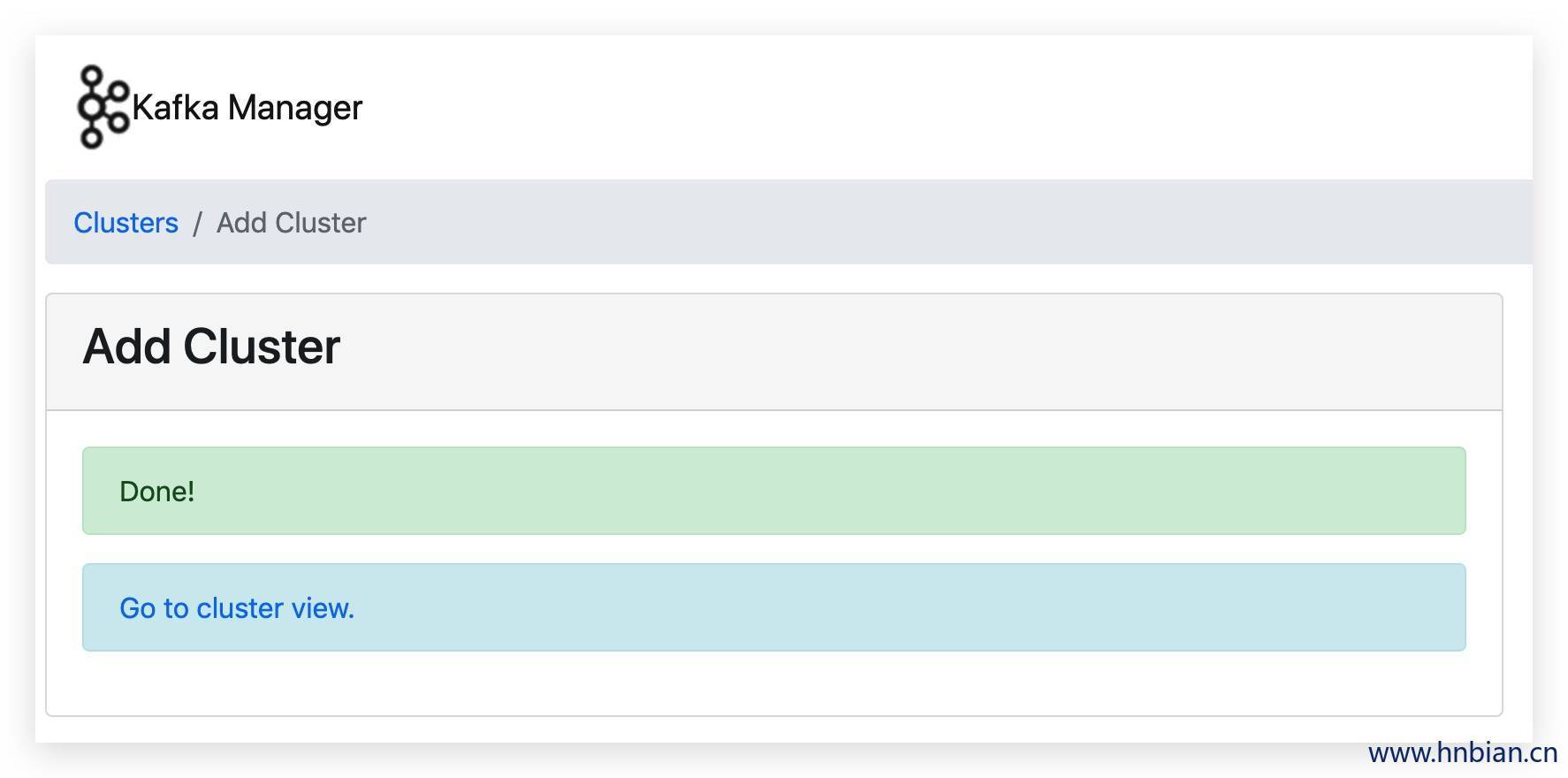
根据自己情况,填写对应参数,单击save,即可完成集群创建;
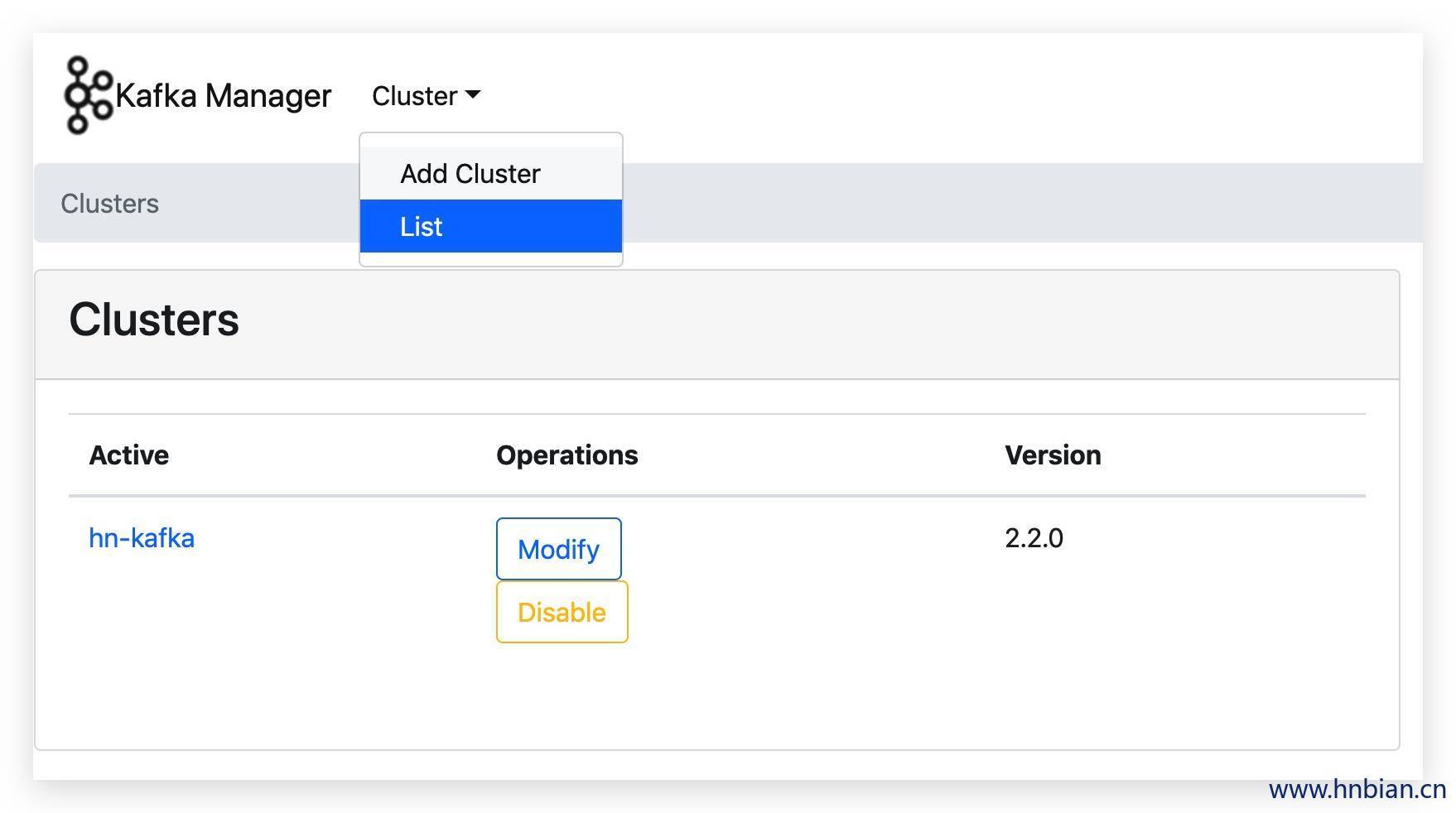
创建好的集群可在集群列表中展示;
7. kafka-manager 功能介绍
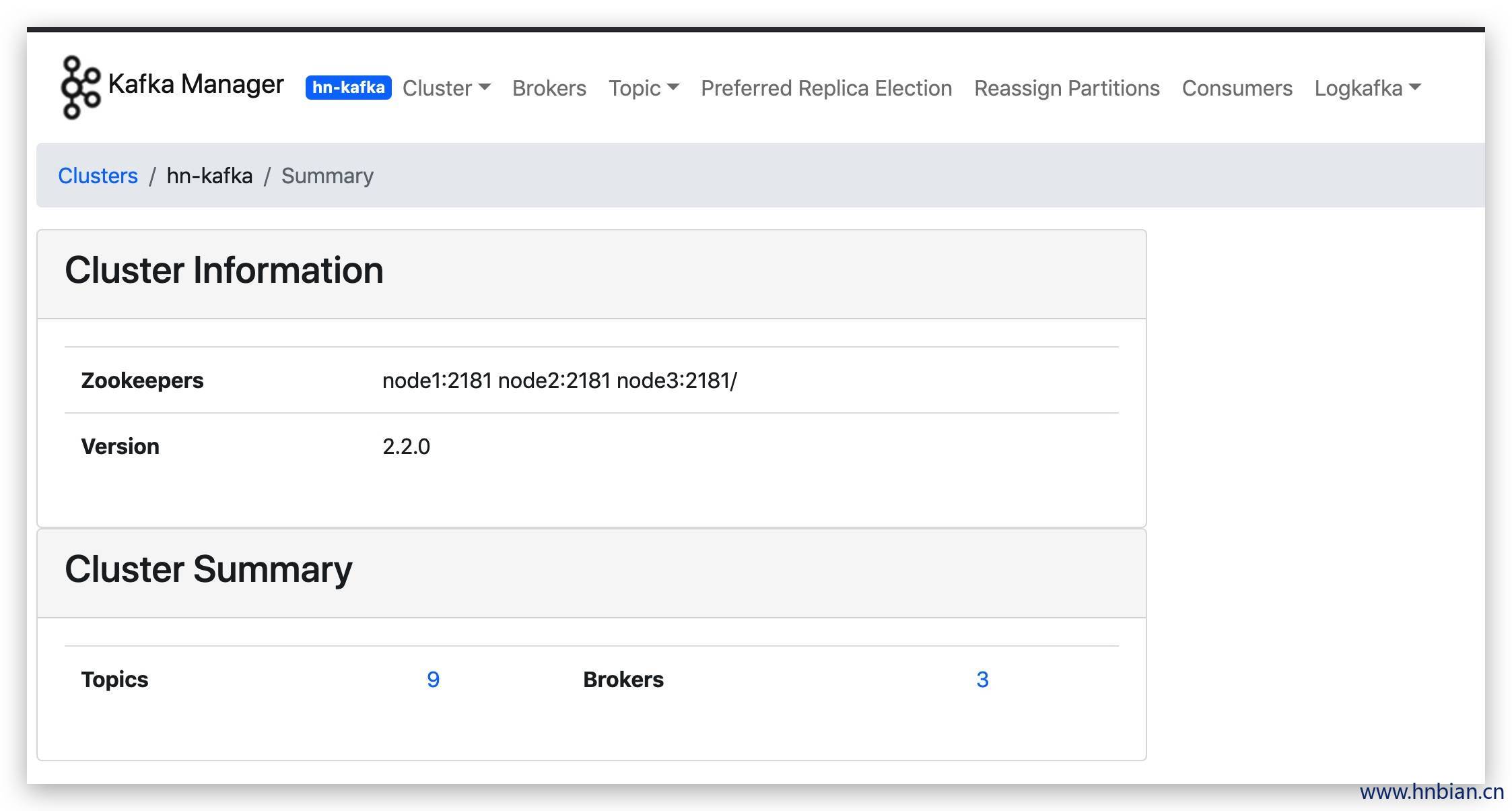
工具栏:
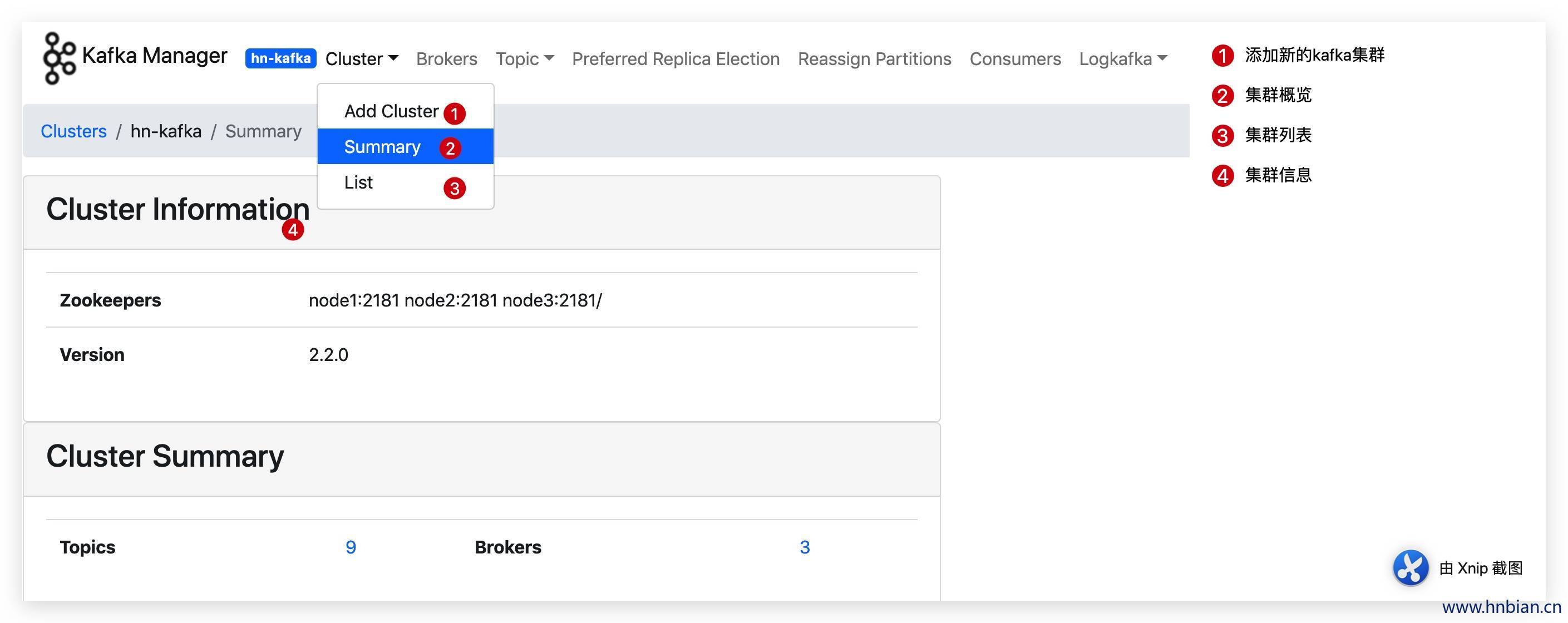
- Cluster:Cluster相关信息
- Brokers:broker管理与相关信息
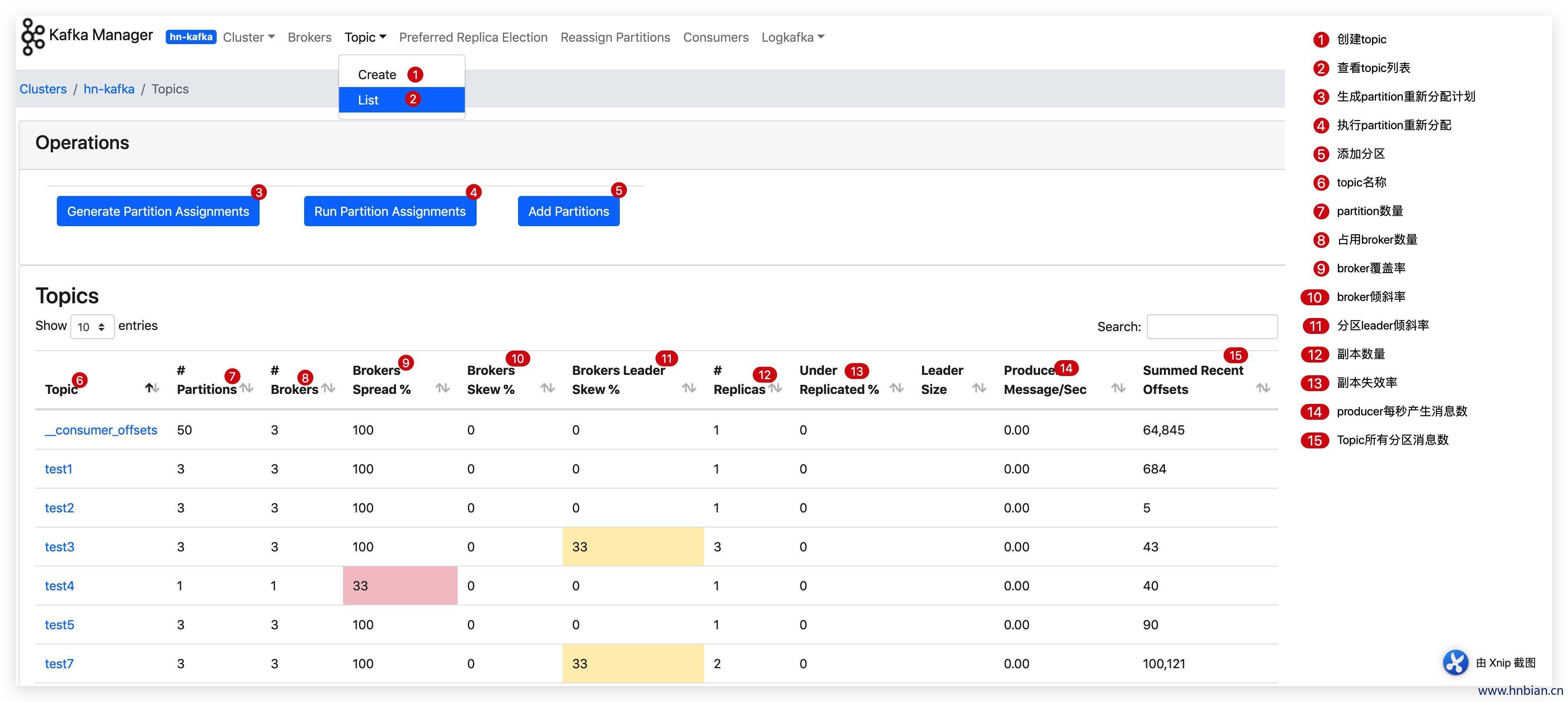
- Topic:topic相关信息
- Preferred Replica Election:首选partition replica 均衡
- Reassign Partitions:重新分配分区
- Consumers:消费者相关信息
7.1 Cluster
7.2 Brokers

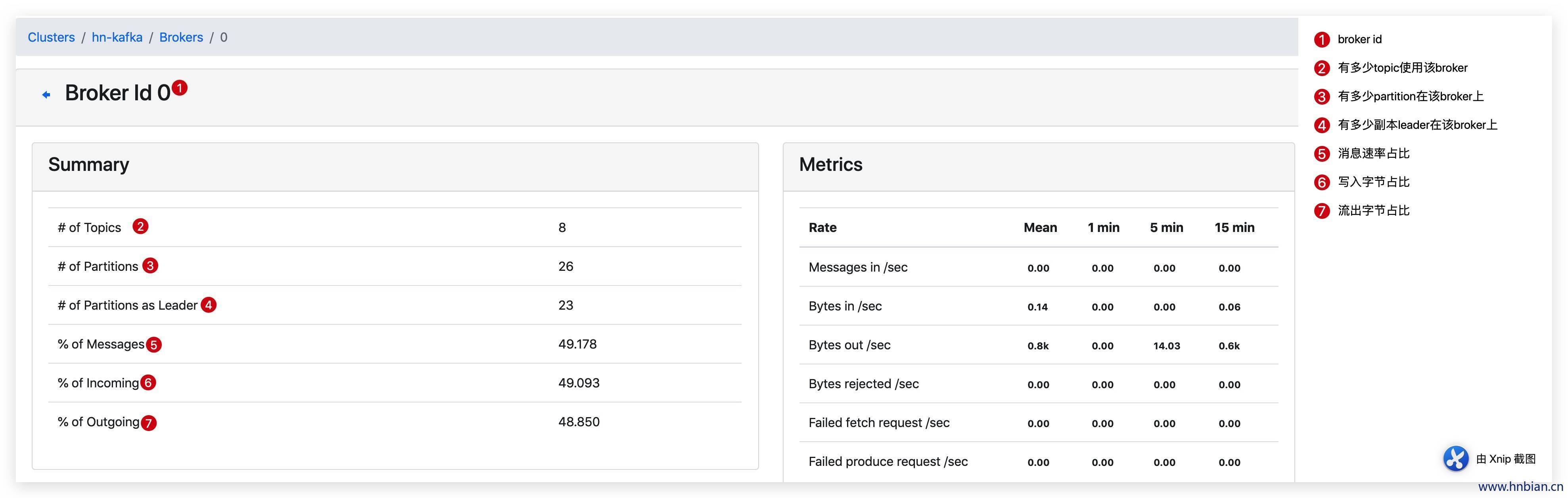

Brokers Skew% (broker 倾斜率)该 topic 占有的 broker 中,拥有超过该 topic 平均分区数的 broker 所占的比重。
7.3 Topic
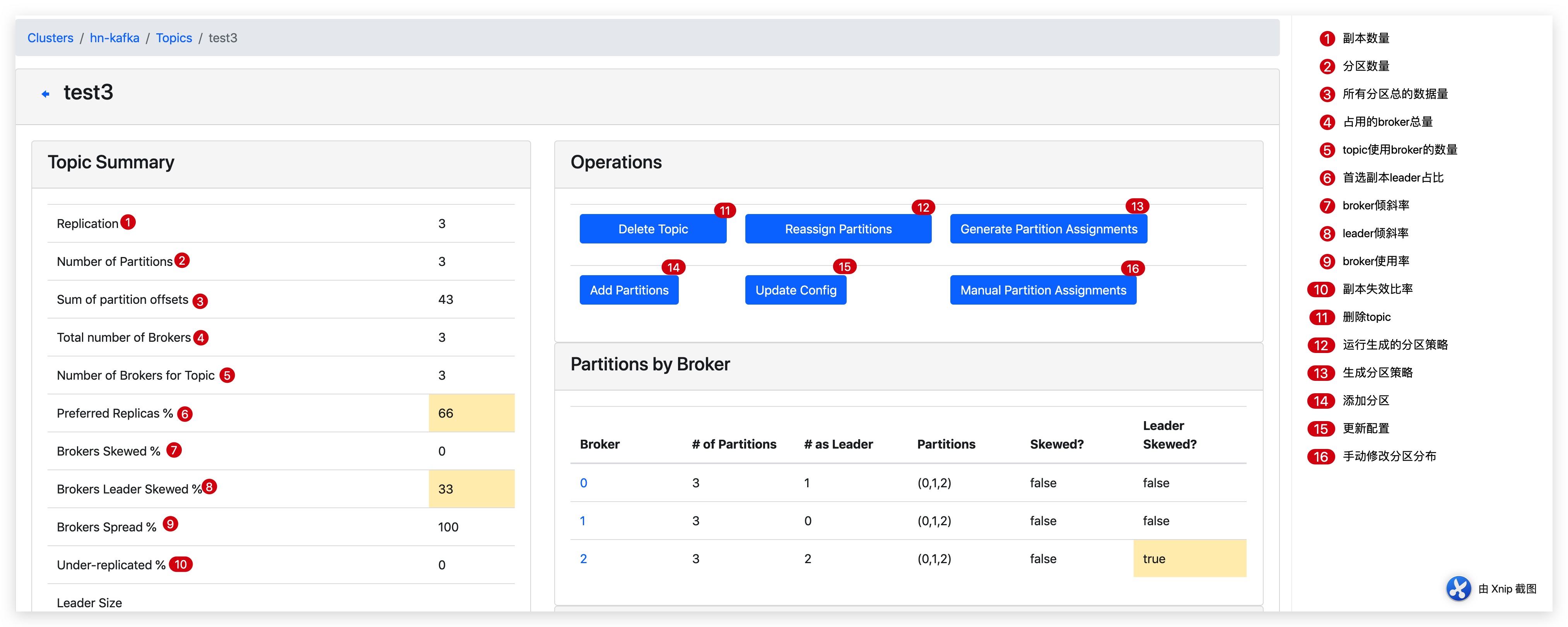
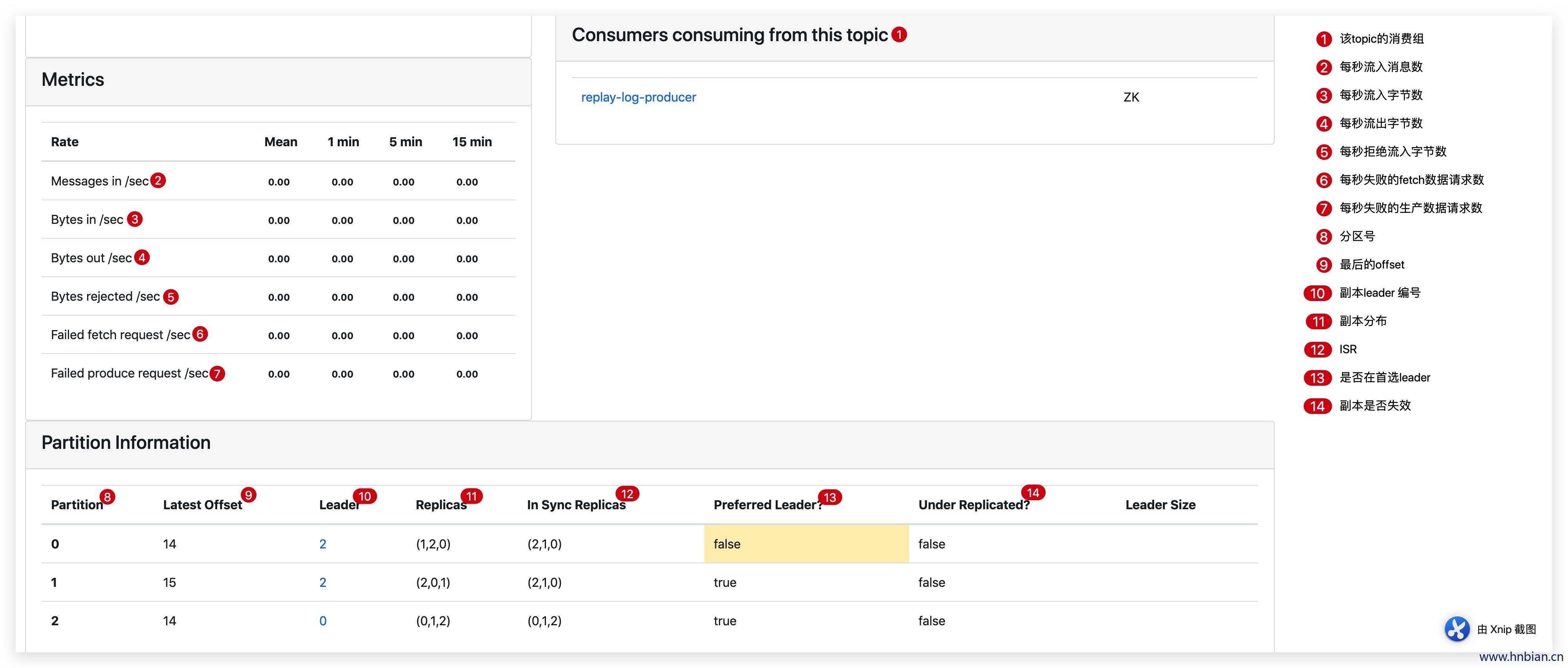

7.4 Preferred Replica Election
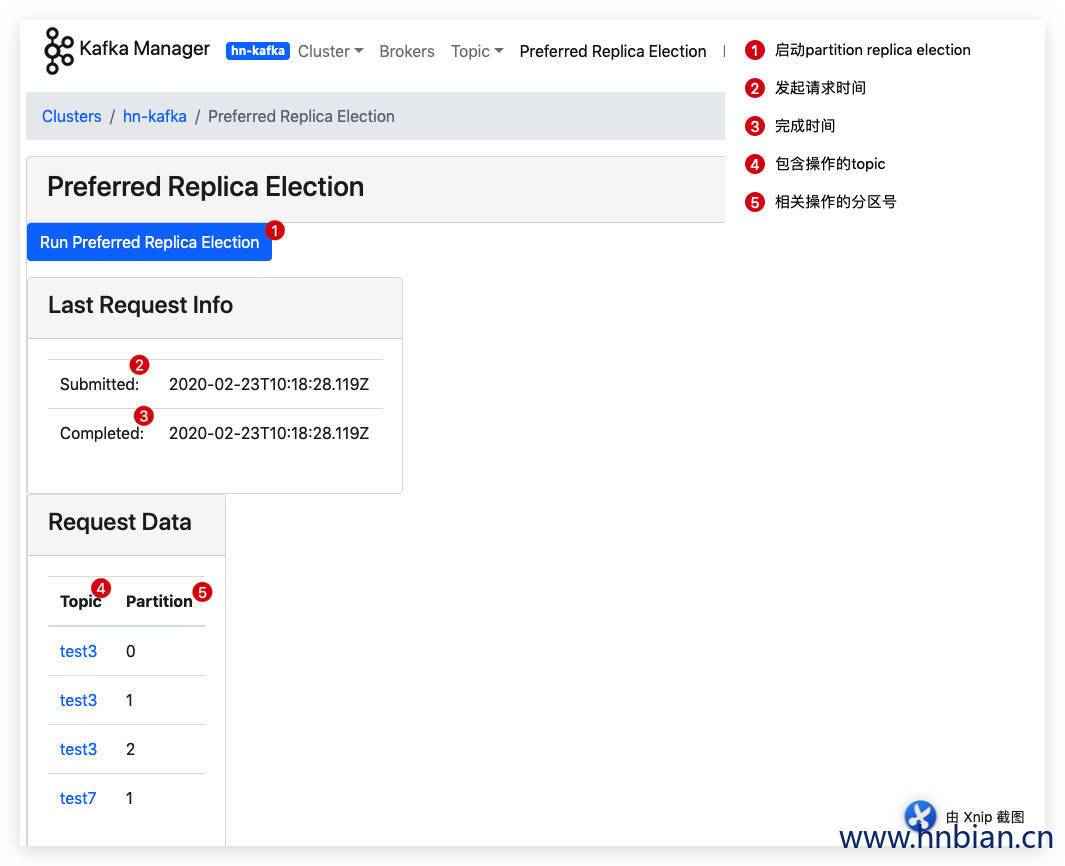
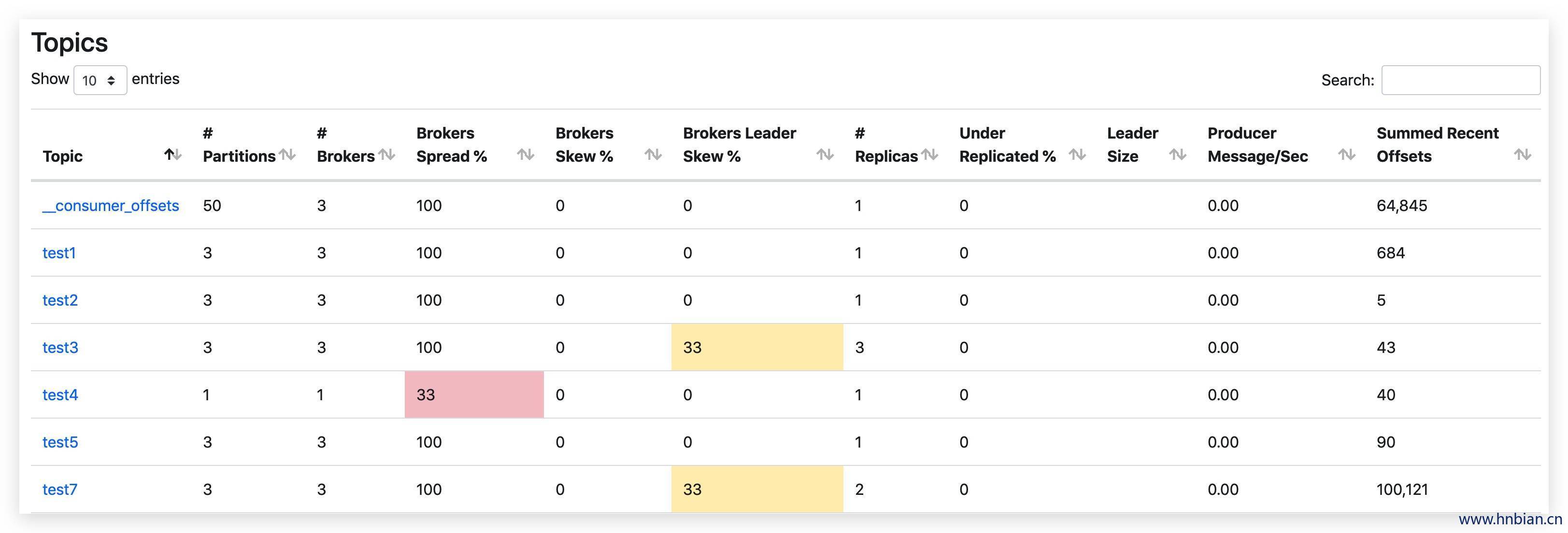
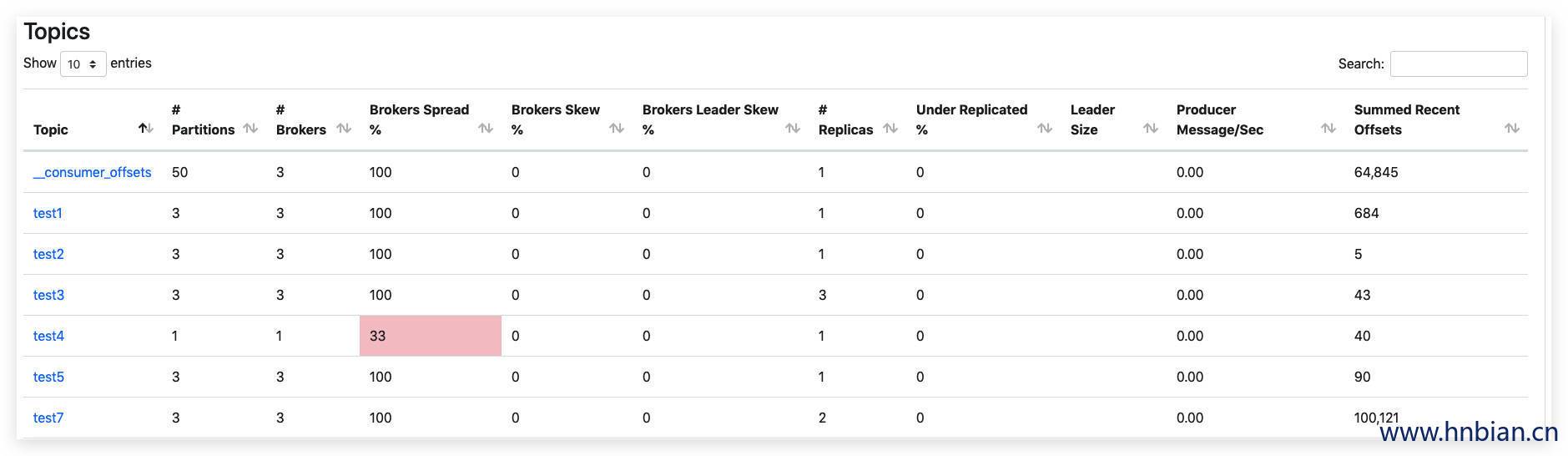
可以看到 test3 和 test7 的leader倾斜率都回到了0 。
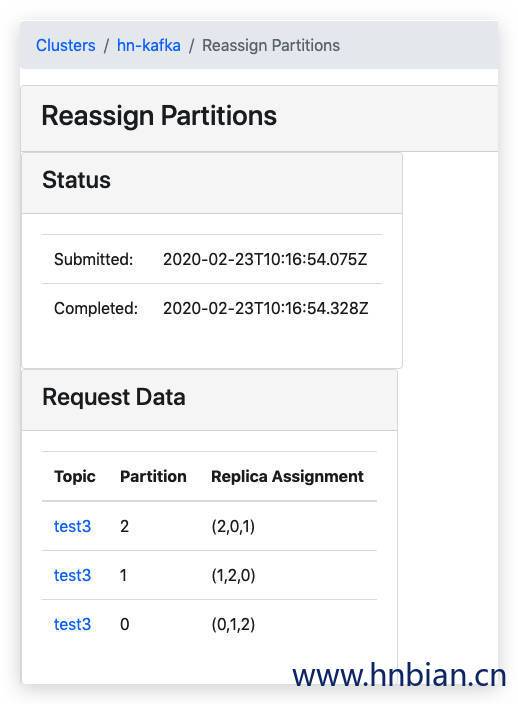
7.5 Reassign Partitions
7.6 Consumers
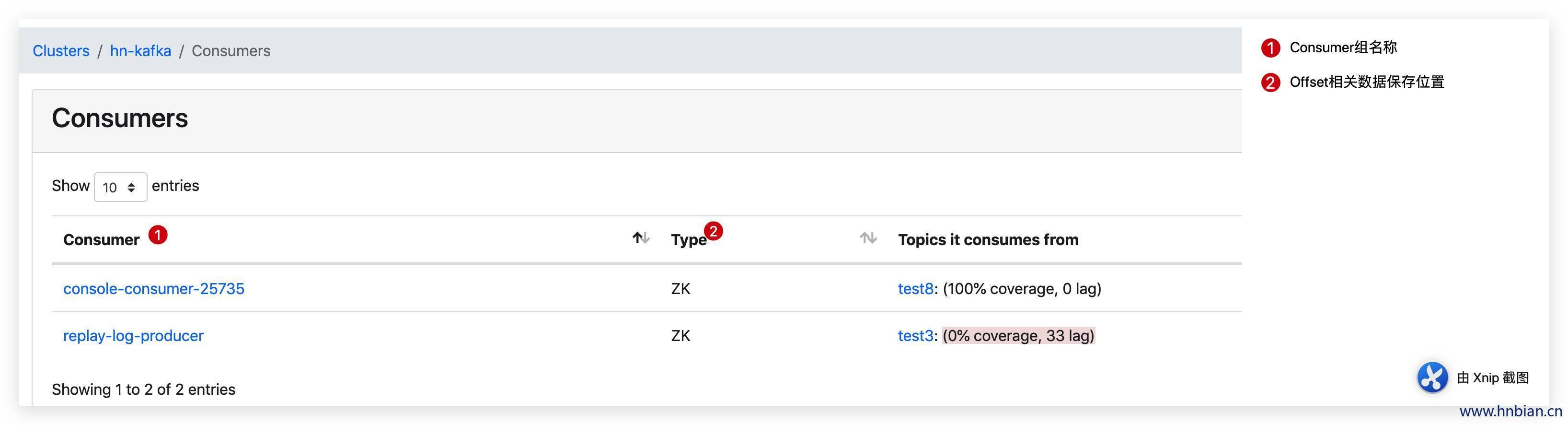
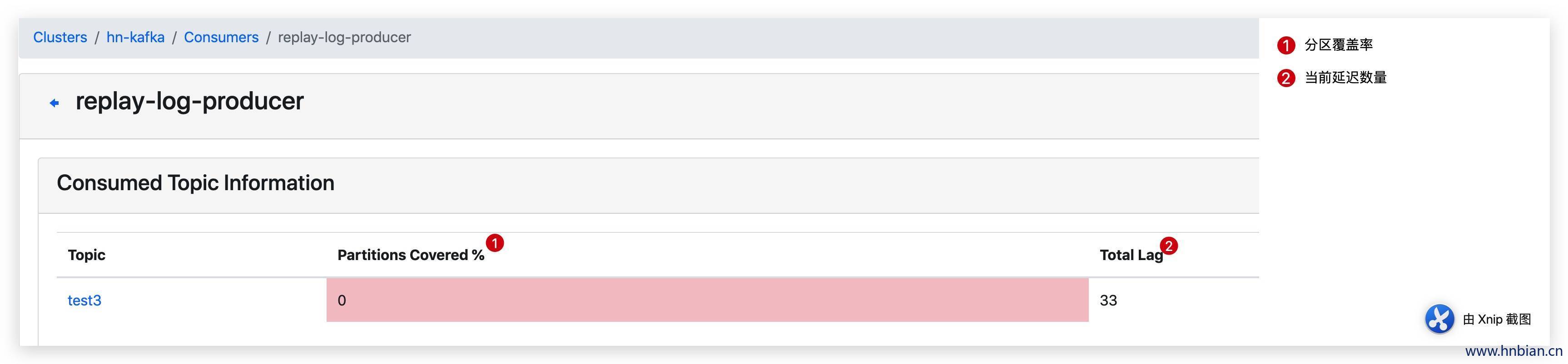

Lag代表consumer的消费能力,计算公式为Lag = Consumer Offset - LogSize,Kafka Manager先从zk获取LogSize,再从kafka __consumer_offsets topic读取Offset。两步操作存在一个时间gap,因此吞吐很大的topic上会出现Offset > LogSize的情况。导致Lag负数。
7.7 重要指标说明
| 指标 | 说明 |
|---|---|
| Brokers Spread | 看作broker使用率,如kafka集群9个broker,某topic有7个partition,则broker spread: 7 / 9 = 77% |
| Brokers Skew | partition是否存在倾斜,如kafka集群9个broker,某topic有18个partition,正常每个broker应该2个partition。若其中有3个broker上的partition数>2,则broker skew: 3 / 9 = 33% |
| Brokers Leader Skew | leader partition是否存在倾斜,如kafka集群9个broker,某topic14个partition,则正常每个broker有2个leader partition。若其中一个broker有0个leader partition,一个有4个leader partition,则broker leader skew: (4 - 2) / 14 = 14%。由于kafka所有读写都在leader上进行, broker leader skew会导致不同broker的读写负载不均衡,配置参数 auto.leader.rebalance.enable=true 可以使kafka每5min自动做一次leader的rebalance,消除这个问题。 |
| Under Replicated | 该 topic 下的 partition,其中副本处于失效或者失败的比率。失败或者失效是指副本不处于 ISR 队列中。目前控制副本是否处于 ISR 中由 replica.log.max.ms 这个参数控制。replica.log.max.ms:如果一个follower在这个时间内没有发送fetch请求或消费leader日志到结束的offset,leader将从ISR中移除这个follower,并认为这个follower已经挂了,默认值 10000 ms |
| Preferred Replicas | 分区的副本中,采用副本列表中的第一个副本作为 Leader 的所占的比重。 |